This site uses cookies to enhance your user experience. By clicking any link on this site you are giving your consent to our cookie policy. Read more
Reject
Accept All
HondaLink

HondaLink

verified Verified App

Developer: American Honda Motor Co., Inc.

  • category

    Category: Auto & Vehicles

  • price

    Price: free

  • age rating

    Age Rating: Everyone

  • rating

    Rating: 2.0

  • download

    Downloads: 1,000,000+

  • version

    Version: 5.0.52

Screenshot 1
Screenshot 2
Screenshot 3
Screenshot 4
Screenshot 5
Screenshot 6

Features & Highlights

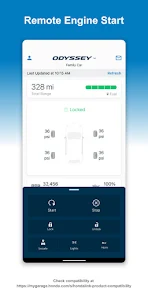
Remote Engine Start

With HondaLink's remote engine start feature, you can start your vehicle from a distance, ensuring it's warm or cool by the time you get in. This convenience is especially useful during extreme weather conditions, allowing you to enjoy a comfortable ride right from the start.

Roadside Assistance

In case of an emergency, HondaLink offers reliable roadside assistance at your fingertips. Whether you need a tow, a tire change, or a jump start, help is just a tap away, giving you peace of mind and ensuring you're never stranded.

Trip Management

HondaLink allows you to track and manage your trips effortlessly. You can review your driving patterns, mileage, and fuel usage, helping you make smarter decisions about your driving habits and optimize your routes for efficiency.

Vehicle Health Monitoring

The app provides real-time insights into your vehicle's health, alerting you to maintenance needs and potential issues. By staying informed about your car's status, you can proactively address concerns, ultimately enhancing your driving experience and prolonging the life of your vehicle.

Pros & Cons

Pros
  • Easy access to navigation and traffic updates
  • Remote start and vehicle control for convenience
  • Real-time vehicle diagnostics for proactive maintenance
  • Seamless smartphone integration for enhanced connectivity
  • 24/7 roadside assistance for peace of mind
Cons
  • Limited compatibility with older vehicle models
  • User interface can be unintuitive
  • Requires a stable internet connection for full functionality
  • Features may vary by region or model

Real Experience Using HondaLink

Application Scenarios

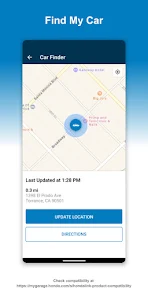
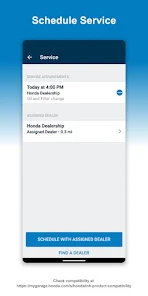
The HondaLink app serves as a versatile companion for Honda vehicle owners, enhancing connectivity between the driver and their car. Users can access a myriad of features depending on their vehicle model, including remote start, lock/unlock capabilities, and vehicle health monitoring. This is particularly useful for individuals who live in extreme climates, allowing them to pre-condition their car before stepping inside. Furthermore, the app provides maintenance reminders and service scheduling, ensuring that owners stay on top of their vehicle's health. The integration with navigation apps allows for seamless route planning, making long journeys more manageable. Whether you are commuting to work, embarking on a road trip, or simply running errands, HondaLink adapts to a variety of driving scenarios, enhancing the overall driving experience.

User Experience

Users generally find the HondaLink app to be intuitive and user-friendly, with a clean interface that makes navigation straightforward. The onboarding process is relatively simple, allowing users to connect their vehicle quickly. Many appreciate the ability to customize notifications and alerts, tailoring the app to their specific needs. The remote features, such as starting the engine or checking the fuel level, are highlighted as particularly convenient. However, some users have reported occasional connectivity issues, especially in areas with weak cellular signals. Despite these minor setbacks, the overall feedback is positive, with many users praising the app's ability to keep them informed about their vehicle's status and enhance their driving experience.

Pricing

The HondaLink app is available for free download, which is a significant advantage for users. However, certain premium features may require a subscription or in-app purchase. Pricing for these premium services varies, often depending on the specific features accessed and the duration of the subscription. Users should consider their usage patterns and whether the added functionalities justify the cost. That said, the free version offers a substantial range of features that cover the basic needs of most drivers, making it a worthwhile investment without any initial financial commitment.

Updates & Support

HondaLink regularly receives updates aimed at improving functionality and user experience. These updates often include bug fixes, performance enhancements, and new features that keep the app aligned with the latest technological advancements. User support is accessible through the app and Honda’s website, providing a range of resources, including FAQs and troubleshooting guides. For more pressing issues, users can reach out to Honda customer service, which is generally responsive. This commitment to ongoing improvement and user support underscores Honda's dedication to maintaining a reliable and effective app experience for its users.

verified Security & Privacy Review

The HondaLink app prioritizes user security and privacy by implementing robust data protection measures. It employs encryption protocols to safeguard sensitive information transmitted between the app and Honda's servers, ensuring that personal data remains confidential during transmission. When users download and install the app, they are prompted to grant various permissions, such as access to location services and contacts. Users should carefully review these permissions, as they directly impact the app's functionality and user experience. HondaLink is transparent about its data collection practices, providing a clear privacy policy that outlines what information is collected, how it is used, and with whom it may be shared. HondaLink adheres to industry standards for data handling, allowing users to manage their privacy settings, including opting out of certain data collection practices. However, users are encouraged to regularly review the app's permissions and privacy settings to ensure their personal data is adequately protected. Overall, HondaLink demonstrates a commitment to maintaining user privacy while delivering a seamless connected experience.

Reviews

2.0

“Great connectivity features, very user-friendly interface!”

“Love the remote start option, super convenient.”

“Navigation is accurate, saves me a lot of time.”

“App crashes occasionally, needs better stability.”

“Overall, a solid companion for my Honda experience.”

Editor's Choice