This site uses cookies to enhance your user experience. By clicking any link on this site you are giving your consent to our cookie policy. Read more
Reject
Accept All

Advertiser and Editorial Disclosures

CarGurus: Used & New Cars

CarGurus: Used & New Cars

verified Verified App

Developer: CarGurus, Inc

  • category

    Category: Auto & Vehicles

  • price

    Price: 0

  • age rating

    Age Rating: Everyone

  • rating

    Rating: 4.7

  • download

    Downloads: /

  • version

    Version: 3.43

Screenshot 1
Screenshot 2
Screenshot 3
Screenshot 4
Screenshot 5
Screenshot 6

Features & Highlights

Dealer Ratings & Reviews

Transparency is key, and CarGurus provides access to dealer ratings and reviews from previous buyers. This feature allows you to gauge the reputation of dealerships, helping you choose a trustworthy seller and enhancing your overall car-buying experience.

Instant Price Analysis

CarGurus offers a unique instant price analysis feature that evaluates the fair market value of used and new cars. This allows users to make informed decisions by comparing listings and understanding whether they are getting a good deal based on real-time market data.

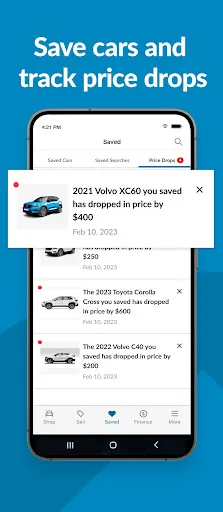
Price Drop Alerts

Stay ahead of the game with CarGurus' price drop alerts, which notify you when the price of a car you're interested in decreases. This ensures you never miss out on a great deal, making your car search not only efficient but also more rewarding.

User-Friendly Search Filters

Navigating the world of car buying is a breeze with CarGurus' user-friendly search filters. You can easily refine your search by make, model, price range, and even specific features, ensuring you find the perfect vehicle that meets your needs without sifting through endless listings.

Pros & Cons

Pros
  • CarGurus offers a vast selection of both new and used vehicles.
  • Advanced search filters help you find your perfect car quickly.
  • Transparent pricing ensures you get the best deals available.
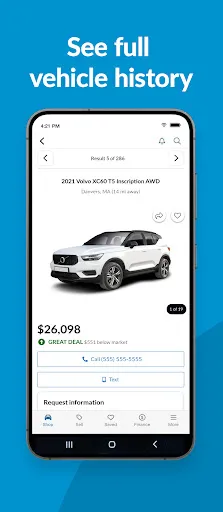
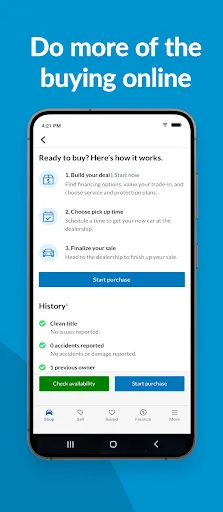
  • Detailed vehicle history reports build trust and confidence in your purchase.
  • User reviews provide valuable insights from real car buyers.
Cons
  • Limited inventory in certain regions may restrict options for buyers.
  • User interface can be overwhelming for first-time car shoppers.
  • Some listings may have inaccurate pricing or condition details.

Real Experience Using CarGurus: Used & New Cars

Application Scenarios

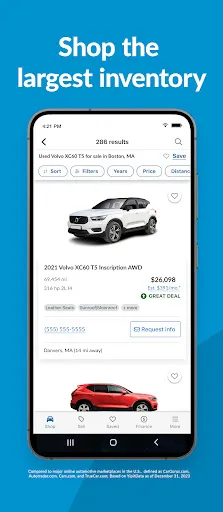
CarGurus is a versatile app that caters to a wide array of users, from first-time car buyers to seasoned auto enthusiasts. Whether you are looking for a reliable used car to navigate daily commutes or a brand-new vehicle to showcase your style, the app provides an extensive database of listings. Users can easily filter their search based on parameters such as price, make, model, and even fuel efficiency. Additionally, the app features a unique price analysis tool that allows users to assess whether a vehicle is fairly priced, making it a valuable resource for negotiating deals. For those who prefer to sell their cars, CarGurus also offers insights into the market value of their vehicles, helping users to set competitive prices that attract potential buyers.

User Experience

The user experience on CarGurus is designed to be intuitive and user-friendly. Upon opening the app, users are greeted with a clean interface that allows for easy navigation through various categories. The search function is robust, enabling users to refine their preferences with ease. The detailed car listings include high-quality images and comprehensive descriptions, which help users make informed decisions. A standout feature is the “Deal Rating” system, which rates the value of the car based on market data. This feature not only saves time but also instills confidence in the purchasing process. Users have reported that the ability to save favorite listings and receive alerts about price drops enhances the overall experience, making it feel personalized and efficient.

Pricing

One of the key advantages of using CarGurus is that it’s free to download and use, making it accessible to a wide audience. Users can browse listings, access market insights, and utilize the app’s features without any cost. However, it’s important to note that while the app itself is free, the actual purchase of a vehicle will, of course, involve costs associated with the car itself and any financing options chosen. Overall, CarGurus provides great value by offering tools that help buyers find the best deals without the associated fees that some other platforms might have.

Updates & Support

CarGurus is committed to providing users with a seamless experience through regular updates and excellent customer support. The app frequently rolls out new features and improvements based on user feedback, enhancing usability and functionality. Additionally, the support team is responsive and readily available to assist users with any issues they may encounter. Whether it’s a technical glitch or a question about listings, users can easily reach out for help. The app also includes a comprehensive FAQ section that addresses common queries, ensuring that users can find answers quickly and efficiently. Overall, CarGurus demonstrates a strong commitment to user satisfaction through consistent updates and dedicated support services.

verified Security & Privacy Review

The CarGurus app prioritizes user security and privacy, implementing robust measures to protect personal information. The app employs encryption protocols to safeguard data transmissions, ensuring that sensitive information remains secure during interactions. In terms of permissions, CarGurus requests access to location services to provide tailored search results and enhance user experience. Users are informed about these permissions clearly, and they have the option to manage them according to their preferences. CarGurus adheres to industry standards for data handling, committing to transparency in how user information is collected, used, and shared. The app explicitly states its privacy policy, detailing the types of data collected, including location, search history, and contact details, while assuring users that their information is not sold to third parties without consent. Overall, CarGurus demonstrates a strong commitment to protecting user data and maintaining privacy, providing a trustworthy platform for users to explore car options with peace of mind.

Reviews

4.7

“Great selection of cars at competitive prices”

“User-friendly interface makes searching easy”

“Helpful reviews and ratings from other buyers”

“Fast and efficient car buying process”

“Excellent customer service support throughout purchase”

FAQ

1

Can I submit suggestions or feedback to CarGurus: Used & New Cars?

Yes, users can submit suggestions or feedback through the app's support or contact options, which are typically found in the settings or help sections of the app.

2

Does CarGurus: Used & New Cars collect my personal data?

Yes, CarGurus: Used & New Cars may collect personal data to enhance user experience and improve services, but it adheres to privacy policies to protect user information.

3

Does CarGurus: Used & New Cars support offline use?

CarGurus: Used & New Cars primarily requires an internet connection to access up-to-date listings and features, so offline use is limited.

4

How do I cancel my CarGurus: Used & New Cars subscription?

Since the app is free and does not require a subscription for its main features, there is no subscription to cancel. Users can simply uninstall the app if they choose to stop using it.

5

How much does a subscription to CarGurus: Used & New Cars cost?

The app does not require a subscription for its core features, as it is free to use. However, certain premium features may be available for a fee.

How to use CarGurus: Used & New Cars

1

Can I reach customer service if I'm having trouble activating my account?

Yes, if you're having trouble activating your account, contact customer service for assistance through their support channels.

2

How can I activate my CarGurus account after signing up?

To activate your CarGurus account, check your email for a confirmation link and click it to complete the activation process.

3

How can I check the status of my customer service request?

You can check the status of your request by logging into your CarGurus account and visiting the support section for updates.

4

How can I contact CarGurus customer service for assistance?

You can reach CarGurus customer service by calling their support number listed on the website or using the live chat feature for immediate help.

5

How do I update my customer number on CarGurus?

You can update your customer number by logging into your account and navigating to your account settings.

Editor's Choice