This site uses cookies to enhance your user experience. By clicking any link on this site you are giving your consent to our cookie policy. Read more
Reject
Accept All

Advertiser and Editorial Disclosures

HelloTalk - Learn Languages

HelloTalk - Learn Languages

verified Verified App

Developer: HelloTalk Learn Languages App

  • category

    Category: Education

  • price

    Price: free

  • age rating

    Age Rating: Teen

  • rating

    Rating: 3.4

  • download

    Downloads: 10,000,000+

  • version

    Version: 6.2.0

Screenshot 1
Screenshot 2
Screenshot 3
Screenshot 4
Screenshot 5
Screenshot 6
Screenshot 7

Features & Highlights

Cultural Exchange Opportunities

Discover diverse cultures while learning a new language through HelloTalk's community features. Share experiences, traditions, and local insights with your language partners, enriching your understanding of the language and making your learning journey more meaningful.

Interactive Lessons

Explore a variety of interactive lessons tailored to your proficiency level. These engaging modules cover essential vocabulary and grammar concepts, allowing you to learn at your own pace while keeping the experience fun and dynamic.

Language Exchange

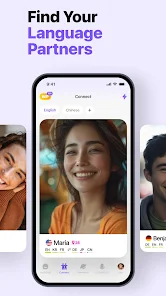
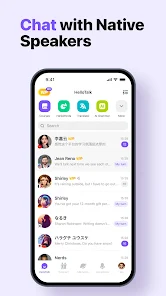
Connect with native speakers from around the world through text, voice, and video chats. This immersive experience allows you to practice your target language in real-time while helping others learn your language, fostering a mutually beneficial learning environment.

Text Correction Tools

Enhance your learning process with built-in text correction features. As you chat with your language partners, you can receive instant feedback on your messages, helping you improve your grammar and vocabulary while building confidence in your language skills.

Pros & Cons

Pros
  • Connect with native speakers worldwide for real practice
  • Learn through text, voice, and video conversations easily
  • Receive instant feedback on your language skills
  • Explore cultural exchange with language partners
  • Enjoy a user-friendly interface for seamless learning
Cons
  • Limited language options for less common languages
  • Frequent ads disrupt user experience
  • Quality of language partners varies greatly
  • Inconsistent app performance and bugs

Real Experience Using HelloTalk - Learn Languages

Application Scenarios

HelloTalk is designed for language learners of all levels, making it suitable for various application scenarios. Whether you are a beginner looking to grasp the basics of a new language or an advanced learner aiming to refine your conversational skills, HelloTalk provides a platform to connect with native speakers around the world. Users can engage in language exchanges, where they teach their native language in exchange for learning another. This interactive method is particularly beneficial for practicing speaking and writing in real-life contexts. Additionally, HelloTalk's community features allow users to join groups based on interests, enabling them to practice languages in specific fields like business, travel, or culture.

User Experience

The user experience on HelloTalk is generally positive, as the app is user-friendly and intuitive. Upon signing up, users create a profile indicating the languages they speak and the languages they wish to learn. The app utilizes a matching algorithm to connect users with compatible partners, facilitating engaging conversations. The messaging feature includes text, voice, and video options, allowing for a rich communication experience. Furthermore, the app offers built-in tools such as translation, pronunciation, and grammar correction, enhancing the learning process. However, users have noted that the effectiveness of matches can vary, and finding a consistent language partner may take some time. Overall, the social aspect of the app contributes to an enjoyable and immersive learning experience.

Pricing

HelloTalk operates on a freemium model, providing a basic version that is free to use, which is appealing for casual learners. The free version includes fundamental features such as text and voice messaging, but premium features are available through a subscription. The paid version unlocks additional benefits like unlimited translation and correction features, the ability to search for partners by specific criteria, and an ad-free experience. Pricing is competitive compared to other language learning apps, making it accessible for a wide audience. Users can choose between monthly, quarterly, or yearly subscription options, allowing flexibility depending on their commitment to language learning.

Updates & Support

HelloTalk regularly updates its app to enhance user experience and introduce new features. Recent updates have included improvements in voice recognition technology and additional language options, catering to an expanding user base. The developers actively seek user feedback, which plays a crucial role in shaping future updates. Support is readily available through in-app options, including FAQs and customer service messaging. Users have reported prompt responses to their inquiries, indicating a commitment to addressing user concerns effectively. Overall, HelloTalk's continuous improvements and responsive support contribute to a reliable language learning platform.

verified Security & Privacy Review

The security and privacy practices of HelloTalk are crucial for users engaging in language exchange. The app adheres to industry-standard encryption protocols to protect user conversations and personal information. However, users should remain cautious about sharing sensitive data, as the platform encourages open communication with strangers. HelloTalk requires various permissions, including access to contacts and location services, which can be concerning for privacy-conscious individuals. Users are advised to review these permissions carefully and adjust them according to their comfort levels. The app offers customizable privacy settings, allowing users to control who can view their profiles and initiate conversations. HelloTalk’s privacy policy outlines how user data is collected, used, and shared. While the app does not sell personal information to third parties, it may share data with partners for analytics and service improvement. Users should regularly check the app for updates to privacy practices and ensure they understand how their data is handled. Overall, HelloTalk provides a platform for language learning while emphasizing the importance of user awareness regarding security and privacy.

Reviews

3.4

“Great for practicing speaking with native speakers!”

“User-friendly interface makes learning fun.”

“Helpful community for language exchange and support.”

“Awesome features for correcting and learning.”

“Effective way to improve conversational skills.”

FAQ

1

Does HelloTalk - Learn Languages collect my personal data?

HelloTalk may collect personal data as outlined in its privacy policy, which includes information necessary for account creation and usage. Users should review the policy to understand what data is collected and how it is used.

2

Does HelloTalk - Learn Languages offer a free trial or free version?

Yes, HelloTalk offers a free version with basic features, and users can also opt for a premium subscription that unlocks additional features.

3

Does HelloTalk - Learn Languages require an internet connection?

Yes, HelloTalk requires an active internet connection to facilitate real-time communication and access its features, such as messaging and video calls.

4

How can I contact support or send feedback for HelloTalk - Learn Languages?

Users can contact HelloTalk support through the app by navigating to the 'Help' or 'Feedback' section, or by visiting the official HelloTalk website for additional support options.

5

How do I manage or cancel my HelloTalk - Learn Languages subscription?

You can manage or cancel your subscription through the app's settings under the subscription section, or by visiting the app store where you purchased the subscription and following the instructions there.

How to use HelloTalk - Learn Languages

1

How can I contact HelloTalk customer service?

You can reach HelloTalk customer service through the app's "Help" section or email support at support

2

How do I activate my HelloTalk account?

After signing up, check your email for a verification link to activate your account. Click the link to complete the process.

3

How do I find my customer number on HelloTalk?

Your customer number is not explicitly provided. For account-related inquiries, use your registered email.

4

How do I log in to my HelloTalk account?

Open the app, tap "Log In," enter your email or phone number, and follow the prompts.

Editor's Choice