This site uses cookies to enhance your user experience. By clicking any link on this site you are giving your consent to our cookie policy. Read more
Reject
Accept All
Garmin Drive™

Garmin Drive™

verified Verified App

Developer: Garmin

  • category

    Category: Auto & Vehicles

  • price

    Price: free

  • age rating

    Age Rating: Everyone

  • rating

    Rating: 4.0

  • download

    Downloads: 1,000,000+

  • version

    Version: 4.28.04

Screenshot 1
Screenshot 2
Screenshot 3
Screenshot 4
Screenshot 5
Screenshot 6

Features & Highlights

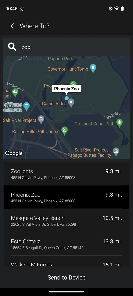
Built-In Trip Planner

Plan your road trips with the built-in trip planner that helps you organize multiple stops along your route. This feature ensures you make the most of your journey by finding interesting places to visit while keeping your travel efficient and enjoyable.

Real-Time Traffic Updates

Avoid traffic jams and delays with real-time traffic updates that provide alternate routes to your destination. Garmin Drive™ utilizes live data to help you navigate congested areas, saving you time and enhancing your overall driving experience.

Smart Notifications

Stay connected on the road with smart notifications that sync with your smartphone. Receive calls, texts, and app alerts directly on your Garmin display, ensuring you never miss an important message while keeping your focus on driving.

Voice-Activated Navigation

Navigate effortlessly with voice-activated navigation that allows you to control your device hands-free. Just speak your destination, and Garmin Drive™ will guide you with clear, turn-by-turn directions, making it safer and easier to drive.

Pros & Cons

Pros
  • Real-time traffic updates for faster routes.
  • User-friendly interface for easy navigation.
  • Customizable route planning for personalized journeys.
  • Built-in points of interest for travel inspiration.
  • Voice-activated commands for hands-free convenience.
Cons
  • Limited offline map availability can be frustrating
  • User interface may feel outdated to some
  • Occasional GPS signal loss in urban areas
  • Price may be higher than competitors

Real Experience Using Garmin Drive™

Application Scenarios

The Garmin Drive™ app is designed primarily for drivers seeking enhanced navigation and safety features. It is particularly useful for long road trips, daily commutes, and even local errands. With its real-time traffic updates, users can avoid congested routes, ensuring quicker travel times. The app also integrates seamlessly with Garmin's range of GPS devices, allowing users to sync their navigation preferences and receive updates directly on their smartphones. Additionally, the app offers points of interest, helping users discover new restaurants, gas stations, and attractions along their route, making it ideal for those who love exploring new areas. For families, the app enhances safety with features like driver alerts and road safety notifications, making it a perfect companion for parent drivers.

User Experience

Users of the Garmin Drive™ app frequently highlight the intuitive interface and ease of navigation. The app presents a clean and straightforward layout, enabling users to quickly input destinations and access essential features without unnecessary distractions. Many appreciate the voice-guided directions, which allow for hands-free operation, enhancing safety while driving. The real-time traffic updates are particularly praised for their accuracy and timely alerts, helping users make informed decisions on the road. Moreover, the ability to customize routes and save favorite locations adds to the overall positive experience. However, some users have reported occasional connectivity issues when syncing with their Garmin devices, which can be frustrating. Still, the app's overall reliability and functionality outweigh these minor drawbacks.

Pricing

The Garmin Drive™ app is free to download and offers a range of basic features at no cost. However, users may encounter premium features that require in-app purchases or subscriptions. These premium options often provide enhanced navigation capabilities, additional points of interest, or advanced safety features. The pricing structure is generally competitive compared to other navigation apps on the market, making it an appealing choice for budget-conscious users. Overall, the app's free version provides a robust set of tools for most drivers, while the premium features cater to those seeking more comprehensive navigation solutions.

Updates & Support

Garmin consistently updates the Drive™ app to enhance functionality and user experience. These updates often include improvements in traffic data accuracy, user interface enhancements, and the addition of new features based on user feedback. The commitment to regular updates ensures that the app remains relevant in an ever-evolving digital landscape. For support, Garmin provides a comprehensive help section within the app, along with an online support portal that offers FAQs, troubleshooting guides, and user forums. Users can also reach out to Garmin's customer service for personalized assistance, ensuring that any issues can be addressed promptly. This level of ongoing support reinforces user confidence in the app and its capabilities.

verified Security & Privacy Review

The Garmin Drive™ app places a strong emphasis on user security and privacy, ensuring that personal data is handled with care. The app requires several permissions, including access to location services, which is essential for its navigation features. Users are informed about the data being collected, including location history, speed, and travel routes, which can enhance personalized services. Garmin adheres to strict data security protocols, employing encryption methods to protect user data both in transit and at rest. The company’s privacy policy outlines how personal information is used, emphasizing that data is not sold to third parties without user consent. Users can manage their data by adjusting privacy settings within the app, allowing them to control what information is shared. Overall, Garmin Drive™ demonstrates a commitment to safeguarding user information, providing transparency in its data handling practices, and allowing users to maintain control over their privacy preferences.

Reviews

4.0

“Reliable navigation with accurate real-time traffic updates.”

“User-friendly interface makes driving stress-free.”

“Great battery life for long trips.”

“Maps are consistently up-to-date and precise.”

“Voice commands work flawlessly while driving.”

Editor's Choice