This site uses cookies to enhance your user experience. By clicking any link on this site you are giving your consent to our cookie policy. Read more
Reject
Accept All
Dolby On: Record Audio & Music

Dolby On: Record Audio & Music

verified Verified App

Developer: Dolby Laboratories Inc.

  • category

    Category: Music & Audio

  • price

    Price: free

  • age rating

    Age Rating: Everyone

  • rating

    Rating: 4.1

  • download

    Downloads: 5,000,000+

  • version

    Version: 1.9

Screenshot 1
Screenshot 2
Screenshot 3
Screenshot 4
Screenshot 5
Screenshot 6
Screenshot 7
Screenshot 8

Features & Highlights

High-Quality Audio Recording

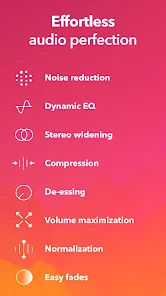
Dolby On allows users to capture studio-quality audio right from their mobile devices, ensuring that every note and nuance shines through. With advanced noise reduction and sound enhancement tools, your recordings will sound professional and polished, making it perfect for musicians and podcasters alike.

Seamless Sharing Options

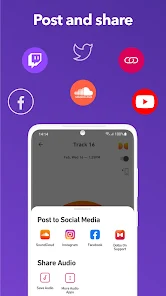
Once your audio masterpiece is ready, Dolby On makes sharing effortless with integrated options for popular social media platforms. You can easily showcase your music or podcasts to the world, allowing your creativity to reach new audiences without any hassle or complicated processes.

Smart Audio Processing

The app features intelligent audio processing that automatically optimizes your recordings for clarity and depth. By analyzing the sound in real-time, Dolby On can enhance vocals and instruments, delivering an immersive listening experience that feels rich and vibrant, no matter where you are.

User-Friendly Interface

Designed with simplicity in mind, Dolby On offers an intuitive interface that makes recording and editing a breeze. Whether you're a seasoned pro or a beginner, you'll find it easy to navigate through its features, helping you focus more on your creativity and less on the technicalities.

Pros & Cons

Pros
  • High-quality audio recording with professional-grade tools
  • User-friendly interface for effortless sound capture
  • Real-time noise reduction for clearer recordings
  • Built-in effects enhance creativity and sound quality
  • Seamless sharing options for instant distribution
Cons
  • Limited editing features for recorded audio
  • Requires stable internet for some functionalities
  • Compatibility issues with certain devices and formats
  • Audio quality may vary based on device settings

Real Experience Using Dolby On: Record Audio & Music

Application Scenarios

Dolby On is designed for a variety of recording scenarios, making it an invaluable tool for musicians, podcasters, and everyday users who want to capture high-quality audio. Whether you're in a bustling café, a quiet room, or even outdoors, the app's noise reduction technology helps to ensure that your recordings are clear and vibrant. Musicians can use it to lay down tracks on the go, capturing spontaneous inspiration without needing bulky equipment. Podcasters can record interviews or discussions in real-time, with the assurance that their audio will sound professional. Additionally, casual users can document personal moments, such as family gatherings or special events, ensuring that memories are captured with the best possible sound quality.

User Experience

The user experience with Dolby On is notably intuitive, making it accessible for both beginners and experienced audio professionals. The interface is clean and user-friendly, allowing users to navigate through options effortlessly. Recording audio is as simple as pressing a button, and the app provides instant feedback on audio levels. Users can also take advantage of various post-processing features, such as EQ presets and reverb adjustments, to enhance their recordings. The ability to share recordings directly to social media platforms or export them to other apps adds to the overall convenience. Many users appreciate the built-in tutorials that guide them through the app’s features, ensuring that they can maximize its potential without feeling overwhelmed.

Pricing

Dolby On is available for free, which makes it an attractive option for anyone looking to improve their audio recording capabilities without financial commitment. While the free version includes a robust set of features, there are opportunities for users to access additional premium options through in-app purchases. These upgrades can provide advanced features or exclusive sound packs, adding value for users who want to take their audio quality to the next level. This flexible pricing model allows users to explore the app’s capabilities without upfront costs, making it a practical choice for those hesitant to invest in audio recording software.

Updates & Support

Dolby is committed to providing ongoing updates for Dolby On, ensuring that the app evolves in line with user feedback and technological advancements. Users can expect regular updates that introduce new features, enhance existing capabilities, and address any bugs or performance issues. The customer support team is responsive and available through multiple channels, including email and social media, providing assistance when needed. The app also has a dedicated FAQ section that covers common inquiries, which helps users troubleshoot issues independently. Overall, the combination of regular updates and reliable support contributes to a satisfying user experience.

verified Security & Privacy Review

Dolby On: Record Audio & Music takes user security and privacy seriously, implementing robust measures to safeguard personal information. The app requires essential permissions to function effectively, such as microphone access for audio recording. Users are informed of these permissions clearly during the setup process, ensuring transparency. The app does not collect unnecessary personal data, focusing primarily on the audio content created by users. Dolby On employs encryption technology to protect user recordings and any associated metadata. This commitment to data security helps prevent unauthorized access and ensures that users' creative works remain private. Furthermore, Dolby adheres to industry-standard privacy practices, providing a comprehensive privacy policy that outlines how user data is handled. Users have the ability to manage their data preferences, including options to delete recordings and control sharing settings. Overall, Dolby On balances functionality with strong security and privacy measures, allowing users to record and share their music with confidence.

Reviews

4.1

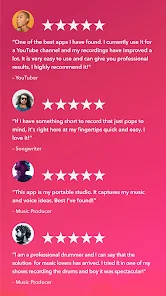
“Amazing sound quality for recordings!”

“User-friendly interface, easy to navigate.”

“Great features for musicians and podcasters.”

“Noise reduction works wonders in noisy environments.”

“Love the built-in effects and presets!”

Editor's Choice