This site uses cookies to enhance your user experience. By clicking any link on this site you are giving your consent to our cookie policy. Read more
Reject
Accept All

Advertiser and Editorial Disclosures

Dog Scanner: Breed Recognition

Dog Scanner: Breed Recognition

verified Verified App

Developer: Siwalu Software GmbH

  • category

    Category: Education

  • price

    Price: free

  • age rating

    Age Rating: Everyone

  • rating

    Rating: 4.3

  • download

    Downloads: 5,000,000+

  • version

    Version: 22.4.1-G

Screenshot 1
Screenshot 2
Screenshot 3
Screenshot 4
Screenshot 5
Screenshot 6
Screenshot 7
Screenshot 8

Features & Highlights

Community Features

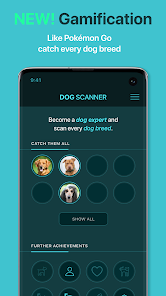
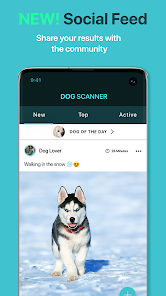
Connect with fellow dog enthusiasts through the app's community features, where you can share your findings and discuss breeds. This social aspect helps foster a sense of belonging among dog lovers, making it more than just an identification tool.

Comprehensive Breed Database

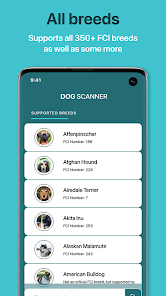
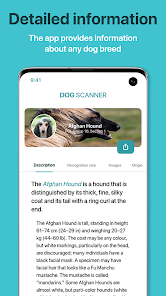
Dog Scanner boasts a vast database of dog breeds, ensuring accurate recognition and detailed information. You can explore breed characteristics, behavior, and care tips, making it a fantastic resource for both seasoned dog owners and newcomers alike.

Instant Breed Identification

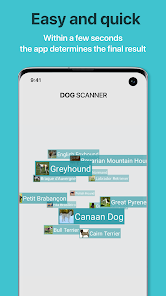
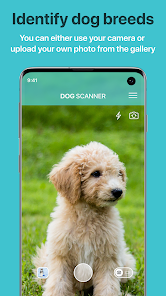
With just a snap of your camera, Dog Scanner instantly identifies the breed of any dog. This feature is perfect for dog lovers who are curious about different breeds and want to learn more about their furry friends on the spot, enhancing your pet knowledge effortlessly.

User-Friendly Interface

Navigating the app is a breeze, thanks to its intuitive design. Whether you're scanning a dog or searching for breed information, the simple layout makes accessing features quick and enjoyable for all users, regardless of tech-savviness.

Pros & Cons

Pros
  • Quickly identifies dog breeds using advanced image recognition technology
  • Offers detailed breed information and characteristics for informed decisions
  • Connects you with a community of dog enthusiasts and owners
  • Provides training tips and health advice tailored to specific breeds
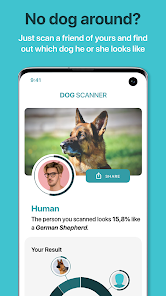
  • Allows for easy sharing of findings with friends and family
Cons
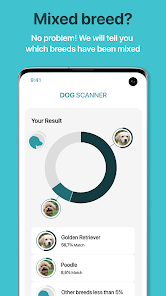
  • Limited breed database may miss rare or mixed breeds.
  • Accuracy can vary based on photo quality.
  • Subscription costs may deter casual users seeking quick identification.

Real Experience Using Dog Scanner: Breed Recognition

Application Scenarios

The Dog Scanner: Breed Recognition app offers a versatile solution for dog enthusiasts, pet owners, and even professionals in the veterinary field. Imagine walking through a park and encountering a unique dog breed you’ve never seen before. With just a simple photo, this app can identify the breed in seconds, making it an invaluable tool for dog lovers. Additionally, the app can be useful for those considering adopting a dog; by understanding the breed characteristics, potential owners can make informed decisions about the best fit for their lifestyle. The app also serves as an excellent educational tool for children, teaching them about various breeds and fostering a love for animals. Whether you're at a dog show, visiting a shelter, or simply curious about a neighbor's pet, the Dog Scanner app is designed to enhance your understanding and appreciation of dogs.

User Experience

User experience with the Dog Scanner app is generally positive, as it features an intuitive interface that is easy to navigate. The scanning process is straightforward—users can either take a new photo or upload an existing one, and within moments, the app provides breed identification. The accuracy of the breed recognition has improved significantly thanks to the app's robust database and machine learning algorithms. Users appreciate the detailed information provided about each breed, including temperament, care requirements, and health concerns, turning a simple identification into a comprehensive educational experience. However, some users have noted occasional discrepancies in breed recognition, particularly with mixed breeds, which is something to keep in mind. Overall, the engaging design and user-friendly functionality contribute to a satisfying experience.

Pricing

The Dog Scanner app is available for free, which provides access to basic features, including breed recognition and limited educational content. However, for users seeking a deeper experience, the app offers a premium subscription that unlocks additional features such as ad-free usage, advanced breed insights, and exclusive content. The pricing is competitive compared to similar apps in the market, making it a worthwhile investment for serious dog lovers and professionals alike. Users often find that the premium features enhance their overall experience and provide excellent value for money, especially for those who frequently engage with the app.

Updates & Support

The development team behind Dog Scanner is committed to continuous improvement, frequently rolling out updates that enhance functionality and expand the breed database. Users can expect regular updates that not only refine the app’s existing features but also introduce new elements based on user feedback. Customer support is readily available through the app, offering assistance for common issues and inquiries. The developers actively engage with the user community, encouraging suggestions and feedback, which fosters a sense of collaboration and ensures that the app evolves in line with user needs. This proactive approach to updates and support significantly enhances user satisfaction and loyalty.

verified Security & Privacy Review

The Dog Scanner: Breed Recognition app prioritizes user privacy and data security through its transparent practices. The app collects minimal user data necessary for functionality, primarily focused on image processing to recognize dog breeds. It employs encryption protocols to protect sensitive information during transmission and storage. Upon installation, users are prompted to grant specific permissions, including access to the camera and photo library. It is essential for users to review these permissions carefully, as they directly relate to the app's core functionality. The app explicitly states that it does not share personal data with third parties without user consent, ensuring a degree of trust in its operations. Furthermore, the app includes privacy settings that allow users to manage their preferences, enhancing user control over their data. Regular updates and security patches contribute to maintaining a secure environment. Overall, the Dog Scanner app demonstrates a commitment to safeguarding user privacy while delivering an enjoyable experience in breed recognition.

Reviews

4.3

“Accurate breed identification, very helpful!”

“User-friendly interface, easy to navigate.”

“Great for dog lovers, fun to use!”

“Fast results, impressed with the accuracy.”

“Occasional misidentifications, but still a useful app.”

FAQ

1

Can I submit suggestions or feedback to Dog Scanner?

Yes, users can submit suggestions or feedback directly through the app or via the app's official website.

2

Does Dog Scanner collect my personal data?

Yes, Dog Scanner may collect personal data to enhance user experience and app functionality, but it adheres to privacy regulations.

3

Does Dog Scanner support offline use?

Dog Scanner requires an internet connection for features like breed identification, but some information may be accessible offline.

4

How do I cancel my Dog Scanner subscription?

Users can cancel their subscription through their app store settings or within the app itself, depending on the platform used.

5

How much does a subscription to Dog Scanner cost?

Subscription costs may vary, but users can generally expect a monthly or yearly fee for premium features.

How to use Dog Scanner: Breed Recognition

1

Can I change my customer number?

Unfortunately, customer numbers cannot be changed. If you need assistance, please contact customer service for further support.

2

How can I activate my Dog Scanner account?

To activate your account, click on the activation link sent to your email after registration. If you didn't receive it, check your spam folder or reach out to customer support.

3

How do I contact customer service for Dog Scanner?

You can reach our customer service via the app's support section or through our website's contact form. We're here to help!

4

How do I update my customer information?

You can update your information by logging into your account and going to the settings section. If you need help, feel free to contact customer service.

5

I forgot my customer number. How can I retrieve it?

Please check your email for the initial registration message, as it contains your customer number. If you still can't find it, contact support.

Editor's Choice