This site uses cookies to enhance your user experience. By clicking any link on this site you are giving your consent to our cookie policy. Read more
Reject
Accept All

Advertiser and Editorial Disclosures

Discogs

Discogs

verified Verified App

Developer: Discogs

  • category

    Category: Music & Audio

  • price

    Price: free

  • age rating

    Age Rating: Teen

  • rating

    Rating: 2.9

  • download

    Downloads: 1,000,000+

  • version

    Version: 2.39.8

Screenshot 1
Screenshot 2
Screenshot 3
Screenshot 4
Screenshot 5
Screenshot 6
Screenshot 7
Screenshot 8

Features & Highlights

Collection Management

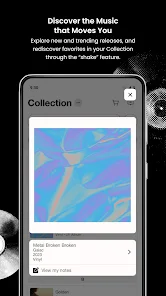
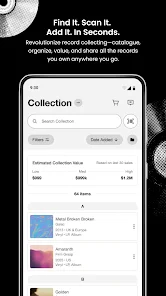
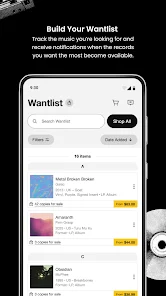
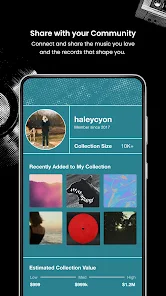
With Discogs, users can easily catalog and manage their music collections through customizable features. Track your inventory, create wish lists, and organize your favorites, helping you keep your collection well-maintained and accessible for all your listening needs.

Community Engagement

Discogs fosters a vibrant community where users can share their passion for music through reviews, ratings, and discussions. Engage with fellow music lovers, contribute to the database, and participate in forums to enhance your overall experience on the platform.

Marketplace Access

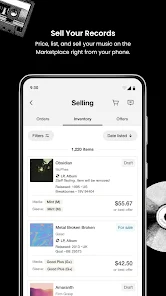
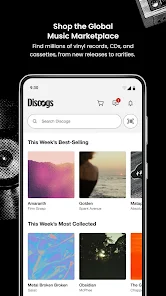
The platform features a robust marketplace where users can buy and sell music in a secure environment. With thousands of listings, you can find rare records and connect with fellow collectors, all while enjoying a user-friendly interface that makes transactions simple and efficient.

Music Database

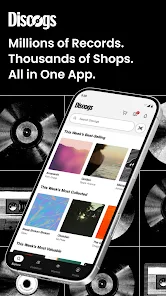
Discogs offers an expansive and detailed music database that includes millions of releases across various genres and formats. Users can explore extensive discographies, track information, and artist profiles, making it an invaluable resource for music enthusiasts and collectors alike.

Pros & Cons

Pros
  • Vast music database for collectors and enthusiasts
  • User-generated content ensures accuracy and updates
  • Easy buying and selling of records and merchandise
  • Community-driven reviews and ratings enhance discovery
  • Powerful search filters help find specific items easily
Cons
  • User interface can be confusing for newcomers
  • Limited seller reliability affects purchases
  • Incomplete or inaccurate data often present
  • High fees may deter casual sellers

Real Experience Using Discogs

Application Scenarios

Discogs is a must-have app for music enthusiasts, collectors, and audiophiles who want to dive deep into the world of vinyl records, CDs, and digital music. Whether you are a casual listener looking to explore new genres or a dedicated collector aiming to track your collection, Discogs caters to all. The app is perfect for browsing extensive music catalogs, discovering rare items, and connecting with other users. It serves as an invaluable tool for managing your personal collection, allowing you to log your purchases, and even create want lists for future acquisitions. Additionally, the app's marketplace enables users to buy and sell music, making it a vibrant platform for those looking to expand their libraries or part ways with their duplicates. From casual browsing to serious collecting, Discogs provides a comprehensive experience tailored to a variety of music-related needs.

User Experience

The user experience on the Discogs app is generally smooth and intuitive. The interface is clean and user-friendly, making navigation easy for both tech-savvy individuals and those less familiar with apps. Users can quickly search for artists, albums, and releases, with results populating in a matter of seconds. The app's features, like adding items to your collection or want list, are straightforward and efficient. However, some users have reported occasional glitches, particularly with loading images or syncing their collections. Despite these minor hiccups, the overall experience is enjoyable, especially for those passionate about music. The community aspect of Discogs is also noteworthy, as users can engage with others through reviews and discussions, enriching their experience further.

Pricing

Discogs operates on a freemium model, allowing users to access a wealth of features at no cost. The basic functionalities, including browsing the catalog, managing collections, and connecting with other users, are entirely free. However, for those who seek an ad-free experience or additional features such as advanced collection analytics, there is an optional premium subscription available at a reasonable monthly fee. This pricing strategy allows casual users to enjoy the app without any financial commitment while offering more dedicated collectors the chance to enhance their experience.

Updates & Support

Discogs regularly updates its app to improve functionality, fix bugs, and introduce new features based on user feedback. The development team is proactive in addressing user concerns, ensuring that the app remains relevant and user-friendly. Support is readily available through the app's help section, where users can access FAQs, troubleshooting guides, and customer service contact options. The community forum is also a helpful resource, allowing users to share tips and solutions. Overall, Discogs maintains a commitment to user satisfaction and continuous improvement, making it a reliable choice for music lovers.

verified Security & Privacy Review

The security and privacy practices of the Discogs app are essential for users who value their personal information. The app implements industry-standard encryption to protect user data during transmission, ensuring that sensitive information remains secure. Users are encouraged to create strong passwords and enable two-factor authentication for an extra layer of security. In terms of permissions, Discogs requires access to certain device features, such as storage for saving offline data. Users should be mindful of granting permissions, as excessive access may raise privacy concerns. The app's privacy policy outlines how user data is collected, used, and shared, with a commitment to not selling personal information to third parties. Discogs allows users to manage their privacy settings, enabling them to control what information is visible to others in the community. Overall, the app demonstrates a robust approach to data handling and user privacy, fostering a secure environment for music enthusiasts to connect and share their collections.

Reviews

2.9

“Great platform for music collectors and enthusiasts!”

“Extensive database, perfect for rare finds.”

“User-friendly interface enhances browsing experience.”

“Community feedback is invaluable for purchases.”

“Excellent for tracking and managing music collections.”

FAQ

1

Does Discogs collect my personal data?

Yes, Discogs collects personal data such as your account information, purchase history, and preferences to enhance user experience and improve services.

2

Does Discogs offer a free trial or free version?

Yes, Discogs offers a free version that allows users to access many features, but some premium features may require a subscription.

3

Does Discogs require an internet connection?

Yes, Discogs requires an internet connection to access its database, browse listings, and conduct transactions.

4

How can I contact support or send feedback for Discogs?

You can contact Discogs support through their help center on the website, where you can submit requests or feedback, or you can reach out via their social media channels.

5

How do I manage or cancel my Discogs subscription?

You can manage or cancel your Discogs subscription by visiting your account settings on the website or app, where you will find options related to your subscription plan.

How to use Discogs

1

How can I contact Discogs customer service for support?

You can reach Discogs customer service through their help page on the website, where you can submit a ticket or browse FAQs.

2

How do I log into my Discogs account?

To log into your Discogs account, visit the website or app, enter your email and password, then click on the 'Log In' button.

3

Is there a way to activate my Discogs account?

If you need to activate your account, check your email for a confirmation link sent by Discogs during registration. Click the link to complete activation.

4

What is the customer service number for Discogs?

Discogs does not provide a customer service phone number; all support is handled through their online help system.

Editor's Choice