This site uses cookies to enhance your user experience. By clicking any link on this site you are giving your consent to our cookie policy. Read more
Reject
Accept All

Advertiser and Editorial Disclosures

Desmos Graphing Calculator

Desmos Graphing Calculator

verified

Desmos Inc

4.5
Rating
5,000,000+ Downloads
7.45.0.0 Version
  • category

    Category: Education

  • price

    Price: free

  • age rating

    Age Rating: Everyone

  • rating

    Rating: 4.5

  • available on

    Available on: /

  • updated on

    Updated on: May 29, 2026

Screenshot 1
Screenshot 2
Screenshot 3
Screenshot 4
Screenshot 5
Screenshot 6
Screenshot 7
Screenshot 8
Screenshot 9

Features & Highlights

Customizable Graph Styles

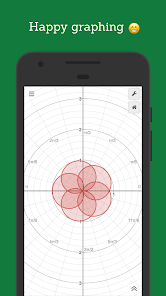
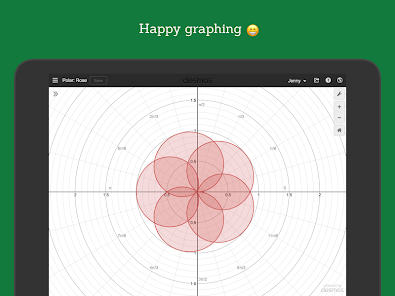
Users can personalize their graphs with different colors, styles, and labels, enhancing clarity and presentation. This feature is particularly useful for creating visually appealing graphics for reports or presentations, ensuring that important information is highlighted effectively.

Interactive Graphing

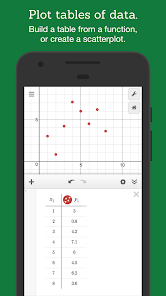
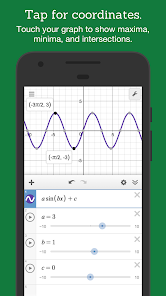
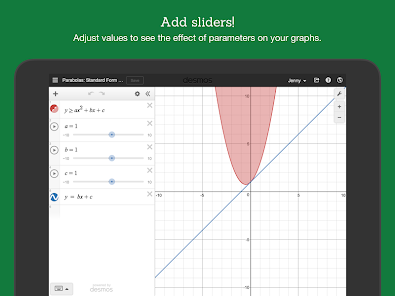
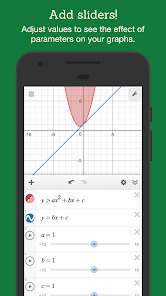
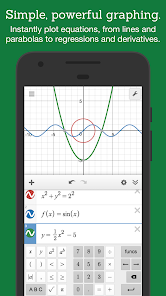
With Desmos, users can effortlessly create and manipulate graphs of functions, inequalities, and data sets. The interactive interface allows for real-time adjustments, making it easy to visualize mathematical concepts and explore how changes in variables affect the graph's shape and position.

Rich Functionality

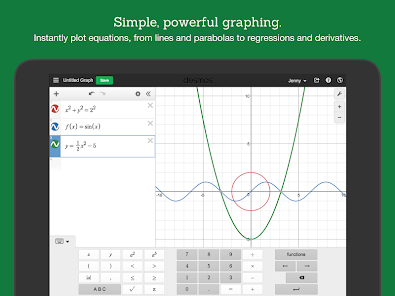
Desmos supports a wide range of mathematical functions, from basic linear equations to complex trigonometric and statistical models. This versatility makes it an excellent tool for students and educators alike, empowering users to dive deep into various mathematical topics and explore them creatively.

User-Friendly Interface

Desmos boasts an intuitive design that's accessible to users of all levels, from beginners to advanced mathematicians. The straightforward layout and helpful tooltips guide users through the graphing process, making it a great choice for learning and teaching mathematics in a fun and engaging way.

Pros & Cons

Pros
  • User-friendly interface makes graphing intuitive and accessible for everyone.
  • Real-time graph updates allow for immediate visualization of changes in equations.
  • Supports a wide range of mathematical functions, enhancing versatility for various topics.
  • Collaborative features enable easy sharing and group work on math problems.
  • Available on multiple platforms, ensuring access anytime, anywhere.
Cons
  • Limited offline functionality restricts use without internet access.
  • Complex interfaces can overwhelm new users.
  • Some advanced features may require additional learning resources.

Real Experience Using Desmos Graphing Calculator

Application Scenarios

The Desmos Graphing Calculator is a versatile tool that caters to a wide range of users, from high school students grappling with algebra to college-level scholars engaging in complex calculus. One of the primary applications of Desmos is in educational settings, where it serves as an invaluable resource for both teachers and students. In a classroom environment, educators can utilize the app to visually demonstrate mathematical concepts, making abstract ideas more tangible. For instance, plotting functions and inequalities allows students to grasp the relationships between variables effectively. Beyond classrooms, the app is also beneficial for professionals in fields like engineering and physics, where graphing data and visualizing mathematical models is essential. Additionally, hobbyists and enthusiasts who enjoy exploring mathematical patterns and creating intricate designs can find satisfaction in using Desmos to experiment with equations and functions.

User Experience

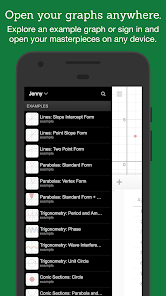
The user experience of the Desmos Graphing Calculator is seamless and intuitive. The interface is clean and user-friendly, allowing users to navigate effortlessly through its features. The graphing environment is responsive, enabling real-time updates as users input equations, which fosters an interactive learning experience. One of the standout features is the ability to customize graphs with various colors and styles, which aids in distinguishing multiple functions simultaneously. Users can also save their work and share graphs with others, promoting collaboration and discussion. The app is designed to be accessible on multiple devices, including smartphones, tablets, and desktops, ensuring that users can graph on-the-go or in their preferred setting. Additionally, the built-in tutorials and help sections provide guidance for users of all skill levels, enhancing their understanding and proficiency.

Pricing

Desmos Graphing Calculator is available for free, making it an exceptional resource for students and educators alike. This free access eliminates barriers to quality mathematical tools, ensuring that everyone has the opportunity to utilize advanced graphing capabilities without incurring costs. While the app does not have a subscription model or in-app purchases, it offers a wealth of features that rival many paid alternatives. The commitment to providing a completely free service underscores Desmos's mission to enhance mathematical education and accessibility, allowing users from diverse backgrounds to engage with mathematics dynamically and interactively.

Updates & Support

Desmos is committed to maintaining and enhancing its Graphing Calculator through regular updates that introduce new features and improvements based on user feedback. The development team is proactive in addressing any bugs or issues that arise, ensuring a smooth user experience. Users can access support through the Desmos website, where a comprehensive FAQ section and contact options are available for more personalized assistance. The community aspect of Desmos is also noteworthy, as users can share their graphs and explore others' creations, fostering a collaborative environment. With a focus on continuous improvement and user support, Desmos Graphing Calculator remains a leading tool in the realm of mathematical education.

verified Security & Privacy Review

The Desmos Graphing Calculator app prioritizes user privacy and data security, ensuring that personal information is handled with care. The app does not require users to create an account, allowing for anonymous usage and minimizing the risk of data breaches associated with account management. Desmos collects minimal data, primarily for performance improvement and user experience enhancement. This data generally includes usage statistics and app interactions, which are anonymized and aggregated to protect user identities. The app's privacy policy clearly outlines the type of information collected and the purpose behind it, reinforcing transparency. In terms of permissions, the app requires basic access necessary for its functionality, such as internet connectivity for updates and online features. No intrusive permissions are requested, which further enhances user trust. Overall, the Desmos Graphing Calculator demonstrates a strong commitment to data security and privacy, making it a reliable tool for students and educators alike. Users can confidently explore mathematical concepts without the concern of compromising their personal information.

User Reviews

  • Trip Ξ Nō (Tripzsy)
    2026/07/03

    This is a frustrating Android App because of the lack of a greek symbol keyboard, the ability to use your own keyboard, and the capability to copy and paste data into or out of the App. Entering a Symbol kind of works if you know them but the app doesn't always work with this feature, infinity goes to the proper symbol but mu just sits there and doesn't enter in μ, so I can't complete my graph using just this app. I could use the desktop version to do this but then what is the point of this App?

  • Ellie
    2025/01/06

    Easily the best graphing calculator on the market, especially considering the cost (or lack thereof) and convenience of it being an app. **I am having an issue in which I can't log in via Google.** This aside, there is not one thing I dislike about this app, and I look forward to seeing what they will add next-- 3D app, anyone? I'd love to see a day in which Desmos wins the metaphorical war against TI.

  • A Google user
    2020/04/09

    This is an advanced calculator that you'd pay alot of money for to do math assignments for classes, except that it's simpler to use, has different graphing methods up for you to simply plug in and give you the answer, allows you different colored and textured lines to distinguish your functions, graphs instantly, allows you to zoom in and out pretty much infinitely.....so in almost every way, it's better than a calculator you could get in a store and pay over $100 for, except this is free.

  • A Google user
    2019/01/09

    Fantastic and incredibly useful. PLEASE change it back so that one can scroll laterally through an equation on a given line!! This makes plugging different numbers into the same formula so much easier! For longer formulas, when the end of the formula is off of the screen, and not being able to swipe to the end, there is a high probability of hitting the clear line (x) button when trying to plug new numbers in to the end of a given formula!!

  • A Google user
    2020/02/29

    As a whole, this app/website is amazing for me, I can visualize the general data given on a homework assignment. I think you should add a few things in the calculator though. Such as the ability to convert a data table into an equation via the settings in the input bar. Also having recursive functions would be super helpful. Finally, another idea is to add a way to view steps for converting from one equation system to another. Like y=mx+b to standard form etc.

Review Source: Google Play store public user reviews.

FAQ

1

Can I submit suggestions or feedback to Desmos Graphing Calculator?

Yes, users can submit suggestions or feedback through the Desmos website or directly within the app, helping the development team improve the tool.

2

Does Desmos Graphing Calculator collect my personal data?

Desmos Graphing Calculator does not collect personal data from users. It focuses on maintaining user privacy and does not require login information to use its core features.

3

Does Desmos Graphing Calculator support offline use?

While Desmos Graphing Calculator primarily requires an internet connection for full functionality, some features may be accessible offline if the app is installed on a device.

4

How do I cancel my Desmos Graphing Calculator subscription?

Since Desmos Graphing Calculator does not operate on a subscription model, there is no need for cancellation, as all features are available at no cost.

5

How much does a subscription to Desmos Graphing Calculator cost?

Desmos Graphing Calculator does not have a subscription model; it is entirely free for all users without any premium features that require payment.

How to use Desmos Graphing Calculator

1

Can I change my customer number?

Customer numbers are unique identifiers and cannot be changed. For more assistance, please reach out to customer service.

2

How can I verify my account after logging in?

After logging in, check your account settings for verification options. Follow the prompts to complete the verification process.

3

How do I contact customer service for account issues?

You can contact customer service through our support page, where you can submit a request or find our support email.

4

How do I log in to my Desmos account?

To log in, visit the Desmos website, click on the "Log In" button, and enter your email and password.

5

How do I update my customer information?

To update your customer information, log in to your account, go to account settings, and make the necessary changes.

What's New

Bug fixes and performance improvements.

Editor's Choice