This site uses cookies to enhance your user experience. By clicking any link on this site you are giving your consent to our cookie policy. Read more
Reject
Accept All

Advertiser and Editorial Disclosures

Carly — OBD2 car scanner

Carly — OBD2 car scanner

verified Verified App

Developer: Carly Solutions GmbH & Co KG

  • category

    Category: Auto & Vehicles

  • price

    Price: free

  • age rating

    Age Rating: Everyone

  • rating

    Rating: 3.5

  • download

    Downloads: 1,000,000+

  • version

    Version: 49.73

Screenshot 1
Screenshot 2
Screenshot 3
Screenshot 4
Screenshot 5
Screenshot 6
Screenshot 7
Screenshot 8

Features & Highlights

Diagnostic Trouble Codes

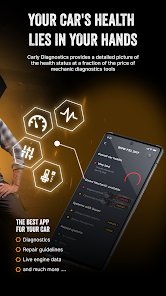
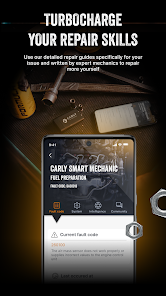
With Carly, you can easily read and clear diagnostic trouble codes (DTCs) from your vehicle's computer. This means you can identify problems quickly and take action before they escalate, saving you both time and money on repairs.

Personalized Vehicle Insights

Carly provides personalized insights tailored to your specific vehicle model, helping you understand its unique needs better. This feature not only educates you about your car but also ensures you can optimize its performance and longevity effectively.

Real-Time Data Monitoring

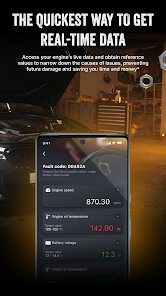
Carly allows you to access real-time data from your vehicle's engine and systems, giving you insights into performance, fuel efficiency, and potential issues. This feature empowers you to make informed decisions about your car's maintenance and driving habits, enhancing your overall driving experience.

User-Friendly Interface

The Carly app boasts a user-friendly interface that simplifies complex diagnostic information, making it accessible for everyone, from seasoned car enthusiasts to everyday drivers. Navigating through features and understanding your car's health has never been easier, ensuring a seamless experience.

Pros & Cons

Pros
  • Carly offers comprehensive diagnostics for a wide range of car brands.
  • User-friendly interface makes it easy for anyone to use.
  • Access to live data helps monitor your vehicle's performance in real-time.
  • Regular updates ensure compatibility with the latest vehicle models and software.
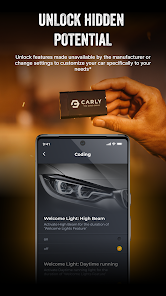
  • Customizable options allow you to personalize settings for your specific car.
Cons
  • Limited compatibility with some car models may restrict its effectiveness.
  • Software updates can be infrequent, affecting performance.
  • User interface may be confusing for beginners, leading to frustration.

Real Experience Using Carly — OBD2 car scanner

Application Scenarios

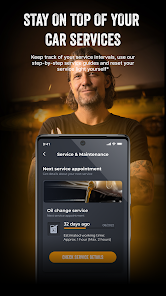
The Carly OBD2 car scanner app is designed for a variety of scenarios that cater to both everyday drivers and automotive enthusiasts. Whether you're a car owner looking to diagnose a pesky check engine light or a DIY mechanic aiming to perform advanced modifications, Carly is equipped to meet your needs. The app seamlessly connects to your vehicle's OBD2 port, allowing users to read and clear error codes, monitor real-time data, and access a wealth of vehicle information. This is particularly beneficial for users who want to understand their vehicle's health before a long trip, ensuring reliability and safety. Additionally, Carly offers features for retrofitting various components in compatible vehicles, such as enabling features like automatic headlights or adjusting the comfort settings of your car, making it a versatile tool for personalization.

User Experience

Users have reported a generally positive experience with the Carly app, noting its intuitive interface and ease of use. The app's design is user-friendly, allowing even those with minimal technical knowledge to navigate through functionalities effortlessly. Upon connecting the app to their vehicle, users are greeted with clear visuals and straightforward instructions, making it easy to understand vehicle diagnostics. The detailed reports generated by the app provide valuable insights, and users appreciate the ability to save and track data over time. Furthermore, Carly’s community features enable users to share experiences and solutions, fostering a sense of camaraderie among car lovers. However, some users have mentioned occasional connectivity issues, particularly with certain car models, which can detract from the experience.

Pricing

Carly offers a flexible pricing model that accommodates various user needs. The app can be downloaded for free, providing access to basic diagnostic features. For users seeking more advanced functionalities, Carly offers a subscription plan that unlocks premium features, including detailed coding options and extensive vehicle information. This premium subscription is competitively priced, making it accessible for most users while still reflecting the value of the features offered. Additionally, Carly regularly runs promotions, allowing users to test premium features at a discounted rate, ensuring that potential subscribers can experience the full capabilities of the app before committing.

Updates & Support

Carly is known for its commitment to continuous improvement, frequently rolling out updates that expand functionality and enhance user experience. These updates often include new vehicle models and additional features based on user feedback, demonstrating the developers' responsiveness to the community's needs. Support is readily available through the app, including a comprehensive FAQ section and direct customer service options. Users can also access a vibrant online community where they can seek advice, share experiences, and troubleshoot common issues. This level of support ensures that users feel confident in their ability to utilize the app effectively, making Carly a reliable choice for OBD2 diagnostics.

verified Security & Privacy Review

The Carly app for OBD2 car scanning prioritizes user security and privacy through a careful approach to data handling. The app requires certain permissions to access vehicle data, including location and Bluetooth, which are essential for functionality. Users are informed about these permissions during installation, allowing them to make informed decisions. Carly employs encryption protocols to protect data transmitted between the app and the vehicle, minimizing the risk of unauthorized access. User data is stored securely, and the app adheres to strict privacy policies that comply with data protection regulations. Carly does not sell user data to third parties, ensuring that personal information remains confidential. Moreover, users have the option to manage their data preferences within the app, including the ability to delete their data if they choose to discontinue using the service. Overall, Carly demonstrates a commitment to safeguarding user information while providing a robust tool for car diagnostics.

Reviews

3.5

“Easy to use and very informative!”

“Great value for DIY car repairs.”

“Accurate readings and quick diagnostics.”

“User-friendly interface, highly recommend!”

“Excellent customer support and helpful resources.”

FAQ

1

Can I submit suggestions or feedback to Carly — OBD2 car scanner?

Yes, users can submit suggestions or feedback through the app's support or contact section, where the team welcomes user input to enhance the app experience.

2

Does Carly — OBD2 car scanner collect my personal data?

Carly — OBD2 car scanner may collect some user data to improve the app experience, but it prioritizes user privacy and complies with data protection regulations.

3

Does Carly — OBD2 car scanner support offline use?

Carly — OBD2 car scanner requires an internet connection for certain features, but basic functionalities like reading and clearing codes can be used offline once the app is downloaded.

4

How do I cancel my Carly — OBD2 car scanner subscription?

To cancel your Carly — OBD2 car scanner subscription, go to your app store account settings (Google Play or Apple App Store) and follow the instructions for managing subscriptions.

5

How much does a subscription to Carly — OBD2 car scanner cost?

The subscription cost for Carly — OBD2 car scanner varies based on the package chosen, typically offering monthly, yearly, or lifetime options. Please check the app for the latest pricing information.

How to use Carly — OBD2 car scanner

1

Can I activate my Carly account without the app?

Account activation is done through the Carly app. Download it, create an account, and follow the prompts to activate.

2

Can I update my email address linked to my Carly account?

Yes, you can update your email address in the account settings after logging in to your Carly account.

3

How can I contact customer service for my Carly OBD2 scanner?

You can reach our customer service team through the support section in the app or via our website's contact page. We're here to help!

4

How do I change my customer number?

Customer numbers are unique and cannot be changed. If you need assistance, please contact customer service for further help.

5

How do I log in to my Carly account?

To log in, open the Carly app, tap the login button, and enter your email and password. If you have trouble, use the "Forgot Password" option.

Editor's Choice