This site uses cookies to enhance your user experience. By clicking any link on this site you are giving your consent to our cookie policy. Read more
Reject
Accept All
Campus Parent

Campus Parent

verified Verified App

Developer: Infinite Campus, Inc.

  • category

    Category: Education

  • price

    Price: free

  • age rating

    Age Rating: Everyone

  • rating

    Rating: 3.1

  • download

    Downloads: 1,000,000+

  • version

    Version: 1.11.5

Screenshot 1
Screenshot 2
Screenshot 3
Screenshot 4
Screenshot 5
Screenshot 6

Features & Highlights

Personalized Dashboard

Customize your dashboard to display the information that matters most to you. With a personalized view, you can prioritize notifications, schedules, and messages, ensuring you never miss a beat. This feature empowers parents to tailor their experience to fit their unique needs and preferences.

Real-Time Notifications

Stay updated with instant notifications about important school events, grades, and announcements. Campus Parent ensures that parents are always in the loop, fostering better communication between home and school. No more missed updates, as everything you need to know is delivered right to your device.

Secure Messaging

Connect directly with teachers and school staff through a secure messaging feature. Campus Parent allows for safe and efficient communication, ensuring that parents can address concerns or ask questions without hassle. This fosters a collaborative environment, enhancing the relationship between parents and educators.

User-Friendly Interface

Navigating through Campus Parent is a breeze, thanks to its intuitive design. The app prioritizes user experience, making it easy for parents to access information quickly and efficiently. Whether you're checking grades or upcoming events, you'll find the layout straightforward and engaging.

Pros & Cons

Pros
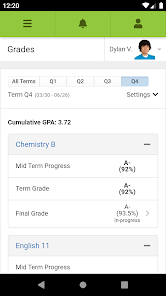
  • Access real-time updates on student progress
  • Streamlined communication with teachers and staff
  • Easy tracking of homework and assignments
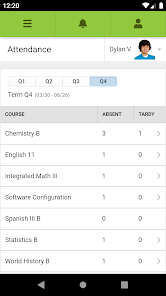
  • Convenient viewing of attendance records
  • Customizable notifications for important events
Cons
  • Limited accessibility for non-tech-savvy parents
  • Frequent technical glitches disrupt user experience
  • Lack of comprehensive support resources available
  • Information overload can confuse users

Real Experience Using Campus Parent

Application Scenarios

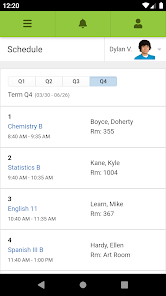
The Campus Parent app is designed to cater to the needs of parents with children enrolled in K-12 schools. This versatile application serves multiple scenarios, including tracking academic progress, managing school events, and communicating with teachers. For parents, it becomes an essential tool to stay informed about their child’s homework assignments, grades, and attendance records. Additionally, it can be used for receiving alerts about school closures, extracurricular activities, and important announcements. The app is particularly beneficial for busy parents who juggle work and family commitments, providing an efficient platform to access essential school-related information from anywhere at any time.

User Experience

The user experience of Campus Parent is largely positive, with a clean and intuitive interface that allows users of all technical abilities to navigate with ease. Upon logging in, users are greeted with a dashboard that summarizes key information such as upcoming assignments, grades, and recent communications from teachers. The app offers personalized notifications, ensuring that parents receive timely updates relevant to their child's activities. Many users appreciate the seamless integration with their school’s existing systems, which enhances the overall reliability of the information displayed. The chat feature also facilitates direct communication with educators, fostering a collaborative environment between parents and teachers. However, some users have reported occasional glitches, particularly during peak usage times, which can detract from an otherwise smooth experience.

Pricing

Campus Parent offers a free version that provides essential features for parents to monitor their child's educational journey. This basic version is often sufficient for many users, especially those who only need to check grades and assignments occasionally. For those seeking additional functionalities, such as advanced reporting tools or the ability to manage multiple children’s profiles seamlessly, a premium subscription is available at a reasonable monthly rate. The pricing model is competitive when compared to similar educational apps, and the value offered through enhanced features makes it a worthwhile investment for parents deeply involved in their child's education.

Updates & Support

The developers of Campus Parent are committed to continuous improvement, frequently releasing updates that introduce new features and fix existing bugs. Users can expect regular enhancements that align with educational trends and user feedback, ensuring that the app remains relevant and useful. Support options are readily available, including an extensive FAQ section and customer service contact through email and chat. Many users have reported quick response times when reaching out for assistance, which adds to the overall satisfaction with the app. The active development team and supportive customer service contribute to a positive user experience, reinforcing the app’s reputation as a reliable tool for parents.

verified Security & Privacy Review

The security and privacy practices of the Campus Parent app are designed to ensure the safety of user data. The app utilizes encryption protocols to protect sensitive information during transmission, mitigating the risk of unauthorized access. User data is stored securely, adhering to industry standards to prevent breaches. Campus Parent requires specific permissions to function effectively, including access to device storage and location services. Users are informed about these permissions during the installation process, allowing for informed consent. The app emphasizes transparency, providing a clear privacy policy outlining how personal information is collected, used, and shared. Data handling practices prioritize user privacy, ensuring that personal information is not sold to third parties. The app also includes options for users to manage their data preferences, including the ability to delete accounts and request data removal. Regular updates are implemented to address potential vulnerabilities, reinforcing the app’s commitment to maintaining a secure environment for all users.

Reviews

3.1

“User-friendly interface for easy access to school info”

“Great communication tool for parents and teachers”

“Helpful notifications keep me updated on events”

“Simplifies tracking my child's assignments and grades”

“Excellent resource for staying connected with school activities”

Editor's Choice