This site uses cookies to enhance your user experience. By clicking any link on this site you are giving your consent to our cookie policy. Read more
Reject
Accept All
brightwheel: Childcare App

brightwheel: Childcare App

verified Verified App

Developer: brightwheel

  • category

    Category: Education

  • price

    Price: free

  • age rating

    Age Rating: Everyone

  • rating

    Rating: 4.7

  • download

    Downloads: 1,000,000+

  • version

    Version: 5.63.0

Screenshot 1
Screenshot 2
Screenshot 3
Screenshot 4
Screenshot 5
Screenshot 6
Screenshot 7

Features & Highlights

Attendance Tracking

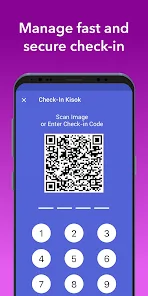
Simplify attendance management with brightwheel's intuitive tracking system. Caregivers can easily check in and out children, ensuring accurate records and providing peace of mind for parents. This feature not only streamlines the process but also enhances safety and accountability.

Billing & Payments

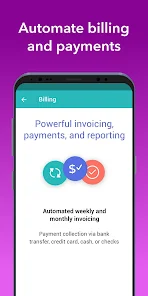
Effortlessly manage billing and payments through the app’s integrated system. Parents can receive invoices, make payments, and track transaction history all in one place, eliminating confusion and ensuring timely payments. This feature makes financial management smoother for both parents and childcare providers.

Learning & Development Tools

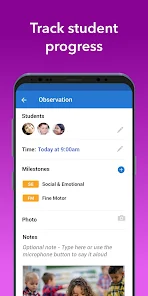
Brightwheel offers a suite of learning and development tools designed to support children's growth. Caregivers can track milestones and share educational resources with parents, fostering a collaborative approach to early childhood development. This feature empowers parents to be active participants in their child's learning journey.

Real-Time Updates

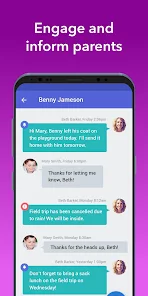
Stay connected with your child's daily activities through real-time updates. Brightwheel allows caregivers to share photos, videos, and notes, keeping parents informed and engaged in their child's early learning experience. It's like having a window into your child's day, no matter where you are.

Pros & Cons

Pros
  • Streamlines communication between parents and caregivers
  • Enhances child development tracking and reporting
  • Simplifies billing and payment processes for families
  • Promotes engagement with daily updates and photos
  • Facilitates easy enrollment and management of children
Cons
  • Limited offline functionality for remote areas
  • Higher subscription costs for small centers
  • User interface can be confusing for new users
  • Lacks features for older children’s activities

Real Experience Using brightwheel: Childcare App

Application Scenarios

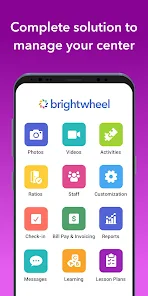
Brightwheel is designed primarily for childcare centers, preschools, and daycare providers, making it an essential tool for managing daily operations. In busy environments, staff can utilize the app to track attendance, manage meal plans, and communicate with parents seamlessly. For instance, teachers can log daily activities and milestones, allowing parents to stay informed about their child's progress throughout the day. Event planning is also simplified; centers can schedule activities, send reminders to parents, and even share photos of special moments, making it an invaluable resource for enhancing parent-teacher communication.

User Experience

The user experience of Brightwheel is intuitive and user-friendly. Both educators and parents find the interface straightforward, making it easy to navigate through various features. The app’s dashboard provides a quick overview of daily activities, child updates, and communication threads, which helps users stay organized. Notifications are prompt, ensuring that parents receive timely updates about their child, whether it’s a photo from art class or a note about diaper changes. Additionally, the app supports multiple languages, which is a great feature for diverse communities. Overall, users appreciate the efficiency and clarity that Brightwheel brings to their daily routines, reducing stress and enhancing engagement between caregivers and parents.

Pricing

Brightwheel offers a tiered pricing structure, catering to various needs and budgets. The basic plan is affordable and includes essential features for small centers or family childcare providers. As the childcare center grows, users can upgrade to more comprehensive plans that offer advanced features like custom reporting, attendance tracking, and expanded parent communication options. While some may find the pricing a bit steep compared to traditional methods, many users agree that the benefits in productivity and communication justify the investment. Brightwheel also provides a free trial, allowing potential users to explore its features before committing financially.

Updates & Support

Brightwheel is consistently updated with new features and enhancements based on user feedback. The development team is responsive to suggestions, ensuring that the app evolves to meet the changing needs of childcare providers. Users can access a robust support system, which includes a comprehensive help center, video tutorials, and responsive customer service via chat or email. This level of support is crucial for ensuring that users can maximize the app’s potential without encountering significant barriers. Regular updates not only improve functionality but also enhance security, ensuring that sensitive information remains protected.

verified Security & Privacy Review

The brightwheel app prioritizes user security and privacy, implementing robust measures to protect sensitive information. The platform employs encryption protocols for data transmission, ensuring that all communications between users and the application remain secure. Additionally, brightwheel adheres to strict data protection regulations, which enhances user trust and confidence in their services. In terms of permissions, the app requires only essential access to function effectively. This includes permissions for notifications and, where applicable, camera access for capturing moments in the classroom. Importantly, brightwheel clearly outlines what data is collected, how it is used, and who it is shared with, fostering transparency. User data is handled with care, and the app allows users to manage their privacy settings easily. Parents can control their visibility and the information shared with teachers and other users. Overall, brightwheel demonstrates a strong commitment to maintaining user privacy and safeguarding personal data, making it a reliable choice for childcare management.

Reviews

4.7

“User-friendly interface makes childcare management easy!”

“Great communication tool between parents and teachers.”

“Keeps me updated on my child's daily activities.”

“Helpful features for tracking developmental milestones.”

“Reliable support team for troubleshooting issues.”

Editor's Choice