This site uses cookies to enhance your user experience. By clicking any link on this site you are giving your consent to our cookie policy. Read more
Reject
Accept All
BlueDriver OBD2 Scan Tool

BlueDriver OBD2 Scan Tool

verified Verified App

Developer: Lemur Vehicle Monitors

  • category

    Category: Auto & Vehicles

  • price

    Price: free

  • age rating

    Age Rating: Everyone

  • rating

    Rating: 3.8

  • download

    Downloads: 1,000,000+

  • version

    Version: 8.5.1

Screenshot 1
Screenshot 2
Screenshot 3
Screenshot 4
Screenshot 5
Screenshot 6

Features & Highlights

Comprehensive Diagnostics

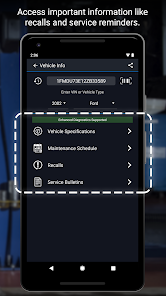
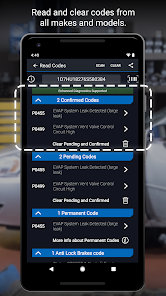
With BlueDriver, you can perform advanced diagnostics that go beyond basic trouble codes. The tool can read and clear codes from all major systems, including the engine, transmission, and ABS, providing a thorough overview of your vehicle's condition and potential issues.

Live Data Streaming

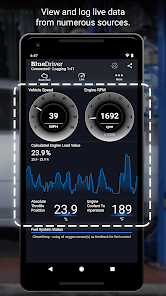
BlueDriver offers real-time data streaming, allowing users to monitor their vehicle's performance while driving. This feature provides insights into various parameters like engine RPM, coolant temperature, and more, helping you make informed decisions about your vehicle's health on the go.

Repair Reports

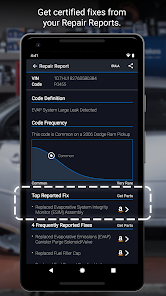
One of the standout features of BlueDriver is its ability to generate detailed repair reports based on the trouble codes detected. These reports include potential causes and suggested fixes, making it easier for you to address issues or communicate effectively with your mechanic.

User-Friendly Interface

The BlueDriver app boasts a simple and intuitive interface that makes it easy for users of all skill levels to navigate. With clear visuals and step-by-step instructions, you can quickly understand your vehicle's status and take action without feeling overwhelmed.

Pros & Cons

Pros
  • Instantly reads and clears diagnostic trouble codes
  • User-friendly app with intuitive interface
  • Real-time data monitoring for vehicle performance
  • Regular updates ensure accurate and current information
  • Compatible with a wide range of vehicles
Cons
  • Limited functionality for advanced diagnostics
  • Requires smartphone for operation
  • Subscription needed for some features
  • May not support all vehicle models

Real Experience Using BlueDriver OBD2 Scan Tool

Application Scenarios

The BlueDriver OBD2 Scan Tool is exceptionally versatile, making it suitable for a variety of application scenarios. Whether you are a DIY enthusiast looking to diagnose your vehicle's issues or a professional mechanic wanting a reliable tool, BlueDriver fits the bill. Users can utilize the app to check the status of their vehicle’s engine, read and clear diagnostic trouble codes (DTCs), and monitor real-time engine data. It's particularly useful for those who frequently encounter check engine lights, as it provides detailed explanations of the error codes, helping users understand the underlying issues. Furthermore, the app can assist in pre-purchase inspections, allowing potential buyers to assess the health of a vehicle before committing to a purchase.

User Experience

The user experience with BlueDriver is largely positive, as the app is designed with an intuitive interface that makes navigation straightforward. Users appreciate the clear layout and easy access to features, such as live data tracking and the ability to generate repair reports. The integration with the BlueDriver hardware is seamless, with quick connections and reliable data transmission. Many users have noted that the app not only helps in troubleshooting but also educates them about their vehicles, thanks to the detailed information and explanations provided. Community feedback highlights that the app’s ability to display manufacturer-specific codes is a standout feature, making it an invaluable tool for those who want comprehensive diagnostics.

Pricing

BlueDriver operates on a one-time purchase model, which many users find attractive compared to subscription-based services. The hardware, which includes the OBD2 Bluetooth adapter, is reasonably priced considering the breadth of features it offers. While some users may initially be hesitant about the upfront cost, the absence of ongoing fees makes it economically viable for long-term use. Additionally, users often report that the savings from doing their own diagnostics and repairs can quickly offset the initial investment, further enhancing the app's value proposition.

Updates & Support

BlueDriver is committed to providing regular updates, ensuring that users have access to the latest enhancements and bug fixes. The app benefits from a well-maintained support system, with a dedicated team available to assist users with any issues they encounter. The FAQs and troubleshooting guides on the website are also comprehensive, helping users resolve common problems independently. Many users commend the company for their responsiveness and willingness to listen to feedback, which contributes to the app's continuous improvement. Overall, the combination of regular updates and excellent customer support enhances the overall user experience, making BlueDriver a reliable companion for vehicle diagnostics.

verified Security & Privacy Review

The BlueDriver OBD2 Scan Tool app takes user security and privacy seriously, implementing several measures to protect personal information. The app requires minimal permissions, primarily accessing Bluetooth and location services to connect with OBD2 devices and enhance functionality. This limited access helps mitigate potential vulnerabilities. Data collected by the app is primarily related to vehicle diagnostics and performance, which is essential for its core functionality. BlueDriver does not request unnecessary personal information, such as social media accounts or location data beyond what is needed for device operation. Users can feel confident knowing that their data is not shared with third parties for marketing purposes. The app employs encryption protocols to safeguard data transmission between the device and the mobile app, ensuring that sensitive information remains secure. Users are encouraged to review the privacy policy for a comprehensive understanding of data handling practices. Overall, BlueDriver demonstrates a commitment to maintaining user privacy and securing sensitive information effectively while delivering a valuable diagnostic tool.

Reviews

3.8

“Accurate diagnostics and easy to use.”

“Great value for money.”

“User-friendly interface and features.”

“Helpful for DIY car repairs.”

“Fast updates and reliable performance.”

Editor's Choice