This site uses cookies to enhance your user experience. By clicking any link on this site you are giving your consent to our cookie policy. Read more
Reject
Accept All

Advertiser and Editorial Disclosures

Audacy: Radio & Sports Talk

Audacy: Radio & Sports Talk

verified Verified App

Developer: Audacy, Inc.

  • category

    Category: Music & Audio

  • price

    Price: free

  • age rating

    Age Rating: Teen

  • rating

    Rating: 3.2

  • download

    Downloads: 5,000,000+

  • version

    Version: 2025.12.1

Screenshot 1
Screenshot 2
Screenshot 3
Screenshot 4
Screenshot 5
Screenshot 6
Screenshot 7
Screenshot 8
Screenshot 9
Screenshot 10
Screenshot 11
Screenshot 12
Screenshot 13
Screenshot 14
Screenshot 15
Screenshot 16
Screenshot 17
Screenshot 18

Features & Highlights

Live Radio Streaming

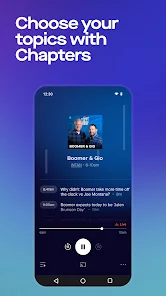
Experience the thrill of live radio with Audacy, offering a vast array of stations across various genres. Whether you're into music, news, or sports talk, you can easily tune in to your favorite shows and discover new ones in real time, anytime and anywhere.

Local and National Coverage

Stay connected with both local news and national stories through Audacy's extensive coverage. The app provides a blend of regional updates and broader discussions, ensuring you never miss important events or developments, whether they're happening in your city or across the country.

On-Demand Podcasts

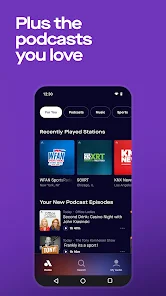
Audacy brings you a diverse selection of on-demand podcasts, allowing you to catch up on your favorite topics at your convenience. From intriguing interviews to in-depth discussions, you can enjoy content that fits your schedule and interests, making it easy to stay informed and entertained.

Personalized Recommendations

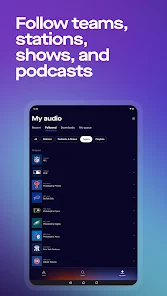
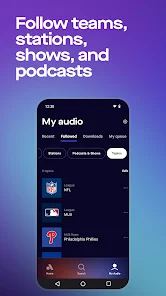
With Audacy, you can enjoy a tailored experience thanks to its smart recommendation system. Based on your listening habits and preferences, the app suggests stations and podcasts that you’re likely to love, helping you discover fresh content that resonates with you.

Pros & Cons

Pros
  • Access a wide variety of live radio stations and podcasts.
  • Enjoy seamless streaming of your favorite sports talk shows.
  • Customize your listening experience with personalized playlists and recommendations.
  • Stay updated with real-time sports news and commentary.
  • Discover exclusive interviews and in-depth analysis from industry experts.
Cons
  • Limited offline access restricts listening options during travel.
  • User interface can be confusing for new users.
  • Some content may be region-restricted, limiting variety.

Real Experience Using Audacy: Radio & Sports Talk

Application Scenarios

The Audacy app serves as a versatile platform for a variety of listening scenarios. Whether you are commuting to work, exercising at the gym, or relaxing at home, this app caters to all your radio and sports talk needs. Users can easily tune into live radio broadcasts, stream on-demand podcasts, or explore exclusive sports content. The app is particularly beneficial for sports enthusiasts, allowing them to stay updated with live game commentary, analysis, and interviews. Moreover, the app's user-friendly interface makes it simple to switch between different channels or genres, ensuring that you can find the perfect audio companion for every moment.

User Experience

The user experience on Audacy is designed to be both intuitive and engaging. Upon opening the app, users are greeted with a sleek interface that prioritizes ease of navigation. With an extensive library of radio stations and podcasts, finding your preferred content is a breeze. The search function allows for quick access to specific shows or genres, while personalized recommendations enhance the listening experience based on individual preferences. Additionally, the app supports background play, enabling users to multitask without interruptions. Social sharing features further enhance the experience, allowing listeners to share their favorite shows with friends and family effortlessly. Overall, the app's seamless integration of various audio formats makes it a go-to choice for anyone looking to immerse themselves in radio and sports talk.

Pricing

Audacy is available for free, allowing users to access a wide range of content without any upfront costs. However, for those seeking an ad-free experience or exclusive content, there are premium subscription options available. These subscriptions unlock additional features, including enhanced audio quality and access to exclusive live events or shows. The pricing is competitive and offers great value considering the extensive library and premium content provided. This flexibility allows users to choose the level of engagement that best fits their needs, whether they prefer the free version or the enhanced premium experience.

Updates & Support

Audacy regularly updates its app to enhance functionality and user experience, ensuring that listeners have access to the latest features and improvements. Users can expect periodic updates that address bugs and introduce new content, keeping the platform fresh and engaging. The support team is also readily available, offering assistance through various channels, including FAQs, in-app support, and social media. User feedback is actively sought and incorporated into future updates, demonstrating the app's commitment to continuous improvement. This focus on user satisfaction ensures that Audacy remains a leader in the online radio and sports talk space.

verified Security & Privacy Review

Audacy: Radio & Sports Talk prioritizes user security and privacy, implementing a variety of measures to protect personal information. The app collects essential data such as location and listening preferences to enhance user experience, but users have control over what information they share. Audacy clearly outlines its data collection practices in its privacy policy, ensuring transparency. Permissions required by the app are generally standard, focusing on location access for personalized content delivery. Users can modify these permissions within their device settings, allowing for greater control over their privacy. Audacy employs encryption protocols to safeguard user data during transmission, reducing the risk of unauthorized access. Furthermore, the app does not sell personal data to third parties, reinforcing its commitment to user privacy. Regular updates and security patches ensure that the app remains resilient against potential threats. Overall, Audacy demonstrates a responsible approach to handling user data while providing a rich listening experience.

Reviews

3.2

“Great variety of stations and shows available!”

“User-friendly interface, easy to navigate.”

“Live sports coverage is fantastic and timely.”

“Occasional ads disrupt the listening experience.”

“Love the personalized playlists and recommendations!”

FAQ

1

Can I submit suggestions or feedback to Audacy: Radio & Sports Talk?

Yes, users can submit suggestions or feedback through the app's support or contact features.

2

Does Audacy: Radio & Sports Talk collect my personal data?

Yes, the app collects personal data to enhance user experience and for advertising purposes, but it adheres to privacy policies to protect users' information.

3

Does Audacy: Radio & Sports Talk support offline use?

Yes, users can download select content for offline listening within the app.

4

How do I cancel my Audacy: Radio & Sports Talk subscription?

Users can cancel their subscription through the account settings within the app or through the app store where they originally subscribed.

5

How much does a subscription to Audacy: Radio & Sports Talk cost?

Subscription costs may vary based on the plan chosen, but the app often provides options for monthly or annual subscriptions.

How to use Audacy: Radio & Sports Talk

1

Can I change my customer number?

Unfortunately, customer numbers cannot be changed. Please contact customer service for further assistance.

2

How can I contact customer service for Audacy?

You can reach Audacy customer service by visiting our website and using the support section.

3

How do I log in to my Audacy account?

To log in, simply open the app or website, enter your email and password, and click the login button.

4

How do I reach customer service if I have account issues?

You can contact customer service via our support page, where you'll find options for live chat, email, or phone support.

5

How do I update my account details after logging in?

Once logged in, go to the account settings section to update your personal information.

Editor's Choice