This site uses cookies to enhance your user experience. By clicking any link on this site you are giving your consent to our cookie policy. Read more
Reject
Accept All
Android Auto

Android Auto

verified Verified App

Developer: Google LLC

  • category

    Category: Auto & Vehicles

  • price

    Price: free

  • age rating

    Age Rating: Everyone

  • rating

    Rating: 4.1

  • download

    Downloads: 10,000,000,000+

  • version

    Version: /

Screenshot 1
Screenshot 2
Screenshot 3
Screenshot 4
Screenshot 5
Screenshot 6

Features & Highlights

Entertainment Hub

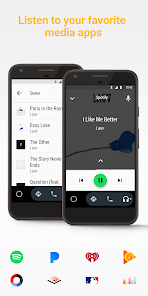
Transform your car into an entertainment hub with Android Auto's access to music and podcast apps. Whether you're in the mood for your favorite playlist or want to catch up on a podcast, this feature allows you to easily browse and control your audio options, enhancing your driving experience.

Navigation Assistance

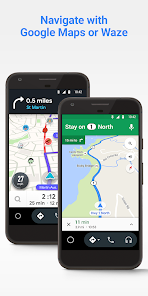
Android Auto offers real-time navigation with Google Maps and other compatible apps, providing you with turn-by-turn directions and traffic updates. This feature not only helps you find the quickest routes but also assists in avoiding delays, making your journeys smoother and less stressful.

Smartphone Integration

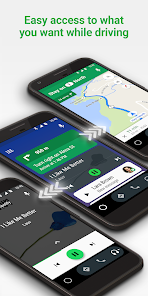
Android Auto seamlessly connects your smartphone to your car's display, allowing you to access apps, navigation, and music with ease. This integration ensures that you can enjoy your favorite features while keeping your focus on the road, making every drive more enjoyable and efficient.

Voice Commands

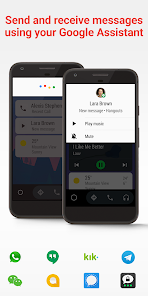
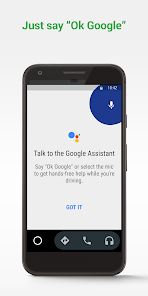
With built-in voice commands, Android Auto lets you control your apps hands-free, ensuring a safer driving experience. Simply say what you want, whether it's to navigate, make a call, or send a message, and Android Auto takes care of the rest, letting you keep your hands on the wheel.

Pros & Cons

Pros
  • Seamless smartphone integration for easy access
  • Voice commands for hands-free control and safety
  • User-friendly interface for quick navigation
  • Access to apps for music, navigation, and messaging
  • Regular updates improve performance and features over time
Cons
  • Limited app compatibility restricts user choices.
  • Connectivity issues can disrupt navigation and audio.
  • Interface can be confusing for new users.
  • Frequent updates may require constant attention.

Real Experience Using Android Auto

Application Scenarios

Android Auto is designed to enhance the driving experience by seamlessly integrating your smartphone with your vehicle's infotainment system. It excels in various scenarios, such as during long road trips, daily commutes, or even casual drives around town. Users can access navigation apps like Google Maps or Waze for real-time traffic updates and turn-by-turn directions, ensuring they reach their destinations efficiently. Additionally, Android Auto allows drivers to listen to their favorite music or podcasts through popular streaming services like Spotify or Google Play Music, making it a versatile companion for entertainment on the road. For those who rely heavily on communication, the app facilitates hands-free calls and text messaging, allowing drivers to stay connected without compromising safety.

User Experience

The user experience of Android Auto is largely positive, thanks to its intuitive interface and voice command capabilities. The app's layout is designed for easy navigation, with large icons and clear menus that minimize distractions while driving. Voice commands enhance the experience, enabling users to make calls, send messages, or change music tracks with simple voice prompts. Many users appreciate the customization options, allowing them to prioritize their preferred apps and features. However, some have reported occasional connectivity issues, particularly when switching between different devices or vehicles. Overall, Android Auto offers a significant improvement over traditional car interfaces, providing a safer and more connected driving experience.

Pricing

Android Auto is a free application, making it accessible to anyone with a compatible Android smartphone. Users do not need to pay for the app itself, but they may incur data charges from their mobile carrier when using data-intensive features such as streaming music or navigation. For those who want to maximize their experience, certain third-party applications available through the Google Play Store may require a purchase or subscription, but these are optional. Overall, the cost-effectiveness of Android Auto makes it an attractive option for drivers looking to enhance their in-car technology without breaking the bank.

Updates & Support

Google consistently updates Android Auto to improve performance and add new features, ensuring users have access to the latest technology and enhancements. The support system is robust, with a dedicated help center that provides troubleshooting tips and user guides. Users can also find community forums where they can share experiences and solutions with other Android Auto users. Despite occasional bugs or glitches, users generally report that updates are rolled out swiftly, addressing issues and introducing new functionalities regularly. This commitment to support and continuous improvement contributes to an overall favorable view of Android Auto among its user base.

verified Security & Privacy Review

The Android Auto app prioritizes user security and privacy through robust data protection measures. When users connect their devices, the app requires certain permissions to function optimally, including access to location, contact lists, and messaging services. These permissions are essential for providing a seamless driving experience, such as navigation and hands-free communication. Android Auto adheres to strict privacy practices, ensuring that personal data is encrypted during transmission. Google emphasizes that user data is not sold to third parties, reinforcing their commitment to privacy. Users have control over their data, with options to manage permissions and access to personal information within the app settings. Additionally, Android Auto complies with industry standards for security, regularly updating its software to address any vulnerabilities. Users are encouraged to keep the app and their devices updated to benefit from the latest security enhancements. Overall, Android Auto demonstrates a commitment to protecting user privacy while delivering a convenient driving experience.

Reviews

4.1

“Easy to use and navigate while driving.”

“Voice commands work perfectly for hands-free control.”

“Frequent connectivity issues and crashes are frustrating.”

“Customizable interface enhances my driving experience.”

“Great app for managing music and calls seamlessly.”

Editor's Choice