This site uses cookies to enhance your user experience. By clicking any link on this site you are giving your consent to our cookie policy. Read more
Reject
Accept All

Advertiser and Editorial Disclosures

Western Union Money Transfer

Western Union Money Transfer

verified Verified App

Developer: Western Union Apps

  • category

    Category: Finance

  • price

    Price: Share

  • age rating

    Age Rating: Everyone

  • rating

    Rating: 4.5

  • download

    Downloads: 10,000,000+

  • version

    Version: 12.6

Screenshot 1
Screenshot 2
Screenshot 3
Screenshot 4
Screenshot 5
Screenshot 6
Screenshot 7
Screenshot 8
Screenshot 9
Screenshot 10
Screenshot 11
Screenshot 12
Screenshot 13
Screenshot 14
Screenshot 15
Screenshot 16
Screenshot 17
Screenshot 18
Screenshot 19
Screenshot 20
Screenshot 21

Features & Highlights

Fast Transfers

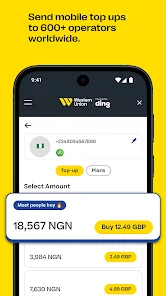
Western Union Money Transfer offers quick and efficient money transfers, enabling users to send funds almost instantly to recipients worldwide. Whether you're sending cash or bank deposits, the service ensures that your loved ones receive their money without unnecessary delays, making it a reliable option for urgent needs.

Global Reach

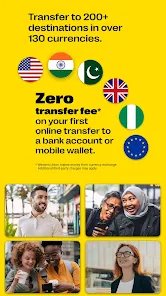
With a presence in over 200 countries and territories, Western Union makes it easy to send money across borders. Users can transfer funds in multiple currencies, ensuring that you can support friends and family no matter where they are located around the globe.

Multiple Payment Options

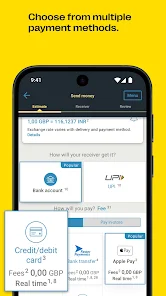
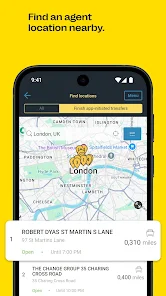
Western Union provides a variety of payment methods for added convenience. Whether you prefer using a debit or credit card, bank transfer, or cash at an agent location, users can choose the option that best suits their needs for seamless transactions.

User-Friendly Interface

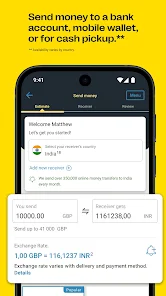
The Western Union app boasts a simple and intuitive design, making it easy for users to navigate through the money transfer process. With clear instructions and a straightforward layout, even first-time users can quickly and confidently send money to their desired destination.

Pros & Cons

Pros
  • Fast transfers to over 200 countries worldwide
  • Reliable service with decades of experience
  • Multiple payment options for convenience
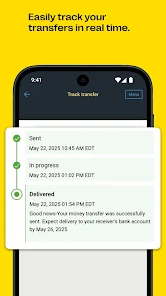
  • Easy tracking of your money transfers
  • Strong security measures to protect transactions
Cons
  • High fees for transfers and currency conversion
  • Limited availability in rural areas
  • Slower transfer times compared to competitors
  • Customer service can be unresponsive

Real Experience Using Western Union Money Transfer

Application Scenarios

The Western Union Money Transfer app is designed for a variety of financial needs, catering to both personal and business users. Users can send money to friends and family across the globe or make payments for goods and services. The app is particularly beneficial for expatriates looking to support their families back home, as well as for individuals who frequently travel or conduct business internationally. Its accessibility makes it easy to transfer funds in real-time or schedule transactions for future dates, depending on user preferences. Whether you need to send emergency funds or simply want to support loved ones, the app's versatility ensures that it can meet various financial scenarios.

User Experience

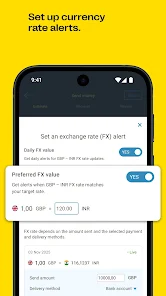
The user experience of the Western Union Money Transfer app is largely positive, with an intuitive interface that simplifies the money transfer process. Users can easily navigate through the app to set up their transfers, check exchange rates, and track the status of their transactions. The onboarding process is straightforward, requiring minimal information to get started. Additionally, users appreciate the security features that protect their financial information, including encryption and two-factor authentication. However, some users have reported occasional technical glitches, such as delays in transaction confirmations or issues with the app crashing. Overall, despite minor hiccups, the app's design and functionality make it user-friendly and efficient for most transactions.

Pricing

Western Union's pricing structure varies based on several factors, including the amount being sent, the destination country, and the payment method chosen. Users can opt for bank transfers, credit card payments, or cash pickups, each with different fee structures. Typically, sending money via a bank transfer tends to incur lower fees compared to credit card transactions. Additionally, exchange rates can also impact the total cost of sending money internationally. While some users find the fees competitive, others believe they can be on the higher side, especially for smaller transfers. Transparency in pricing is crucial, and the app provides a detailed breakdown of fees before finalizing a transaction, allowing users to make informed decisions.

Updates & Support

Western Union frequently updates its app to enhance user experience and security. Recent updates have focused on improving transaction speed and adding new features, such as enhanced tracking options and a more streamlined user interface. Customer support is available through multiple channels, including in-app chat, email, and phone support. Users have reported mixed experiences with customer service, with some praising the quick resolution of issues while others have expressed frustration over long wait times. Nonetheless, the commitment to regular updates and the availability of customer support are significant factors that contribute to the app's reliability and user satisfaction.

verified Security & Privacy Review

The Western Union Money Transfer app prioritizes user security and privacy, employing robust encryption protocols to safeguard personal and financial information. Transactions are secured with industry-standard SSL technology, ensuring that sensitive data is transmitted securely. The app also features two-factor authentication (2FA), adding an extra layer of protection against unauthorized access. Regarding privacy practices, Western Union adheres to strict data handling policies, complying with relevant regulations such as GDPR and CCPA. Users are informed about the types of data collected, including transaction history and location information, which is used to enhance service delivery and fraud prevention. Users have control over their data, with options to manage privacy settings within the app. The app requires certain permissions, such as access to location services for transaction verification and fraud detection. However, users can adjust these permissions based on their preferences, ensuring they maintain control over their data sharing. Overall, the Western Union Money Transfer app demonstrates a strong commitment to protecting user information while providing a convenient money transfer service.

Reviews

4.5

“Reliable service for quick international transfers”

“User-friendly app, easy to navigate”

“Great customer support, very helpful”

“Fees can be a bit high”

“Transfers are fast, but exchange rates vary”

Compare APP

FAQ

1

Does Western Union Money Transfer collect my personal data?

Yes, Western Union Money Transfer collects personal data such as your name, contact information, and financial details to facilitate transactions and comply with regulatory requirements.

2

Does Western Union Money Transfer offer a free trial or free version?

Western Union Money Transfer does not offer a free trial, but the app itself is free to download and use for money transfers, although fees may apply for certain transactions.

3

Does Western Union Money Transfer require an internet connection?

Yes, an internet connection is required to use the Western Union Money Transfer app for sending money, tracking transfers, and managing your account.

4

How can I contact support or send feedback for Western Union Money Transfer?

You can contact support through the app or visit the Western Union website to find customer service options, including live chat, email, and phone support.

5

How do I manage or cancel my Western Union Money Transfer subscription?

Since Western Union Money Transfer does not operate on a subscription model, there is no need to manage or cancel a subscription; you simply pay for each transaction as needed.

How to use Western Union Money Transfer

1

How can I contact Western Union customer service?

You can contact Western Union customer service by calling their support number or visiting their website for live chat options.

2

How do I log in to the Western Union Money Transfer app?

To log in, open the app, enter your registered email or phone number, and your password. Tap "Log In" to access your account.

3

Is there a way to activate my Western Union account?

Yes, you can activate your account by following the prompts in the app after downloading it, including verifying your identity and setting up a secure password.

4

What is the customer service number for Western Union?

The customer service number for Western Union varies by country. You can find the specific number on their official website under the "Contact Us" section.

Editor's Choice