This site uses cookies to enhance your user experience. By clicking any link on this site you are giving your consent to our cookie policy. Read more
Reject
Accept All

Advertiser and Editorial Disclosures

Citi Mobile®

Citi Mobile®

verified Verified App

Developer: Citibank N.A.

  • category

    Category: Finance

  • price

    Price: free

  • age rating

    Age Rating: Everyone

  • rating

    Rating: 4.8

  • download

    Downloads: 10,000,000+

  • version

    Version: 9.90.0

Screenshot 1
Screenshot 2
Screenshot 3
Screenshot 4
Screenshot 5
Screenshot 6
Screenshot 7

Features & Highlights

Easy Bill Payments

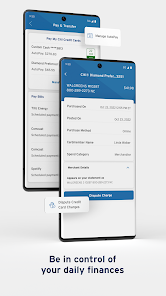
Say goodbye to late fees with the easy bill payment feature of Citi Mobile®. You can schedule, manage, and pay your bills directly through the app, making it a breeze to keep track of your payment due dates and ensuring you stay organized and in control of your expenses.

Instant Account Access

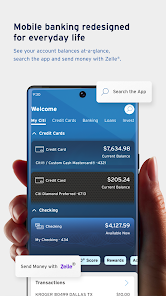
With Citi Mobile®, you can access your accounts anytime, anywhere. The app offers a user-friendly interface that makes it easy to view balances, transaction history, and account details, so you can stay on top of your finances with just a few taps.

Personal Finance Tools

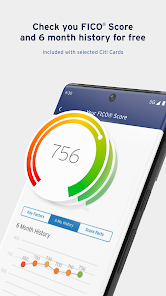
Citi Mobile® offers a suite of personal finance tools that help you budget and track your spending. From setting savings goals to monitoring your transaction trends, these features empower you to make informed financial decisions and achieve your financial objectives.

Secure Banking

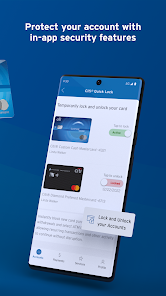
Citi Mobile® prioritizes your security with advanced encryption and multi-factor authentication, ensuring your personal and financial information is protected. You can bank confidently, knowing that your transactions are safe and secure, allowing you to focus on managing your finances without worry.

Pros & Cons

Pros
  • Access your accounts anytime, anywhere for ultimate convenience.
  • Enjoy seamless money transfers between accounts instantly.
  • Track your spending with detailed transaction insights for better budgeting.
  • Secure your finances with advanced biometric authentication features.
  • Receive real-time alerts to stay informed about your account activity.
Cons
  • Limited customization options may not suit all users' preferences
  • Some features may require a learning curve for new users
  • Occasional technical issues can hinder access to important transactions

Real Experience Using Citi Mobile®

Application Scenarios

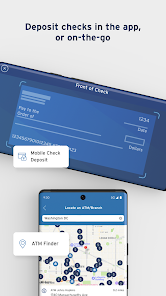
The Citi Mobile® app is designed to cater to a diverse range of banking needs, making it suitable for various scenarios. Whether you’re managing your daily finances, making payments, or tracking your investments, the app serves as a comprehensive tool. Users often find themselves using the app to pay bills on the go, transfer money between accounts, or even send funds to friends and family. The app's interface is particularly beneficial for users who travel frequently, allowing them to manage their accounts, check exchange rates, and even locate nearby ATMs without hassle. For those who enjoy budgeting, the app provides tracking features that help users monitor their spending habits and set financial goals. Overall, the Citi Mobile® app proves to be a reliable companion for both casual banking needs and more complex financial management tasks.

User Experience

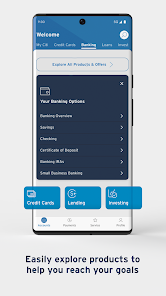
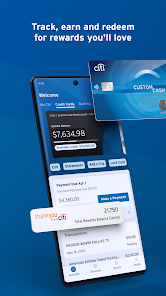
User experience is a cornerstone of the Citi Mobile® app, and it shines through its intuitive design and functionality. Upon launching the app, users are greeted with a clean, user-friendly interface that simplifies navigation. The dashboard provides quick access to essential features, such as account balances, transaction history, and recent activity. The app also boasts robust security features, including biometric login options, which enhance user confidence in performing transactions. Many users appreciate the seamless integration of various banking services, allowing them to switch between credit cards, loans, and investments with ease. However, some users have reported occasional glitches or slow loading times during peak hours. Overall, the app is designed to foster a positive user experience, encouraging users to engage more actively with their finances.

Pricing

Citi Mobile® is free to download and use for all Citi bank account holders. There are no monthly fees for accessing the app's features, which makes it an attractive option for those seeking a cost-effective banking solution. However, it’s important to note that while the app itself is free, standard bank fees may still apply for certain services, such as international wire transfers or overdraft charges. Users can benefit from the app’s features without incurring additional costs, provided they manage their accounts responsibly. This pricing structure allows users to maximize their banking experience without the burden of hidden fees, making it a budget-friendly choice for many.

Updates & Support

Citi Mobile® continuously evolves through regular updates that enhance functionality and address user feedback. The app frequently introduces new features, such as improved budgeting tools and enhanced security measures, ensuring users have access to the latest banking technology. Support is readily available through the app, with options for live chat, FAQs, and customer service contact details. Users can easily find assistance for any issues they encounter, from technical difficulties to questions about banking services. The responsiveness of the support team has received positive reviews, contributing to a sense of reliability. Overall, the commitment to updates and user support makes Citi Mobile® a strong contender in the mobile banking space.

verified Security & Privacy Review

The Citi Mobile® app prioritizes user security and privacy through a combination of advanced technology and strict data handling protocols. The app employs multi-factor authentication, ensuring that only authorized users can access their accounts. Additionally, data encryption is utilized during transmission and storage, safeguarding sensitive information from potential breaches. Citi Mobile® is transparent about its privacy practices, providing users with clear information regarding data collection and usage. The app collects personal information such as location, transaction history, and device details to enhance user experience and provide tailored services. However, users have control over permissions, allowing them to manage what data is shared. Furthermore, Citi implements regular security updates and monitoring to detect and address vulnerabilities promptly. Users are also encouraged to enable biometric login options, such as fingerprint or facial recognition, to enhance security. Overall, the Citi Mobile® app demonstrates a strong commitment to protecting user data and privacy while providing a convenient banking experience.

Reviews

4.8

“User-friendly interface makes banking easy and convenient”

“Quick transactions and real-time updates are very helpful”

“Love the budgeting tools for managing my finances”

“Customer support is responsive and knowledgeable”

“Frequent app crashes can be frustrating at times”

FAQ

1

Can I submit suggestions or feedback to Citi Mobile®?

Yes, users can submit suggestions or feedback through the app's support or contact features, helping to improve the overall experience.

2

Does Citi Mobile® collect my personal data?

Yes, Citi Mobile® collects personal data to provide services, enhance user experience, and ensure security; however, it adheres to privacy policies to protect user information.

3

Does Citi Mobile® support offline use?

Some features of Citi Mobile® can be accessed offline, but most functionalities require an internet connection for real-time updates and transactions.

4

How do I cancel my Citi Mobile® subscription?

Since Citi Mobile® does not require a subscription, there is no cancellation process; however, you can choose to uninstall the app at any time.

5

How much does a subscription to Citi Mobile® cost?

There is no subscription fee for using the Citi Mobile® app; it is free to use as long as you have an account with Citi.

How to use Citi Mobile®

1

Can I activate my account directly through the Citi Mobile® app?

Yes, you can activate your account by downloading the app and following the activation prompts using your customer number.

2

Can I log in to Citi Mobile® using my email instead of my customer number?

No, you must use your customer number to log in to the Citi Mobile® app for security reasons.

3

Can customer service assist me with issues regarding my Citi Mobile® app performance?

Yes, customer service can help troubleshoot any issues you experience with the Citi Mobile® app and provide solutions.

4

How can I contact customer service for assistance with my Citi Mobile® account?

You can reach customer service by calling the number listed on the back of your debit or credit card or through the app’s help section.

5

How do I activate my Citi Mobile® account after signing up?

To activate your account, download the app and follow the on-screen instructions. You may need your customer number and other personal information.

Editor's Choice