This site uses cookies to enhance your user experience. By clicking any link on this site you are giving your consent to our cookie policy. Read more
Reject
Accept All

Advertiser and Editorial Disclosures

Chime

Chime

verified Verified App

Developer: Chime

  • category

    Category: Finance

  • price

    Price: free

  • age rating

    Age Rating: Everyone

  • rating

    Rating: 4.8

  • download

    Downloads: 10,000,000+

  • version

    Version: 5.311.2

Screenshot 1
Screenshot 2
Screenshot 3
Screenshot 4
Screenshot 5
Screenshot 6
Screenshot 7
Screenshot 8

Features & Highlights

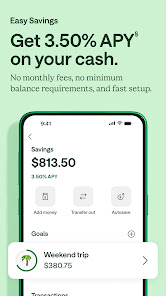
Automatic Savings

Chime makes saving effortless through its Automatic Savings feature, which allows users to round up their purchases to the nearest dollar and transfer the difference to a savings account. This simple yet effective approach helps users save money without even thinking about it, promoting a healthy financial habit.

Credit Builder Account

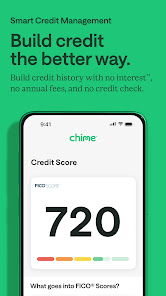
Chime offers a unique Credit Builder Account that allows users to establish or improve their credit score without the stress of high-interest rates. By using their own money to back a secured credit card, users can build credit responsibly while enjoying the benefits of financial flexibility.

Early Direct Deposit

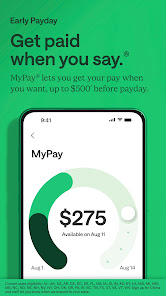
With Chime's Early Direct Deposit feature, you can access your paycheck up to two days earlier than traditional banks. This can be a game-changer for budgeting and managing expenses, giving you a head start on your financial plans and peace of mind knowing your funds are available sooner.

No Hidden Fees

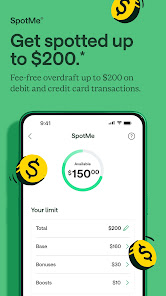
Chime stands out with its commitment to transparency, offering banking services without the burden of hidden fees. This means no overdraft charges, monthly maintenance fees, or minimum balance requirements, allowing users to manage their finances without unexpected costs getting in the way.

Pros & Cons

Pros
  • Chime offers no monthly fees, saving you extra money.
  • Enjoy early direct deposits for faster access to funds.
  • Access over 24,000 fee-free ATMs nationwide for convenience.
  • Receive instant transaction notifications to track your spending easily.
  • Benefit from automatic savings features to grow your money effortlessly.
Cons
  • Limited ATM access may incur fees outside the network.
  • Customer service response times can be slow.
  • Lack of physical branches makes in-person assistance difficult.

Real Experience Using Chime

Application Scenarios

Chime is designed primarily for individuals seeking a modern banking experience that emphasizes convenience and accessibility. Whether you’re a busy professional managing daily expenses, a student navigating financial independence, or someone looking to budget effectively, Chime caters to a wide range of users. The app is particularly beneficial for those who prefer digital banking solutions without the hassle of traditional banking visits. Users can easily deposit checks via their smartphones, set up direct deposits, and manage their spending through intuitive budgeting tools. Additionally, Chime’s automatic savings features allow users to effortlessly save money without the need for manual intervention, making it ideal for anyone looking to build their savings over time.

User Experience

The user interface of Chime is sleek and user-friendly, making navigation a breeze for both tech-savvy individuals and those less familiar with banking apps. Upon logging in, users are greeted with a clean dashboard displaying their account balances, recent transactions, and spending habits. The app’s design emphasizes simplicity, with features like round-up savings and customizable notifications that help users keep track of their financial goals. Feedback from users consistently highlights the app's reliability and speed, with minimal loading times and quick access to important features. Chime also provides a seamless onboarding process, allowing new users to set up their accounts in just a few minutes, which is particularly appealing for those who might feel overwhelmed by conventional banking procedures.

Pricing

Chime stands out in the digital banking space by offering its services with no monthly maintenance fees, no overdraft fees, and no minimum balance requirements. This makes it an attractive option for individuals looking to avoid hidden costs commonly associated with traditional banks. Users can also take advantage of Chime’s fee-free ATM access at thousands of ATMs across the country. While the app does not offer interest on checking accounts, Chime provides a competitive interest rate on savings accounts, allowing users to grow their savings without incurring costs. Overall, Chime’s transparent pricing model resonates with users who appreciate straightforward banking without unexpected charges.

Updates & Support

Chime is committed to continually improving its app through regular updates that enhance functionality and user experience. Users can expect timely bug fixes and feature enhancements aimed at addressing customer feedback. The support system is robust, offering a comprehensive FAQ section, live chat, and responsive customer service via email. This multi-channel approach ensures that users receive the help they need promptly, fostering a positive relationship between Chime and its customers. Overall, Chime’s dedication to updates and support contributes to a trustworthy banking experience, empowering users to manage their finances confidently.

verified Security & Privacy Review

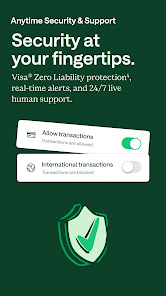
Chime takes user security and privacy seriously, implementing robust measures to protect sensitive information. The app employs bank-level encryption to secure data during transmission and storage, ensuring that personal and financial details are safeguarded against unauthorized access. In terms of privacy practices, Chime clearly outlines its data handling policies in its privacy policy, informing users about the types of information collected and how it is used. The app collects minimal personal data necessary for account creation and transaction processing, which helps in reducing the risk of data exposure. Chime also provides users with control over their privacy settings, allowing them to manage permissions related to notifications and location services. Importantly, the app does not sell user data to third parties, reinforcing its commitment to user privacy. Overall, Chime's security measures and transparent privacy practices make it a reliable choice for individuals seeking a secure digital banking experience.

Reviews

4.8

“User-friendly interface makes banking easy and convenient.”

“Great app for managing finances on the go.”

“No hidden fees, love the transparency.”

“Fast direct deposit is a game changer.”

“Customer service is responsive and helpful.”

FAQ

1

Can I submit suggestions or feedback to Chime?

Yes, Chime encourages user feedback and suggestions, which can typically be submitted through the app or their official website.

2

Does Chime collect my personal data?

Yes, Chime collects personal data to comply with financial regulations, provide services, and improve user experience. Users can review their privacy policy for details.

3

Does Chime support offline use?

Chime primarily requires an internet connection to access its features; however, you can view transaction history offline if it has been previously loaded.

4

How do I cancel my Chime subscription?

Since Chime does not require a subscription, users can simply stop using the app or close their account through the app settings or customer support.

5

How much does a subscription to Chime cost?

Chime does not have a subscription fee; it is free to use, although there may be fees for optional services like expedited transfers.

How to use Chime

1

How can I check the status of my account activation?

To check your account activation status, log in to the Chime app or contact customer service for help.

2

How can I contact Chime customer service?

You can reach Chime customer service through the in-app chat, by calling their support number, or visiting their website for more options.

3

How can I update my customer number with Chime?

To update your customer number, contact Chime customer service directly for assistance with your account details.

4

How do I activate my Chime account?

To activate your Chime account, simply follow the instructions in the email you received after signing up or use the app for guidance.

5

Is there a way to reach customer service if I can't log in?

Yes, you can contact customer service using their support number or visit their website for assistance, even without logging in.

Editor's Choice