This site uses cookies to enhance your user experience. By clicking any link on this site you are giving your consent to our cookie policy. Read more
Reject
Accept All

Advertiser and Editorial Disclosures

VyStar Mobile

VyStar Mobile

verified Verified App

Developer: VyStar Credit Union

  • category

    Category: Finance

  • price

    Price: free

  • age rating

    Age Rating: Everyone

  • rating

    Rating: 4.7

  • download

    Downloads: 100,000+

  • version

    Version: 2.5.246

Screenshot 1
Screenshot 2
Screenshot 3
Screenshot 4
Screenshot 5
Screenshot 6
Screenshot 7
Screenshot 8

Features & Highlights

Comprehensive Account Management

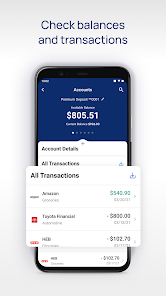
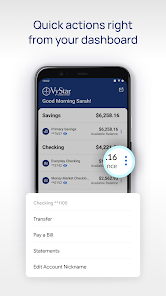
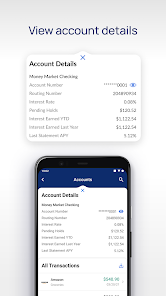
With VyStar Mobile, you can effortlessly monitor your account balances, track transactions, and manage your finances all in one place. The user-friendly interface ensures that you have all the information you need at your fingertips, making banking simpler than ever.

Custom Alerts & Notifications

Stay informed about your account activity with customizable alerts and notifications. From transaction updates to low balance warnings, VyStar Mobile keeps you in the loop, helping you make timely decisions and maintain control of your finances.

Seamless Fund Transfers

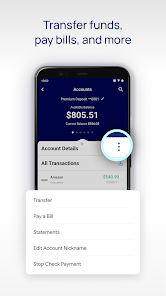
Easily send and receive money with VyStar Mobile's intuitive fund transfer capabilities. Whether you're paying a friend or setting up recurring payments, the process is quick, convenient, and hassle-free, making managing your finances a breeze.

Secure Mobile Banking

VyStar Mobile offers robust security features that protect your financial information with advanced encryption and multi-factor authentication. You can bank with peace of mind, knowing that your personal data is safeguarded against unauthorized access and potential threats.

Pros & Cons

Pros
  • User-friendly interface for easy navigation
  • 24/7 access to account information anytime
  • Secure transactions with advanced encryption technology
  • Instant notifications for account activities and updates
  • Seamless integration with other financial tools
Cons
  • Limited availability in certain geographic regions
  • Frequent app glitches and crashes reported
  • Customer support response times can be slow
  • Lack of advanced features compared to competitors

Real Experience Using VyStar Mobile

Application Scenarios

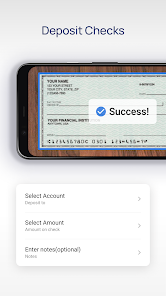
VyStar Mobile is designed to cater to a variety of banking needs for both personal and business users. Whether you need to check your account balances, transfer funds between accounts, or pay bills, the app provides a seamless interface that allows users to perform these tasks with ease. For individuals who are always on the go, VyStar Mobile becomes an indispensable tool for managing finances from anywhere. The app is particularly useful for those who prefer to avoid long lines at the bank, as it allows users to deposit checks using their mobile camera, access statements, and even locate nearby ATMs. Business users can also benefit from features like managing multiple accounts and tracking transactions, making it a versatile option for anyone looking to simplify their banking experience.

User Experience

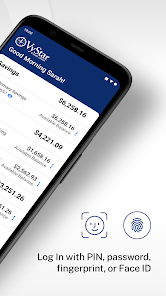
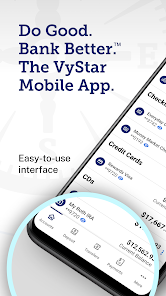
The user experience of VyStar Mobile stands out due to its intuitive design and user-friendly navigation. Upon opening the app, users are greeted with a clean layout that makes it easy to find essential features. The login process is secure yet straightforward, requiring only a few taps to gain access to accounts. The app’s performance is generally smooth, with quick loading times and minimal downtime. Users have reported that the mobile check deposit feature works efficiently, with clear instructions and a straightforward process. Additionally, the app supports biometric login options like fingerprint and facial recognition, which enhance security while improving convenience. Overall, the user experience is enhanced by responsive customer support options, ensuring that assistance is readily available if issues arise.

Pricing

VyStar Mobile operates under the umbrella of VyStar Credit Union, which means that most services are available to members at no additional cost. There are no monthly fees associated with using the app for standard banking activities, including transfers, bill payments, and mobile check deposits. However, users should be aware that certain features, such as wire transfers or specific loan applications, may incur fees depending on their account type and usage. This pricing model is advantageous for users looking for a comprehensive banking solution without the burden of excessive fees, making it an appealing choice among credit union services.

Updates & Support

Regular updates to VyStar Mobile ensure that users benefit from the latest features and security enhancements. The developers frequently roll out updates to improve functionality, fix bugs, and enhance the overall performance of the app. Users can easily access the latest version through their app store, ensuring they have the most secure and efficient tools at their fingertips. VyStar also offers robust customer support, available through in-app chat, phone support, and a detailed FAQ section on their website. This commitment to user satisfaction provides peace of mind, knowing that help is just a click or call away if any questions or issues arise.

verified Security & Privacy Review

VyStar Mobile prioritizes user security and privacy, employing robust measures to protect sensitive information. The app utilizes advanced encryption protocols to safeguard data during transmission and storage, ensuring that personal and financial details remain confidential. Users are required to set up multi-factor authentication, adding an extra layer of protection against unauthorized access. The app requests permissions that are essential for its functionality, such as access to the device's camera for check deposits and location services for branch and ATM locator features. VyStar Mobile is transparent about its data handling practices, clearly outlining its privacy policy, which details how user information is collected, used, and shared. Additionally, the app adheres to industry standards and regulations, reinforcing its commitment to user privacy. Regular security updates and vulnerability assessments are conducted to address potential threats. Overall, VyStar Mobile demonstrates a strong dedication to maintaining user trust through its comprehensive security and privacy framework.

Reviews

4.7

“User-friendly interface, easy navigation and functionality”

“Reliable app with fast transactions”

“Occasional bugs, but overall a solid experience”

“Great for checking balances and making transfers”

“Customer support is responsive and helpful”

FAQ

1

Does VyStar Mobile collect my personal data?

Yes, VyStar Mobile collects personal data necessary for account management and security purposes, but it adheres to strict privacy policies to protect your information.

2

Does VyStar Mobile offer a free trial or free version?

VyStar Mobile is a free app available to members of VyStar Credit Union, with no trial period or subscription fees required to use its basic features.

3

Does VyStar Mobile require an internet connection?

Yes, VyStar Mobile requires an internet connection to access your accounts and perform transactions. You can use either Wi-Fi or cellular data.

4

How can I contact support or send feedback for VyStar Mobile?

You can contact VyStar support through the app, visit their website for customer service options, or call their member services line for assistance and to provide feedback.

5

How do I manage or cancel my VyStar Mobile subscription?

Since VyStar Mobile does not involve a subscription model, there are no subscription management or cancellation steps required; simply uninstall the app if you no longer wish to use it.

How to use VyStar Mobile

1

How do I activate the VyStar Mobile app?

To activate the app, download it from your device's app store, then log in with your existing VyStar account credentials.

2

How do I contact Customer Service for the VyStar Mobile app?

You can reach VyStar Customer Service by calling 1-800-445-6289 or using the secure messaging feature within the app.

3

How do I log in to the VyStar Mobile app?

Open the app, enter your username and password, and tap "Log In." If you’re a new user, you may need to register first.

4

What is the Customer Number for VyStar?

Your Customer Number is typically found on your account statements or by logging into your online account. If you need assistance, contact Customer Service.

Editor's Choice