This site uses cookies to enhance your user experience. By clicking any link on this site you are giving your consent to our cookie policy. Read more
Reject
Accept All

Advertiser and Editorial Disclosures

Vrbo Owner

Vrbo Owner

verified Verified App

Developer: Vrbo

  • category

    Category: Travel & Local

  • price

    Price: free

  • age rating

    Age Rating: Everyone

  • rating

    Rating: 4.3

  • download

    Downloads: 1,000,000+

  • version

    Version: 2026.4.1

Screenshot 1
Screenshot 2
Screenshot 3
Screenshot 4
Screenshot 5
Screenshot 6
Screenshot 7
Screenshot 8
Screenshot 9
Screenshot 10
Screenshot 11
Screenshot 12
Screenshot 13
Screenshot 14
Screenshot 15
Screenshot 16
Screenshot 17
Screenshot 18
Screenshot 19
Screenshot 20
Screenshot 21
Screenshot 22
Screenshot 23
Screenshot 24

Features & Highlights

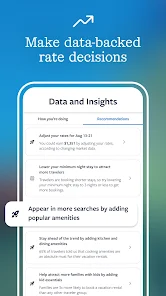
Detailed Analytics Tools

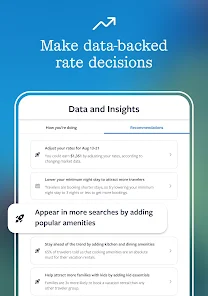
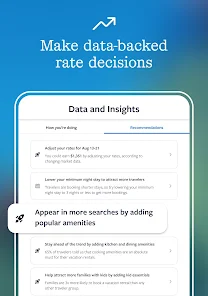
Gain valuable insights into your rental's performance with Vrbo Owner's comprehensive analytics tools. Track bookings, revenue, and guest demographics to make informed decisions and enhance your marketing strategies, ensuring your property stands out in a competitive market.

Easy Property Management

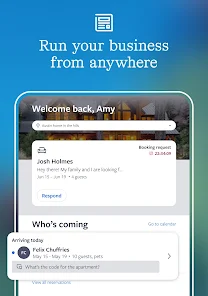
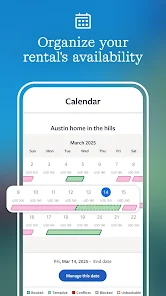
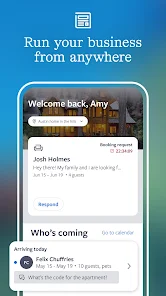
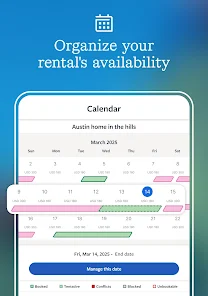
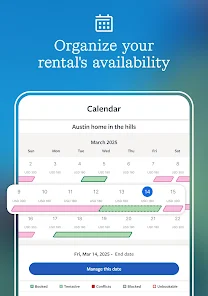
Vrbo Owner offers a user-friendly interface that simplifies property management for owners. You can easily list your vacation rental, manage bookings, and update availability all in one place, saving you time and effort while maximizing your property’s potential.

Flexible Pricing Options

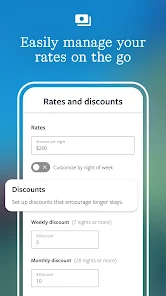
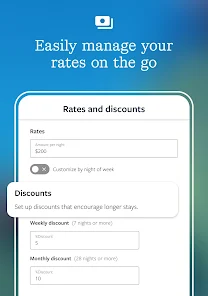
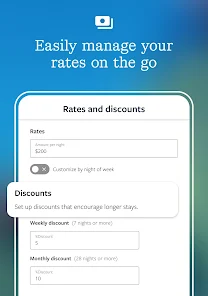
Vrbo Owner provides customizable pricing options to help you optimize your rental income. Adjust rates based on seasonality, demand, or special events, allowing you to attract more guests while maximizing your earnings throughout the year.

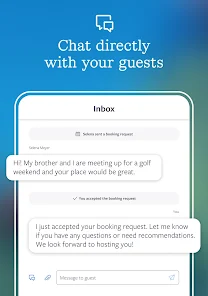
Seamless Guest Communication

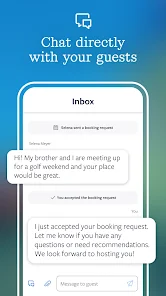
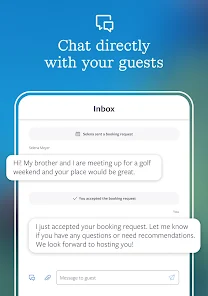
Stay connected with your guests through Vrbo Owner's integrated messaging system. This feature allows you to communicate effortlessly, answer inquiries, and provide essential information, helping you build rapport and ensure a smooth stay for your guests.

Pros & Cons

Pros
  • Maximize your rental income potential easily
  • User-friendly interface for seamless property management
  • Wide reach to millions of potential travelers
  • Flexible pricing options to suit your needs
  • Dedicated support services for owners available
Cons
  • High service fees can reduce owners' earnings.
  • Limited control over booking policies and pricing.
  • Customer service response times can be slow.
  • Competition with numerous listings can be challenging.

Real Experience Using Vrbo Owner

Application Scenarios

The Vrbo Owner app is designed specifically for property owners looking to manage their vacation rentals efficiently. This app is particularly useful in scenarios where owners need to oversee multiple listings across various locations. Whether you are a seasoned property manager or a first-time owner, the app provides a centralized platform to handle bookings, guest communications, and property maintenance. Users can respond to inquiries in real-time, manage calendars to avoid double bookings, and even adjust pricing based on seasonal demand or local events. The app is ideal for owners who want to maximize their rental income while minimizing the hassle associated with managing a property.

User Experience

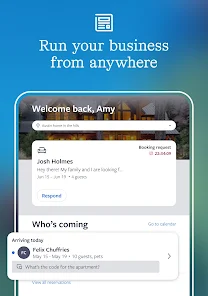
The user experience of the Vrbo Owner app is intuitive and user-friendly, making it accessible for individuals with varying levels of tech-savviness. The dashboard is well-organized, allowing users to navigate seamlessly between different features such as booking management, calendar synchronization, and guest messaging. The notification system keeps owners informed about new inquiries and booking requests, ensuring prompt responses. Additionally, the app offers a comprehensive analytics section, providing insights into occupancy rates and earnings. Users have reported that the ease of use and the straightforward design significantly enhance their overall experience, making property management less stressful and more efficient.

Pricing

Vrbo Owner operates on a commission-based pricing model, which means that owners only pay when they receive bookings through the platform. This flexible pricing structure can be advantageous for owners who are just starting and may not have a steady stream of guests. There are no upfront costs to list a property, allowing users to test the waters without financial commitment. However, it is essential for owners to familiarize themselves with the commission rates and any additional fees that might apply, such as payment processing charges. Overall, the cost-effectiveness of the Vrbo Owner app makes it a viable option for property owners looking to maximize their rental potential.

Updates & Support

Vrbo regularly updates the Owner app to introduce new features and enhance user experience. These updates often address user feedback and incorporate the latest trends in vacation rental management. The support system is robust, offering a comprehensive help center with FAQs, articles, and video tutorials to assist users in navigating the app. Additionally, Vrbo provides customer support through email and chat, ensuring that owners can resolve any issues they encounter promptly. The commitment to continuous improvement and user support has made the Vrbo Owner app a reliable tool for property management.

verified Security & Privacy Review

The Vrbo Owner app places a strong emphasis on security and privacy, ensuring that user data is handled with care. The app utilizes industry-standard encryption protocols to protect sensitive information, such as payment details and personal identification. This commitment to data security helps to safeguard users against potential breaches and unauthorized access. In terms of privacy practices, Vrbo Owner adheres to stringent data protection regulations, providing users with transparency regarding how their information is collected, used, and shared. Users are informed about their rights and can manage their privacy settings directly within the app. The app requests permissions that are necessary for its functionality, such as location access for listing properties and notifications for booking updates. Users have control over these permissions and can modify them according to their preferences. Overall, Vrbo Owner demonstrates a proactive approach to security and privacy, prioritizing user trust while providing a reliable platform for property management.

Reviews

4.3

“Great platform for renting out my property easily.”

“User-friendly interface makes managing bookings a breeze.”

“Responsive customer support resolves issues quickly.”

“Wide reach helps attract diverse guests.”

“Listing tools are effective for showcasing my home.”

FAQ

1

Does Vrbo Owner collect my personal data?

Yes, Vrbo Owner collects personal data to facilitate bookings, improve user experience, and provide customer support, but it adheres to privacy regulations and guidelines.

2

Does Vrbo Owner offer a free trial or free version?

Vrbo Owner does not offer a free version, but it may provide a trial period for new users to evaluate its features before committing to a subscription.

3

Does Vrbo Owner require an internet connection?

Yes, Vrbo Owner requires an internet connection to access features such as booking management and guest communication in real-time.

4

How can I contact support or send feedback for Vrbo Owner?

You can contact support through the Vrbo Owner app or website by accessing the help section, where you can submit inquiries or feedback directly to the customer service team.

5

How do I manage or cancel my Vrbo Owner subscription?

You can manage or cancel your Vrbo Owner subscription through the app or web portal by navigating to your account settings and following the cancellation instructions provided there.

How to use Vrbo Owner

1

Can I change my login email for the Vrbo Owner app?

Yes, you can change your login email in your account settings within the app under "Profile" and then "Email Address."

2

How do I activate my Vrbo Owner account?

To activate your account, click the activation link sent to your email after registration. Follow the prompts to complete the activation process.

3

How do I log in to the Vrbo Owner app?

To log in, open the app, enter your email and password, and tap "Log In." If you forget your password, use the "Forgot Password?

4

How do I update my payment information in the Vrbo Owner app?

To update your payment information, go to "Account Settings," then select "Payment Methods" and enter your new details.

5

Is there a way to contact customer service through the app?

Yes, you can contact customer service directly within the app by navigating to the "Help" section and selecting "Contact Us."

Editor's Choice