This site uses cookies to enhance your user experience. By clicking any link on this site you are giving your consent to our cookie policy. Read more
Reject
Accept All

Advertiser and Editorial Disclosures

U-verse

U-verse

verified

AT&T Services, Inc.

4.1
Rating
1,000,000+ Downloads
7.12.1 Version
  • category

    Category: Entertainment

  • price

    Price: free

  • age rating

    Age Rating: Teen

  • rating

    Rating: 4.1

  • available on

    Available on: /

  • updated on

    Updated on: Jun 1, 2026

Screenshot 1
Screenshot 2
Screenshot 3
Screenshot 4
Screenshot 5
Screenshot 6

Features & Highlights

Advanced DVR Features

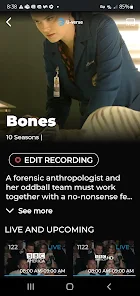
The U-verse DVR system allows you to record up to four shows simultaneously while watching another. With features like pause, rewind, and fast-forward, it offers unmatched control over your viewing experience, making it easy to catch up on missed episodes or binge-watch your favorite series.

Flexible TV Packages

U-verse provides customizable TV packages that let you choose channels based on your preferences. This flexibility empowers you to tailor your viewing experience, ensuring you only pay for what you actually want to watch, from sports to lifestyle programming and everything in between.

High-Speed Internet

U-verse offers lightning-fast internet speeds that cater to all your online activities, from streaming movies to online gaming. With reliable connectivity and minimal lag, you can enjoy seamless browsing and downloading, making it perfect for households with multiple devices connected at once.

On-Demand Content

With U-verse, you gain access to a vast library of on-demand movies and TV shows, allowing you to watch what you want, when you want. Whether it's the latest blockbuster or a classic series, the convenience of on-demand viewing ensures you never miss out on your favorite entertainment.

Pros & Cons

Pros
  • High-definition channels deliver stunning picture quality for an immersive viewing experience.
  • Reliable internet speeds ensure smooth streaming and gaming without interruptions.
  • Access to a vast library of on-demand content for endless entertainment options.
  • User-friendly interface makes navigating channels and features simple and intuitive.
  • Bundled services offer cost savings on TV, internet, and phone plans.
Cons
  • Limited availability in rural areas restricts service options for many customers.
  • Higher monthly costs compared to competitors can strain budgets.
  • Internet speeds may drop during peak usage times, affecting streaming quality.

Real Experience Using U-verse

Application Scenarios

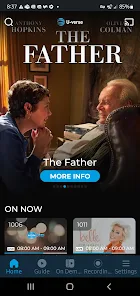
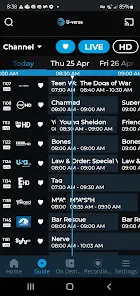
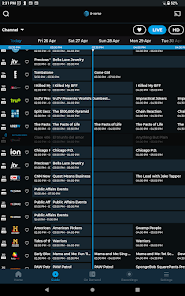
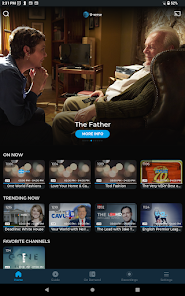
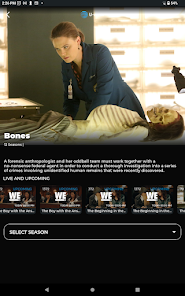
The U-verse app is designed to enhance your entertainment experience by allowing you to access live TV, on-demand content, and DVR recordings from your mobile device. It is particularly useful for users who are often on the go and want to catch up on their favorite shows while commuting or traveling. The app is also an excellent tool for families, as it enables multiple users to watch different programs simultaneously. Users can easily browse channels, search for specific shows or movies, and set recordings from anywhere, thus ensuring they never miss an episode. The app's integration with smart home devices adds another layer of convenience, making it a versatile option for various lifestyles.

User Experience

The user interface of the U-verse app is intuitive and user-friendly, making navigation a breeze for users of all ages. The layout is clean, with well-organized menus that allow for easy access to live TV, on-demand titles, and DVR settings. Users have reported that the app's streaming quality is generally high, with minimal buffering and clear visuals, provided they have a stable internet connection. The search functionality is robust, allowing users to filter results by genre, network, or airing time, which is a significant advantage for those with specific viewing preferences. Notifications for upcoming shows and reminders for recordings enhance the overall user experience, ensuring that users are always informed about their viewing options.

Pricing

Updates & Support The U-verse app is regularly updated to improve performance and introduce new features, reflecting the company’s commitment to providing an optimal user experience. Users can expect periodic enhancements, including bug fixes and interface improvements. Support options are readily available through the app, with access to FAQs, troubleshooting guides, and customer service contact details. The responsiveness of the support team has been noted positively by users, who appreciate timely assistance for any issues encountered. Overall, the combination of regular updates and reliable support contributes to a positive experience for U-verse app users.

verified Security & Privacy Review

The U-verse app prioritizes user security and privacy through robust data protection measures. It employs encryption protocols to safeguard personal information transmitted over the network, ensuring that user data remains confidential and secure from unauthorized access. The app requests various permissions, including access to device storage and location services. Users should carefully review these permissions during installation, as unnecessary access can lead to privacy concerns. U-verse is transparent about its data collection practices, informing users about the types of information gathered, such as account details and usage statistics. Moreover, U-verse adheres to industry standards for data handling and complies with relevant privacy regulations. Users can manage their privacy settings within the app, allowing them to control what data is shared and with whom. Regular updates are provided to address potential vulnerabilities, demonstrating the app's commitment to maintaining a secure environment for its users. Overall, U-verse takes significant steps to protect user data, making it a reliable choice for those concerned about security and privacy.

User Reviews

  • XoXo XoXo (Lori)
    2020/10/16

    App worked for 2 years then no longer connects to server via my tablet. It also would crash a lot or play video and live tv with constant buffering. When it works, it's great. I do wish that locked movies on demand were clearly marked. And I wish that I could watch recorded shows. It would be great too if I could adjust the volume of shows/movies. Doesn't work at all when casting via One Plus 6; can only view what is available but I can't watch anything.

  • Patricia Bodnar
    2023/12/07

    The U-verse app worked great for 2 years, and it suddenly stopped opening. It crashes and closes every time it tries to open. I've uninstalled, re-installed, power cycled my phone, cleared cache, and nothing helped. After several hours on the phone with AT&T troubleshooting, nothing helped. I did a factory reset, sure that it would solve the problem, but it didn't! The app still closes while it's trying to open. I've wasted many hours.

  • A Google user
    2019/04/01

    I have never had problems till recently and it's pissing me off. It's not only ridiculous that I'm forced to sign in now EVERY time I open the app (never used to), but it also shows none of my recordings saying, "you have no recorded programs at this time," yet underneath it says how I only have 39% recording space left, obviously showing I have plenty of recordings. So ya, it'd be nice to actually have them show up so I can WATCH THEM!!

  • A Google user
    2020/01/06

    It's so unreliable!!! It often says that the network is bad and won't load shows when I know the network is fine because I'm AT HOME! Oftentimes there's another error message that makes no sense because I'm somewhere that has great wifi and it should have great signal. The app also has issues with freezing... the sound continues but the picture is frozen. Then it'll start skipping! Ugh. There are days where it works perfectly fine, but you just never know! It's so frustrating.

  • Jack Singman
    2023/12/09

    App has get been getting weirder and weirder over the last year or so. Now with the most recent update, I'm also getting the issue where it just won't open. It starts to open and then crashes every time - uninstalled, reinstalled, cleared cache and data. Nothing helps. It appears AT&t just doesn't care about this service anymore at all. I'll be surprised if they actually fix this thing. I've been looking for a reason after 15 years to try other services and this may be the last straw.

Review Source: Google Play store public user reviews.

FAQ

1

Can I submit suggestions or feedback to U-verse?

Yes, users can submit suggestions and feedback through the app or by visiting the AT&T website's customer support section.

2

Does U-verse collect my personal data?

U-verse may collect personal data to improve user experience, but it is governed by their privacy policy which outlines what data is collected and how it is used.

3

Does U-verse support offline use?

Yes, U-verse allows users to download certain content for offline viewing, depending on licensing agreements.

4

How do I cancel my U-verse subscription?

You can cancel your U-verse subscription by contacting AT&T customer service or through your online account management portal.

5

How much does a subscription to U-verse cost?

Subscription costs for U-verse vary based on the chosen package and additional features, typically starting from a base monthly fee.

How to use U-verse

1

Can I get help with my U-verse installation?

Yes, for installation assistance, contact customer service or refer to the installation guide available on the AT&T website.

2

How can I activate my U-verse account?

You can activate your U-verse account online by logging in with your customer number and following the prompts on the activation page.

3

How can I contact customer service for U-verse?

You can reach U-verse customer service by calling the number on your bill or visiting the AT&T website for live chat support.

4

How can I find my customer number for U-verse?

Your customer number is located on your bill or can be found by logging into your online account.

5

How do I log in to my U-verse account?

To log in, visit the AT&T website and enter your user ID and password. If you need help, use the “Forgot Password” option.

What's New

Enhanced Security & minor bug fixes

Editor's Choice