This site uses cookies to enhance your user experience. By clicking any link on this site you are giving your consent to our cookie policy. Read more
Reject
Accept All
The Roku App (Official)

The Roku App (Official)

verified Verified App

Developer: Roku, Inc. & its affiliates

  • category

    Category: Entertainment

  • price

    Price: free

  • age rating

    Age Rating: Teen

  • rating

    Rating: 4.7

  • download

    Downloads: 50,000,000+

  • version

    Version: 13.4.0.7242945

Screenshot 1
Screenshot 2
Screenshot 3
Screenshot 4
Screenshot 5
Screenshot 6
Screenshot 7
Screenshot 8

Features & Highlights

Casting and Screen Mirroring

Easily cast photos, videos, and music from your device to your TV using the Roku App. Additionally, with screen mirroring capabilities, you can share your smartphone screen on the big screen, perfect for sharing memories or presentations with friends and family.

Channel Browsing

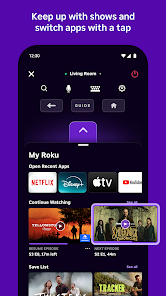
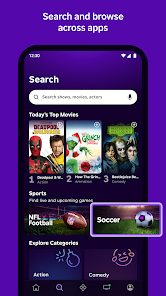
Explore a wide array of channels directly from the app. You can search for new content, browse categories, and even add channels to your Roku device with a few taps, ensuring you never miss out on the latest entertainment options.

Personalized Recommendations

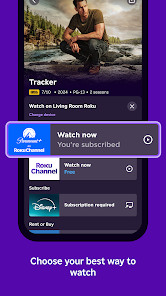
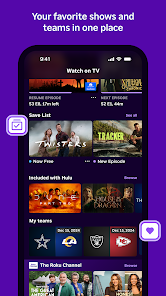
The app provides tailored recommendations based on your viewing habits and preferences. This makes discovering new shows and movies a breeze, allowing you to dive into content that truly piques your interest without endlessly scrolling.

Remote Control

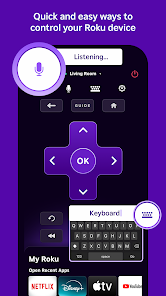
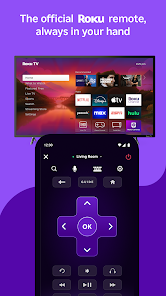
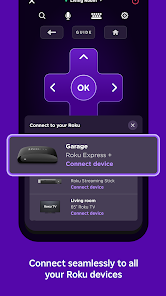
The Roku App transforms your smartphone into a convenient remote control for your Roku device. With a simple tap, you can navigate menus, adjust volume, and even use voice commands, making it easier than ever to find and enjoy your favorite shows and movies.

Pros & Cons

Pros
  • Control your Roku device from your smartphone easily
  • Stream content directly to your TV with a tap
  • Search for shows and movies using voice commands
  • Access a personalized channel lineup tailored for you
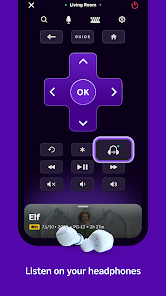
  • Use private listening for an immersive audio experience
Cons
  • Limited functionality compared to physical remotes
  • Frequent connectivity issues with devices
  • User interface can be confusing for newcomers
  • Some features require account sign-in to access

Real Experience Using The Roku App (Official)

Application Scenarios

The Roku App (Official) serves as a versatile companion for Roku device users, enhancing the overall streaming experience. One of the most common scenarios involves using the app as a remote control, particularly when the physical remote is misplaced or when users prefer the convenience of their smartphones. The app allows users to navigate through their Roku device seamlessly, offering features like voice search and keyboard input, which significantly improve the user experience. Additionally, the app facilitates content discovery by providing personalized recommendations based on viewing history, allowing users to curate their watchlist effectively. Another scenario is during travel; users can connect to their Roku devices from hotel Wi-Fi networks, ensuring they can access their favorite shows and movies regardless of location. Moreover, the app enables users to cast media from their mobile devices directly to the TV, making it ideal for sharing photos, videos, or music during gatherings.

User Experience

The user experience of The Roku App is generally smooth and intuitive. Upon opening the app, users are greeted with a clean interface that mirrors the Roku device's layout, making navigation familiar and easy. The setup process is straightforward, allowing users to link their phones to their Roku devices quickly. The remote control feature is responsive, and the addition of voice commands enhances usability, especially for those who prefer hands-free navigation. Users often appreciate the quick access to their favorite channels and the ability to search for content without scrolling through endless menus. However, some users have reported occasional connectivity issues, which can disrupt the experience. Overall, the app streamlines the streaming process, but users may encounter minor hiccups that could affect their enjoyment.

Pricing

The Roku App (Official) is free to download and use, making it an accessible tool for anyone with a Roku device. There are no hidden fees or subscription costs associated with the app itself, which is a major advantage for users looking to enhance their streaming experience without additional financial commitment. However, it's important to note that while the app is free, users may still need subscriptions to third-party services to access premium content. This means that while the app itself is budget-friendly, the overall streaming experience may incur costs depending on the channels or services the user chooses to subscribe to.

Updates & Support

The developers of The Roku App regularly release updates to improve functionality and address any bugs. These updates often introduce new features, enhance compatibility with the latest Roku devices, and refine the user interface for an even smoother experience. Users can expect frequent enhancements that keep the app in line with the evolving streaming landscape. Support is readily available through the app, with robust FAQs and troubleshooting guides designed to assist users in resolving common issues. Additionally, users can reach out via the official Roku support page for more complex inquiries. This proactive approach to updates and customer support significantly enhances user satisfaction, ensuring that help is never far away.

verified Security & Privacy Review

The Roku App prioritizes user security and privacy, implementing robust measures to protect personal information. The app requires permissions that are essential for its functionality, such as access to the device’s location and network connections. These permissions enable users to enjoy a seamless streaming experience, including personalized content recommendations and device management. Data handling practices are designed to align with industry standards, ensuring that user data is encrypted during transmission. Roku adheres to strict privacy policies that disclose how data is collected, used, and shared. Users are informed about the types of data collected, which may include viewing history and device information, and have the option to manage their privacy settings within the app. Furthermore, Roku allows users to opt-out of certain data collection practices, empowering them to maintain control over their information. Regular updates ensure that the app stays compliant with evolving security standards, providing users with peace of mind while they enjoy their streaming experience.

Reviews

4.7

“Easy to use and navigate, love the interface!”

“Great remote control functionality, very convenient.”

“Casting videos is seamless and fast.”

“Occasional connectivity issues, but overall reliable.”

“Helpful for managing channels and watching shows.”

Editor's Choice