This site uses cookies to enhance your user experience. By clicking any link on this site you are giving your consent to our cookie policy. Read more
Reject
Accept All

Advertiser and Editorial Disclosures

TUDN: TU Deportes Network

TUDN: TU Deportes Network

verified Verified App

Developer: Univision Communications Inc.

  • category

    Category: Sports

  • price

    Price: free

  • age rating

    Age Rating: 10+

  • rating

    Rating: 4.2

  • download

    Downloads: 5,000,000+

  • version

    Version: 20.0.4

Screenshot 1
Screenshot 2
Screenshot 3
Screenshot 4
Screenshot 5
Screenshot 6
Screenshot 7
Screenshot 8

Features & Highlights

Exclusive Content

Dive into exclusive interviews, behind-the-scenes footage, and expert analysis that you won't find anywhere else. TUDN provides a unique perspective on sports stories, making it a go-to destination for die-hard fans looking to deepen their connection with their favorite teams and athletes.

Interactive Features

TUDN enhances viewer engagement with interactive features such as polls, live chats, and social media integration. Fans can share their thoughts and connect with others in real time, creating a vibrant sports community that extends beyond the screen.

Live Sports Coverage

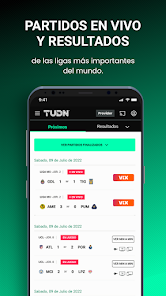
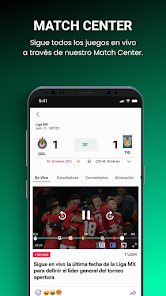
TUDN offers extensive live coverage of various sports, including soccer, football, and basketball, ensuring fans never miss a moment of their favorite games. With real-time updates and broadcasts, viewers can experience the excitement as it unfolds on the field or court.

Multilingual Access

Available in both English and Spanish, TUDN caters to a diverse audience, making it easy for fans to engage with the content in their preferred language. This accessibility fosters a broader community of sports enthusiasts, enriching the viewing experience for everyone.

Pros & Cons

Pros
  • Comprehensive coverage of Latin American sports events
  • Live broadcasts of popular soccer matches
  • Expert analysis from seasoned sports commentators
  • Access to exclusive interviews with top athletes
  • Engaging content for fans of all ages
Cons
  • Limited coverage of non-mainstream sports events
  • High subscription costs deter potential viewers
  • Inconsistent streaming quality affects user experience
  • Lack of diverse programming options for broader audiences

Real Experience Using TUDN: TU Deportes Network

Application Scenarios

The TUDN: TU Deportes Network app is designed for sports enthusiasts, particularly fans of Latin American sports. It serves as an all-in-one platform for live broadcasts, highlights, and up-to-date news on various sports, including soccer, basketball, and baseball. Users can tune in to live matches, catch exclusive interviews, and enjoy behind-the-scenes content that enhances their understanding and appreciation of the games. The app is particularly useful during major sporting events such as the FIFA World Cup, Copa América, and CONCACAF tournaments, providing real-time updates and notifications. Whether you’re at home, on your commute, or at a gathering with friends, the app allows you to stay connected with your favorite teams and players.

User Experience

The user experience of the TUDN app is generally praised for its intuitive layout and easy navigation. Upon opening the app, users are greeted with a clean interface that highlights the latest sports news, upcoming matches, and featured videos. The app’s ability to personalize content based on user preferences enhances engagement, as fans can quickly access information relevant to their favorite teams. Live streaming quality is commendable, with minimal buffering and clear visuals, making it easy to follow intense match moments. Additionally, the integration of social media features allows users to share content effortlessly, fostering a community of sports fans. However, some users have reported occasional glitches during peak usage times, which can detract from the overall experience.

Pricing

TUDN: TU Deportes Network operates on a free-to-download model, making it accessible for a wide audience. While the app offers a wealth of free content, users may encounter advertisements during live streams and video playback. For those seeking an ad-free experience, there may be options for in-app purchases or subscription plans, although specifics may vary based on current promotions or regional availability. This pricing structure allows casual viewers to enjoy essential features without a financial commitment while providing premium options for die-hard fans.

Updates & Support

The app receives regular updates aimed at enhancing functionality and user experience. These updates often include bug fixes, new features, and improvements to streaming quality. Users can easily access support through the app, with a dedicated help section that addresses common issues and provides troubleshooting tips. Customer service options, including email support and social media channels, are also available for more complex inquiries. The developers appear committed to responding to user feedback, making continuous improvements to cater to their audience's needs.

verified Security & Privacy Review

The TUDN: TU Deportes Network app prioritizes user security and privacy, implementing industry-standard measures to protect personal information. The app collects minimal user data, focusing on enhancing user experience while respecting privacy preferences. It adheres to relevant data protection regulations, ensuring that users are informed about the type of data collected and its intended use. The app requests permissions that are consistent with its functionality, such as access to device storage for saving media content. Users are encouraged to review these permissions during installation to ensure they are comfortable with the app's data access. TUDN employs encryption protocols to safeguard data during transmission, minimizing the risk of unauthorized access. Furthermore, the app provides users with clear privacy settings, allowing them to manage their data sharing preferences effectively. Regular updates are released to address potential security vulnerabilities, ensuring that user data remains protected against emerging threats. Overall, TUDN demonstrates a commitment to maintaining a secure environment for its users while providing transparency regarding data handling practices.

Reviews

4.2

“Great coverage of live sports events and highlights!”

“User-friendly interface makes navigation easy and enjoyable.”

“Excellent commentary, keeps me engaged during games.”

“Love the variety of sports content available.”

“Occasional streaming issues, but overall a solid app.”

FAQ

1

Does TUDN: TU Deportes Network collect my personal data?

Yes, TUDN: TU Deportes Network may collect personal data as part of its registration process and for user experience enhancement, but users can review the privacy policy for detailed information on data collection practices.

2

Does TUDN: TU Deportes Network offer a free trial or free version?

TUDN: TU Deportes Network may offer a free trial period or promotional access, but availability can vary; it’s best to check the app or website for current offers.

3

Does TUDN: TU Deportes Network require an internet connection?

Yes, TUDN: TU Deportes Network requires a stable internet connection to stream live content and access on-demand features.

4

How can I contact support or send feedback for TUDN: TU Deportes Network?

You can contact support for TUDN: TU Deportes Network through the app’s help section or by visiting the official website, where you can find contact information and submit feedback.

5

How do I manage or cancel my TUDN: TU Deportes Network subscription?

You can manage or cancel your TUDN: TU Deportes Network subscription through the account settings within the app or by visiting the official website, where you can find options for subscription management.

How to use TUDN: TU Deportes Network

1

How can I contact customer service for the TUDN app?

You can contact TUDN customer service through their official website or by calling their support number available in the app's help section.

2

How do I activate my TUDN app?

To activate the TUDN app, download it, open it, and follow the on-screen instructions to log in with your TV provider credentials.

3

How do I log in to the TUDN app?

Open the TUDN app and tap on the login button. Enter your email and password associated with your account, then tap 'Log In.'

4

What is the customer number for TUDN support?

The customer support number for TUDN is typically found within the app under the help or support section. Check there for the most accurate information.

Editor's Choice