This site uses cookies to enhance your user experience. By clicking any link on this site you are giving your consent to our cookie policy. Read more
Reject
Accept All

Advertiser and Editorial Disclosures

TeamReach - Your Team App

TeamReach - Your Team App

verified

TeamReach LLC

4.3
Rating
1,000,000+ Downloads
9.7.1 Version
  • category

    Category: Sports

  • price

    Price: free

  • age rating

    Age Rating: Everyone

  • rating

    Rating: 4.3

  • available on

    Available on: /

  • updated on

    Updated on: Jul 2, 2026

Screenshot 1
Screenshot 2
Screenshot 3
Screenshot 4
Screenshot 5
Screenshot 6

Features & Highlights

Event Scheduling

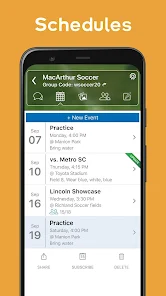
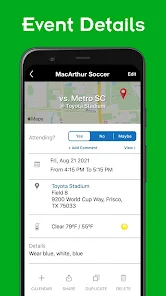
Organize and manage team events with ease using TeamReach's built-in scheduling feature. You can create events, send invites, and track RSVPs all in one place. This functionality helps keep everyone informed and ensures that no one misses out on important practices or games.

File Sharing

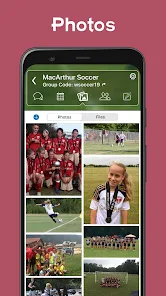
Easily share documents, images, and other files with your team members through TeamReach. This feature allows for quick access to essential resources, such as playbooks, schedules, and training materials. By simplifying file sharing, you enhance collaboration and make information readily available to everyone.

Real-Time Communication

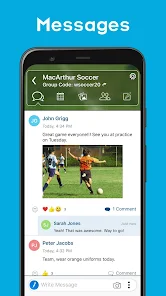
Stay connected with your team through instant messaging and notifications. TeamReach enables seamless communication, ensuring everyone is on the same page, whether they're on the field or at home. You can easily share updates, ask questions, and keep the conversation flowing, making teamwork more efficient and engaging.

Team Management Tools

Take advantage of TeamReach's comprehensive management tools designed for coaches and team leaders. You can assign roles, track attendance, and monitor performance metrics all within the app. This functionality helps streamline team operations and empowers leaders to focus on what really matters: building a strong, cohesive team.

Pros & Cons

Pros
  • Seamless communication for all team members
  • Easy scheduling to coordinate activities efficiently
  • File sharing simplifies document access and collaboration
  • Instant updates keep everyone informed and engaged
  • User-friendly interface for quick and easy navigation
Cons
  • Limited customization options for user interface design
  • Notifications can be overwhelming and hard to manage
  • May lack advanced features for larger teams
  • Some users report slow loading times and glitches

Real Experience Using TeamReach - Your Team App

Application Scenarios

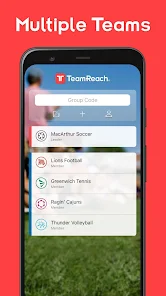
TeamReach is designed to streamline communication and collaboration among teams, making it an ideal app for sports teams, clubs, and organizations. Coaches and managers can easily share schedules, game updates, and practice times with players and parents. This is particularly useful for youth sports teams where parents need to stay informed. Additionally, the app can be utilized by workplace teams to coordinate projects, share files, and keep everyone on the same page. Whether you’re organizing a community event or managing a remote team, TeamReach provides a centralized platform for all your communication needs.

User Experience

The user interface of TeamReach is intuitive and user-friendly, making it easy for users of all ages to navigate. Upon logging in, users are greeted with a clean dashboard that highlights upcoming events, announcements, and messages. The ability to customize notifications ensures that users only receive alerts that matter to them, minimizing distractions. TeamReach also supports group chats, allowing for real-time discussions among team members. Users have reported that the app significantly enhances their overall communication experience, reducing the need for endless email threads and text messages. The seamless integration of calendar features helps keep everyone informed about important dates, while the document-sharing option simplifies the distribution of essential files.

Pricing

TeamReach offers a flexible pricing structure that caters to both small teams and larger organizations. The app is free to download and provides a robust set of features at no cost. However, for teams seeking more advanced functionalities, such as custom branding and enhanced administrative controls, there are premium subscription options available. These plans are competitively priced, ensuring that teams can find a solution that fits their budget while still gaining access to powerful tools that enhance team collaboration and efficiency. The free version is perfectly adequate for most users, making it an excellent starting point for teams of all sizes.

Updates & Support

The developers of TeamReach are committed to continuous improvement and regularly release updates that enhance performance and introduce new features based on user feedback. The app has a dedicated support team that is responsive and helpful, ready to assist users with any technical issues or inquiries. In-app tutorials and a comprehensive FAQ section further empower users to maximize the app's potential. Overall, TeamReach is not only a functional tool for team management but also a well-supported application that evolves with its users’ needs.

verified Security & Privacy Review

TeamReach prioritizes user security and privacy, implementing robust measures to protect personal information. The app employs encryption protocols to safeguard data transmission, ensuring that sensitive information is not exposed during communication. Users are encouraged to create strong passwords and take advantage of two-factor authentication for added security. In terms of privacy practices, TeamReach limits data collection to what is necessary for app functionality. The app does not sell user data to third parties, and any data shared is anonymized where possible. Users have control over their privacy settings, allowing them to manage who can view their information and communicate with them. Permissions requested by TeamReach are clearly outlined during the installation process. Users can review and adjust these permissions at any time, providing transparency and control over their data. Overall, TeamReach demonstrates a commitment to secure user data handling and privacy, making it a trustworthy choice for team communication.

User Reviews

  • Tom White
    2026/06/29

    Problems found with recent update so far: Scrolling thru group members appears to have buffering issues when there is a large number of members. The display will endlessly chatter up and down when trying to scroll to the bottom of the list. Display of comments is confusing and illogical without any indentation of replies vs new comments. In some cases my name does not appear in the member list even though the group is listed on the main panel. Other members CAN see my name however.

  • Caleb Larioza
    2023/09/14

    I've had an OK experience with the app for around a year now. Sometimes notifications aren't pushed for messages, but it's mostly been positive. I'm only writing my review now because they've updated it so that there's ads in the midst of all the messages. I'm pretty understanding when it comes to ads in mobile apps but I don't understand how a messaging app can justify the extra cash grab, especially when they offer an Ad-Free version for money.

  • Gary Steele
    2023/07/16

    Has a lot of potential but room for improvement. The app is on the right track. Just started using this today so I'm still learning it. My biggest issue at the moment is the lack of a roster. I can invite the parents and tag them with their kids name but that's not a roster. So when I setup attendance for an event, I'm taking attendance with the parents names and not the kids themselves. Just more names to memorize.

  • Jo P.
    2025/06/18

    App needs a lot of bugs fixed. Unable to edit a recurring event. it says you can edit it, but doesn't allow the option to change dates and if you change the attendance or who's available, it doesn't actually save it correctly. if you don't set something up right the first time, you basically have to delete it and do it again. and sometimes you have to it up three times before it'll actually save.

  • Cecilia Hamilton
    2025/05/09

    We started using Teamreach to organize area pickleball games, mostly open play. Teamreach is flexible, easy enough to use that most members can reliably create and edit events, and free! Considering the dozens of apps and websites that can be used for pickleball (some of which are strictly for pickleball!), Teamreach is by far the easiest to use and most popular. Great app.

Review Source: Google Play store public user reviews.

FAQ

1

Does TeamReach - Your Team App collect my personal data?

TeamReach collects some personal data necessary for account creation and functionality, but it is committed to user privacy and follows data protection regulations.

2

Does TeamReach - Your Team App offer a free trial or free version?

TeamReach offers a free version with basic features, allowing users to explore the app before considering any premium subscription options.

3

Does TeamReach - Your Team App require an internet connection?

Yes, TeamReach requires an internet connection to access its features, sync data, and communicate with team members in real-time.

4

How can I contact support or send feedback for TeamReach - Your Team App?

You can contact TeamReach support or send feedback through the app's help section, which provides options for submitting inquiries or reporting issues.

5

How do I manage or cancel my TeamReach - Your Team App subscription?

You can manage or cancel your subscription directly through the app's settings or your account management page, where you can follow the prompts to modify your subscription.

How to use TeamReach - Your Team App

1

How can I contact Customer Service for TeamReach?

You can reach Customer Service by visiting the TeamReach website and using the contact form or checking the app for support options.

2

How do I activate my TeamReach account?

After signing up, check your email for an activation link. Click the link to activate your account and start using the app.

3

How do I log in to TeamReach?

Open the app, enter your email and password, then tap 'Log In'. If you’re new, you can create an account from the login screen.

4

What is the customer number for TeamReach?

TeamReach does not publicly list a customer number; use the app or website for support inquiries.

What's New

TeamReach is faster than ever with a streamlined interface.What's New:- More than 30% faster than the previous version- More space for viewing group chats, events and photos- A streamlined, more modern design that’s easier to navigate- Control which types of notifications you receive (and which you don't)- Choose if your most recent messages appear on top or on bottom of your feed- Your groups, messages, and data carry over automatically- Now available in Spanish- And MUCH MORE coming!

Editor's Choice