This site uses cookies to enhance your user experience. By clicking any link on this site you are giving your consent to our cookie policy. Read more
Reject
Accept All

Advertiser and Editorial Disclosures

onX Hunt: Offline Hunting Maps

onX Hunt: Offline Hunting Maps

verified Verified App

Developer: onXmaps

  • category

    Category: Sports

  • price

    Price: free

  • age rating

    Age Rating: Everyone

  • rating

    Rating: 4.6

  • download

    Downloads: 5,000,000+

  • version

    Version: /

Screenshot 1
Screenshot 2
Screenshot 3
Screenshot 4
Screenshot 5
Screenshot 6
Screenshot 7
Screenshot 8

Features & Highlights

Layered Map Options

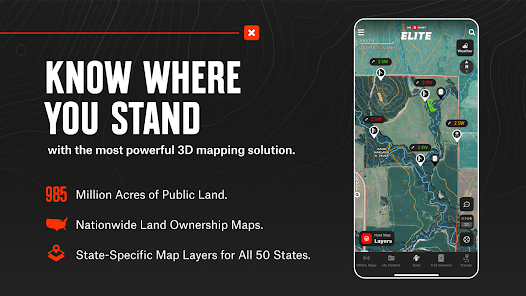
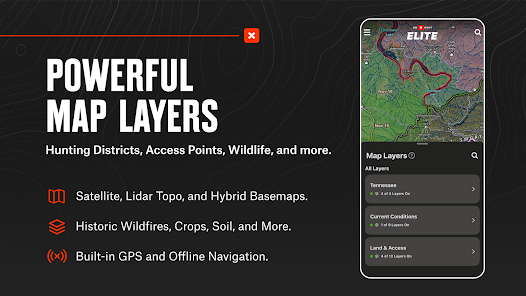
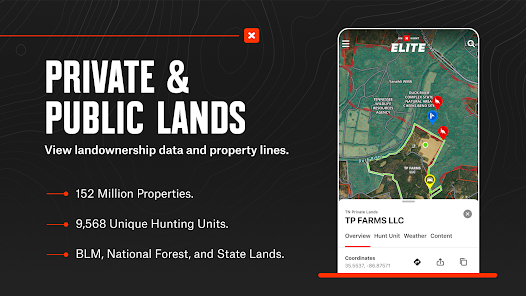
With onX Hunt, you can choose from various map layers, including topographic, satellite, and land ownership overlays. This flexibility helps you make informed decisions about where to hunt by understanding the terrain and property boundaries better.

Offline Maps Access

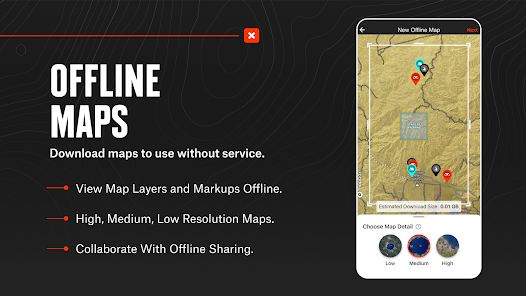
onX Hunt allows you to download detailed hunting maps for offline use, ensuring you can navigate even in remote areas without cell service. This feature is essential for hunters who venture into the wilderness, providing peace of mind while tracking their routes and locations.

Real-Time Weather Updates

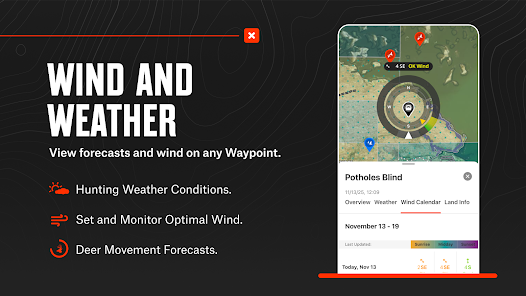
Stay informed with real-time weather updates directly within the app. This feature helps you plan your hunting trips more effectively by providing crucial information on changing weather conditions, ensuring you're prepared for whatever nature throws your way.

Waypoints and Markers

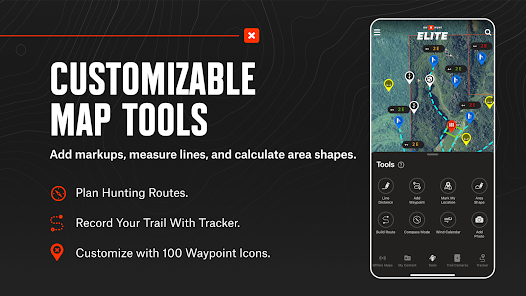
The app lets you easily create and save waypoints for significant locations, such as animal sightings, stands, and trails. These markers help you keep track of your hunting spots and can be shared with fellow hunters for enhanced collaboration.

Pros & Cons

Pros
  • Access detailed hunting maps without cellular service
  • Locate property boundaries and land ownership easily
  • Track routes and waypoints to enhance navigation
  • Utilize weather forecasts to plan your trips effectively
  • Share locations and insights with fellow hunters seamlessly
Cons
  • Limited functionality without a cellular signal can hinder navigation.
  • Battery drain from constant GPS use can be problematic.
  • Subscription costs may not justify the features for occasional users.

Real Experience Using onX Hunt: Offline Hunting Maps

Application Scenarios

onX Hunt: Offline Hunting Maps is designed for the avid hunter who needs reliable navigation tools in the great outdoors. Whether you’re tracking game in dense forests, navigating expansive fields, or scouting new territories, this app proves invaluable. Users can access detailed topographic maps, satellite imagery, and land ownership data, making it easier to identify public versus private land. The offline capabilities ensure that even in remote areas where cell service is nonexistent, hunters can still rely on the app to find their way. Additionally, features such as waypoint marking allow users to pinpoint their exact locations, track their routes, and save locations of interest, such as game trails or water sources, making it a versatile tool for various hunting scenarios.

User Experience

The user experience of onX Hunt is generally well-received by both novice and experienced hunters alike. The app boasts an intuitive interface that simplifies navigation, allowing users to quickly access the features they need. The map layering options, which include property boundaries, public land designations, and satellite imagery, provide a wealth of information at the user's fingertips. Users appreciate the ability to customize their maps, enabling a personalized hunting experience. The app’s performance is smooth, and updates are regularly pushed to improve functionality. However, some users have noted that the battery consumption can be significant during extended use, so it’s advisable to bring a portable charger on long outings. Overall, the app provides a reliable and user-friendly experience that enhances the hunting journey.

Pricing

onX Hunt offers a subscription-based pricing model that is competitive compared to other outdoor navigation apps. Users can choose between an annual subscription or a monthly plan, with the annual plan generally providing better long-term value. The pricing also includes access to all maps and features, ensuring that users have comprehensive tools at their disposal without hidden fees. While some may find the subscription cost a barrier, many users feel that the value delivered in terms of enhanced safety and improved hunting experience justifies the investment. Additionally, onX Hunt often provides promotional discounts or trial periods for new users, allowing them to explore the app before committing to a subscription.

Updates & Support

The commitment to ongoing updates and customer support is a strong point for onX Hunt. The developers frequently release updates that enhance app functionality, fix bugs, and introduce new features based on user feedback. This responsiveness demonstrates their dedication to improving the user experience. Furthermore, the app includes an extensive knowledge base and customer support resources, including FAQs and contact options for direct assistance. Users report positive experiences with the support team, noting timely responses and helpful guidance. This level of support ensures that users can maximize their use of the app and feel confident in their hunting adventures.

verified Security & Privacy Review

The onX Hunt app prioritizes user security and privacy, implementing several measures to safeguard personal information. The app requires location permissions to provide accurate offline maps and hunting data, but users can control these settings to limit tracking. onX Hunt collects essential data to enhance user experience, such as app usage statistics and device information, which are anonymized to ensure user identities remain protected. Users can access a detailed privacy policy outlining data collection practices, how data is used, and the measures taken to protect it. Encryption technologies are employed to secure data transmissions, minimizing the risk of unauthorized access. Additionally, the app does not sell personal information to third parties, reinforcing its commitment to user privacy. For enhanced privacy, users are encouraged to review and adjust their privacy settings within the app regularly. Overall, onX Hunt demonstrates a responsible approach to data handling, making it a reliable choice for outdoor enthusiasts concerned about security and privacy.

Reviews

4.6

“Great offline maps for hunting adventures!”

“User-friendly interface, easy to navigate.”

“Accurate property boundaries, very helpful!”

“Love the waypoint feature for tracking.”

“Best hunting app I've ever used!”

FAQ

1

Can I submit suggestions or feedback to onX Hunt: Offline Hunting Maps?

Yes, users are encouraged to submit suggestions or feedback directly through the app or via the onX Hunt website to help improve the app and its features.

2

Does onX Hunt: Offline Hunting Maps collect my personal data?

onX Hunt may collect certain personal data for account creation and usage analytics; however, they prioritize user privacy and provide options for managing data sharing.

3

Does onX Hunt: Offline Hunting Maps support offline use?

Yes, onX Hunt allows users to download maps for offline use, enabling hunters to navigate areas without cellular service during their trips.

4

How do I cancel my onX Hunt: Offline Hunting Maps subscription?

Users can cancel their subscription through their account settings in the app or by managing their subscription through the app store they used for purchase.

5

How much does a subscription to onX Hunt: Offline Hunting Maps cost?

Subscription prices may vary depending on the plan chosen, but they typically offer options for monthly or yearly subscriptions, with discounts often available for longer commitments.

How to use onX Hunt: Offline Hunting Maps

1

Can I update my customer information after logging in?

Yes, you can update your customer information in the account settings after logging into your onX Hunt account.

2

How do I activate my onX Hunt account?

To activate your account, follow the link in your confirmation email after signing up or contact customer service if you need assistance.

3

How do I contact customer service for onX Hunt?

You can reach customer service by emailing support

4

How do I get help with my account if I’m overseas?

You can still contact customer service via email, and they’ll assist you regardless of your location.

5

I lost my customer number. How can I retrieve it?

You can retrieve your customer number by checking your account settings or by contacting customer service for help.

Editor's Choice