This site uses cookies to enhance your user experience. By clicking any link on this site you are giving your consent to our cookie policy. Read more
Reject
Accept All

Advertiser and Editorial Disclosures

The Official MTA App

The Official MTA App

verified Verified App

Developer: MTA (Metropolitan Transportation Authority)

  • category

    Category: Travel & Local

  • price

    Price: free

  • age rating

    Age Rating: Everyone

  • rating

    Rating: 4.6

  • download

    Downloads: 1,000,000+

  • version

    Version: 3.24.1

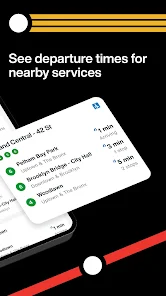
Screenshot 1
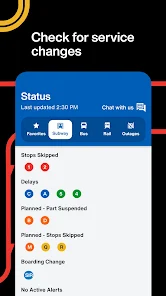
Screenshot 2
Screenshot 3
Screenshot 4
Screenshot 5
Screenshot 6

Features & Highlights

Live Train Tracking

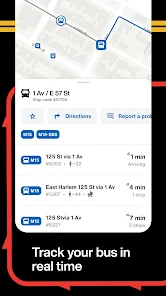
Stay informed with real-time tracking of trains across the MTA network. Whether you're at home or on the go, you can easily check the status of your train and receive updates on delays or service changes, ensuring you're never left in the dark about your commute.

Mobile Ticketing

Purchase and store your tickets directly in the app for a hassle-free experience. With mobile ticketing, you can avoid lines at ticket machines and simply scan your phone when boarding, making your travel more convenient and streamlined.

Service Disruption Alerts

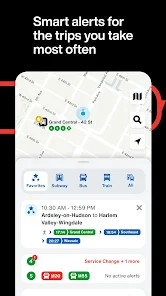
Get timely notifications about service disruptions and emergency updates. The app ensures you receive alerts directly to your device, helping you plan your journey better and avoid unexpected delays, so you can travel with confidence.

Subway Map Navigation

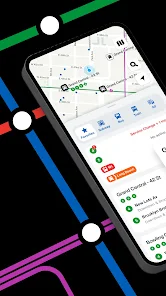
Navigate the subway system effortlessly with the interactive map feature. The Official MTA App allows you to zoom in on routes, view station information, and find the fastest path to your destination, making your travels smoother and more efficient.

Pros & Cons

Pros
  • Access real-time transit information for seamless travel planning.
  • Receive alerts for delays and service changes directly to your device.
  • Find the nearest stations and routes based on your location.
  • Purchase and store tickets for convenient travel at your fingertips.
  • Track bus and train arrivals to minimize waiting times effectively.
Cons
  • Limited features compared to third-party apps might hinder user experience
  • Frequent updates can result in bugs disrupting usability
  • Navigation can be confusing for new users, leading to frustration

Real Experience Using The Official MTA App

Application Scenarios

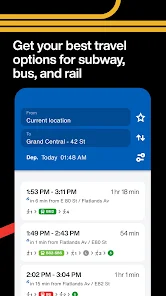
The Official MTA App is designed to be an essential tool for commuters navigating the bustling transit system of New York City. Whether you are a daily subway rider, a bus user, or an occasional traveler, this app caters to a variety of scenarios. For daily commuters, the app provides real-time updates on train and bus schedules, making it easier to plan your journey and avoid delays. Tourists will find the app invaluable for exploring the city, as it offers detailed maps and route suggestions that can simplify travel between popular attractions. Additionally, the app assists in emergency situations by providing alerts about service disruptions, helping users to adapt their travel plans on the fly. Overall, the versatility of the Official MTA App makes it suitable for anyone who relies on public transportation in New York City.

User Experience

The user experience of the Official MTA App is generally positive, characterized by a clean interface that is intuitive for users of all ages. The app's home screen displays crucial information upfront, such as real-time train arrivals and service alerts. Users can easily navigate through the various sections, including trip planning tools, service notifications, and fare information. The interactive map feature allows users to visualize their routes and even locate nearby stations. Feedback from users often highlights the app's reliability, especially during peak commuting hours when getting timely updates is critical. While some users have reported occasional glitches, the overall consensus is that the app significantly enhances the daily commuting experience. The convenience of having comprehensive transit information at your fingertips cannot be overstated, making it a go-to resource for many New Yorkers.

Pricing

The Official MTA App is free to download and use, which adds to its appeal for a broad audience. Users can access all basic features, including real-time information, service alerts, and trip planning without incurring any costs. There are no hidden fees or in-app purchases, making it accessible for everyone from students to professionals. Given that public transportation can be a significant expense, having a free app that enhances the commuting experience is a welcome advantage for many users. The MTA has prioritized making transit information readily available, and the absence of a price tag further demonstrates their commitment to serving the community.

Updates & Support

The MTA regularly updates the app to ensure that it remains functional and user-friendly. Users can expect periodic enhancements that improve existing features or introduce new tools based on user feedback. The app also includes a dedicated support section where users can access FAQs, report issues, or seek assistance with any problems they encounter. This level of support reinforces the MTA's commitment to providing a reliable transit experience. Regular updates not only fix bugs but also adapt to the evolving needs of users, ensuring that the app continues to be a valuable resource for navigating New York City's complex transit system.

verified Security & Privacy Review

The Official MTA App prioritizes user security and privacy by implementing robust data protection measures. It employs encryption for data transmission, ensuring that sensitive information remains secure while in transit. The app only collects essential user information necessary for providing public transportation services, minimizing the risk of unnecessary data exposure. In terms of permissions, the app requests access to location services to provide real-time transit updates and route recommendations. Users have the option to grant or deny this permission, allowing for greater control over personal data. The app also offers clear privacy settings, enabling users to manage their data preferences effectively. The MTA is committed to transparency, providing a detailed privacy policy outlining what data is collected, how it is used, and the measures in place to protect user information. Regular updates ensure that the app adheres to the latest security standards and best practices in data handling. Overall, The Official MTA App demonstrates a dedication to safeguarding user privacy while enhancing the commuting experience.

Reviews

4.6

“User-friendly interface, easy navigation and real-time updates”

“Reliable for tracking train schedules and delays”

“Great for planning my daily commute efficiently”

“Helpful alerts for service changes and delays”

“Occasional bugs, but overall a solid app experience”

FAQ

1

Can I submit suggestions or feedback to The Official MTA App?

Yes, users can submit suggestions or feedback through the app's support or contact features, which are designed to gather user input for improvements.

2

Does The Official MTA App collect my personal data?

The app may collect personal data to enhance user experience and provide personalized services, but users can review the privacy policy for detailed information on data collection practices.

3

Does The Official MTA App support offline use?

Yes, The Official MTA App allows users to access certain features offline, such as maps and saved trips, although real-time updates require an internet connection.

4

How do I cancel my The Official MTA App subscription?

Since The Official MTA App is free and does not offer a subscription service, there is no need to cancel; users can simply uninstall the app if they wish to stop using it.

5

How much does a subscription to The Official MTA App cost?

The Official MTA App does not require a subscription; it is free to use without any hidden fees.

How to use The Official MTA App

1

Can I change my customer number?

Unfortunately, customer numbers cannot be changed. If you need assistance, please contact Customer Service for support.

2

Can I log in from multiple devices?

Yes, you can log in from multiple devices, but make sure to log out from any device you're not using to maintain account security.

3

How can I contact Customer Service for help with the app?

You can reach Customer Service through the app's support section or by calling the MTA customer service number listed on our website.

4

How do I activate my account in The Official MTA App?

To activate your account, follow the link sent to your email after registration or access the activation option in the app settings.

5

How do I reach Customer Service for account activation issues?

For account activation issues, contact Customer Service via the app's help section or call our support line for immediate assistance.

Editor's Choice