This site uses cookies to enhance your user experience. By clicking any link on this site you are giving your consent to our cookie policy. Read more
Reject
Accept All
TeamSideline

TeamSideline

verified Verified App

Developer: TeamSideline.com

  • category

    Category: Sports

  • price

    Price: free

  • age rating

    Age Rating: Everyone

  • rating

    Rating: 2.8

  • download

    Downloads: 100,000+

  • version

    Version: 3.7.02

Screenshot 1
Screenshot 2
Screenshot 3
Screenshot 4
Screenshot 5
Screenshot 6

Features & Highlights

Communication Tools

Stay connected with your team through TeamSideline's built-in messaging system. Coaches and parents can send updates, reminders, and important announcements directly through the app, ensuring that everyone is informed and engaged. This feature enhances teamwork and fosters a sense of community.

Payment Management

Managing team fees is a breeze with TeamSideline's payment processing feature. You can set up online payments for registration, uniforms, and other expenses, streamlining the financial aspect of team management. This ensures transparency and convenience for parents, making it easier to support their children's activities.

Schedule Coordination

TeamSideline takes the hassle out of scheduling by providing a centralized calendar that all team members can access. Coaches can easily create and share game and practice times, while parents can receive real-time updates, minimizing confusion and maximizing participation.

Team Management

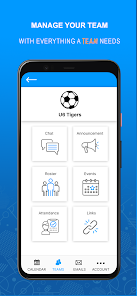
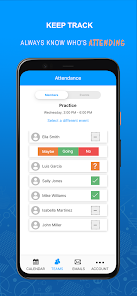
Effortlessly manage your team with TeamSideline's intuitive interface. You can easily track player information, attendance, and schedules, ensuring that everyone is on the same page. This feature simplifies communication and organization, making it a breeze for coaches and team managers alike.

Pros & Cons

Pros
  • Streamlines team management processes efficiently.
  • Enhances communication among team members easily.
  • Simplifies scheduling for games and practices.
  • Facilitates secure online payment processing.
  • Provides customizable features for unique needs.
Cons
  • Limited customization options for team management features
  • User interface can be confusing for new users
  • Lacks robust data analytics and reporting tools
  • Customer support response times may be slow

Real Experience Using TeamSideline

Application Scenarios

TeamSideline is an indispensable tool for coaches, team managers, and parents involved in youth sports. Whether you're coordinating schedules for a local soccer team or managing a basketball league, this app simplifies the entire process. Coaches can easily create and update practice schedules, manage rosters, and communicate with team members in real time. Parents can keep track of their children’s games, receive notifications about any changes, and stay connected with other families. TeamSideline is not only suitable for team sports but also for events like tournaments and clinics, making it versatile for various sporting needs.

User Experience

The user experience on TeamSideline is intuitive and user-friendly. Upon logging in, users are greeted with a clean interface that makes navigation straightforward. The dashboard provides quick access to team schedules, messages, and updates. One standout feature is the ability to customize notifications, ensuring that users receive relevant information without being overwhelmed by alerts. The app’s calendar integration allows users to sync events with their personal calendars, providing a seamless experience across platforms. Additionally, the app's responsive customer support team is readily available to assist users with any confusion or technical issues, enhancing overall satisfaction.

Pricing

TeamSideline offers a variety of pricing options tailored to different needs. The basic version is free and provides essential features suitable for smaller teams or leagues. For those requiring more advanced features, such as extensive scheduling options or additional storage, TeamSideline offers several paid plans. These premium plans are competitively priced, making them accessible for most organizations. The cost-effectiveness of TeamSideline, combined with its robust features, makes it a worthwhile investment for sports teams looking to streamline their management processes.

Updates & Support

TeamSideline is committed to continuous improvement, regularly releasing updates that enhance functionality and user experience. Recent updates have included new features like enhanced messaging capabilities and improved reporting tools, which have been well-received by users. The app also boasts a comprehensive support section, complete with FAQs, video tutorials, and community forums. Should users require direct assistance, the support team is responsive and helpful, ensuring that any issues are resolved promptly. Overall, TeamSideline’s dedication to updates and support significantly contributes to a positive user experience, making it a reliable choice for team management.

verified Security & Privacy Review

The security and privacy of user data in the TeamSideline app are paramount, reflecting a commitment to safeguarding sensitive information. The app employs robust encryption protocols to protect data both in transit and at rest, ensuring that user details remain confidential. TeamSideline adheres to strict privacy practices, offering transparency regarding data collection and usage. Users are informed about the types of data collected, which generally includes personal information necessary for account creation and team management. The app does not share user data with third parties without explicit consent, aligning with best practices in data protection. Permissions requested by TeamSideline are relevant to its functionality, such as access to contacts for team communication. Users are encouraged to review these permissions and can manage them through their device settings, promoting user control over personal information. Overall, TeamSideline demonstrates a strong focus on user security and privacy, making it a trustworthy choice for managing sports teams and events.

Reviews

2.8

“Great for organizing youth sports teams efficiently!”

“User-friendly interface makes scheduling a breeze.”

“Excellent communication tools for coaches and parents.”

“Reliable app, perfect for managing multiple teams.”

“Customer support is responsive and helpful.”

Editor's Choice