This site uses cookies to enhance your user experience. By clicking any link on this site you are giving your consent to our cookie policy. Read more
Reject
Accept All

Advertiser and Editorial Disclosures

Tasty

Tasty

verified Verified App

Developer: BuzzFeed

  • category

    Category: Food & Drink

  • price

    Price: free

  • age rating

    Age Rating: Everyone

  • rating

    Rating: 4.7

  • download

    Downloads: 10,000,000+

  • version

    Version: 2.14.0

Screenshot 1
Screenshot 2
Screenshot 3
Screenshot 4
Screenshot 5
Screenshot 6

Features & Highlights

Ingredient Scanner

Tasty's innovative ingredient scanner allows you to input available ingredients and receive tailored recipe suggestions instantly. This feature is perfect for minimizing food waste and making the most out of what you have on hand, enabling you to whip up something delicious without extra trips to the store.

Interactive Cooking Mode

The interactive cooking mode transforms your kitchen experience by guiding you through each recipe with voice commands and easy-to-follow steps. This hands-free feature lets you focus on cooking without constantly checking your phone, making meal prep more enjoyable and less stressful.

Personalized Recipe Suggestions

With Tasty's personalized recipe suggestions, you can discover new dishes tailored to your taste preferences and dietary needs. The app learns from your interactions, making it easier to find recipes that excite you, whether you're craving comfort food or looking for healthy options.

Quick Recipe Videos

Tasty's signature quick recipe videos are a feast for the eyes, offering step-by-step visual guides that make cooking approachable and fun. Each clip is designed to fit seamlessly into your busy life, showcasing delicious dishes in just a few minutes, perfect for both beginners and seasoned chefs alike.

Pros & Cons

Pros
  • Tasty offers a vast library of easy-to-follow recipes.
  • Users can discover new dishes daily, keeping meals exciting.
  • The platform features engaging video tutorials for visual learners.
  • Tasty's community allows sharing and discovering user-generated content.
  • Recipes are tailored for various dietary preferences and restrictions.
Cons
  • Tasty recipes often lack nutritional information, making healthy choices difficult.
  • Overly simplified instructions can lead to cooking errors for inexperienced users.
  • The focus on visual appeal may overshadow essential cooking techniques and skills.

Real Experience Using Tasty

Application Scenarios

Tasty is an innovative cooking app designed to revolutionize the way users approach meal preparation. Ideal for home cooks of all skill levels, it offers a plethora of scenarios where it can be utilized effectively. For beginners, Tasty provides step-by-step video tutorials that guide users through the cooking process, making it easy to follow along. Intermediate cooks can explore diverse cuisines and experiment with new recipes, while advanced chefs can find inspiration and techniques to elevate their culinary skills. Whether you’re planning a casual family dinner, hosting a festive gathering, or simply looking to whip up a quick meal after a long day, Tasty caters to every cooking need. Additionally, with its meal planning feature, users can organize their weekly meals, making it an excellent tool for busy individuals and families striving for a balanced diet.

User Experience

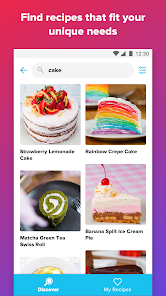
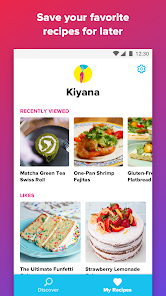
The user experience on Tasty is nothing short of exceptional. Upon launching the app, users are greeted with a visually appealing interface that is both intuitive and easy to navigate. The recipe discovery feature allows users to search by ingredients, meal types, or dietary preferences, ensuring that everyone can find something to suit their tastes. Each recipe is accompanied by high-quality videos and detailed instructions, which enhance the learning experience. The interactive features, such as the ability to save favorite recipes and create shopping lists, further streamline the cooking process. Users have reported that the app's seamless integration with social media platforms allows them to share their culinary creations with friends and family effortlessly. Overall, Tasty successfully combines functionality with a delightful user experience, making cooking feel enjoyable and rewarding.

Pricing

Tasty operates on a freemium model, allowing users to access a vast array of recipes and features without any cost. The free version is laden with advertisements, which some users may find intrusive. However, for those who crave an ad-free experience and additional premium features, Tasty offers a subscription plan. This plan unlocks exclusive recipes, advanced meal planning tools, and the ability to create personalized meal kits. The pricing is competitive within the culinary app market, making it a worthwhile investment for avid home cooks. Users have found that the value provided by the subscription justifies the cost, especially for those who frequently utilize the app for daily cooking needs.

Updates & Support

Tasty is committed to enhancing its platform, consistently rolling out updates that introduce new features and improve existing ones. Users can expect regular additions to the recipe library, ensuring that the content remains fresh and engaging. The development team actively listens to user feedback, incorporating suggestions to refine the app's functionality. In terms of support, Tasty offers a comprehensive help section within the app, along with a responsive customer service team that addresses user inquiries promptly. The combination of regular updates and robust support enhances user satisfaction, making Tasty a reliable companion in the kitchen.

verified Security & Privacy Review

The Tasty app prioritizes user security and privacy through a combination of robust data protection practices and transparent privacy policies. The app employs encryption protocols to safeguard user information during transmission, ensuring that personal data remains confidential. Tasty collects minimal personal information, primarily focusing on user preferences to enhance the recipe experience. Upon installation, Tasty requests a variety of permissions, including access to the device's camera and storage. These permissions are essential for functionalities such as capturing cooking videos or saving favorite recipes. However, users have the option to limit these permissions, maintaining greater control over their data. Tasty’s privacy policy is easily accessible within the app, providing users with clear insights into how their data is collected, used, and shared. The app does not sell user data to third parties, reinforcing its commitment to user privacy. Regular updates further ensure that security measures stay current, addressing any potential vulnerabilities promptly. Overall, Tasty demonstrates a strong commitment to protecting user data while delivering a personalized cooking experience.

Reviews

4.7

“Great recipes, easy to follow and delicious results!”

“Love the variety of dishes available.”

“User-friendly interface makes cooking fun.”

“Perfect for quick meals and family gatherings.”

“Step-by-step videos are super helpful!”

FAQ

1

Can I submit suggestions or feedback to Tasty?

Yes, Tasty encourages users to submit suggestions or feedback through their support channels, helping them improve the app and user experience.

2

Does Tasty collect my personal data?

Yes, Tasty collects certain personal data to enhance user experience, including preferences and usage statistics, but they have privacy policies in place to protect your information.

3

Does Tasty support offline use?

Yes, Tasty allows users to download recipes and videos for offline access, so you can cook without needing an internet connection.

4

How do I cancel my Tasty subscription?

You can cancel your Tasty subscription through the app settings or your account management settings on the platform where you subscribed.

5

How much does a subscription to Tasty cost?

The subscription cost for Tasty varies based on the plan selected, but it typically includes options for monthly or annual billing.

How to use Tasty

1

Can I activate my account using a mobile device?

Yes, you can activate your account using a mobile device by following the activation link sent to your email.

2

Can I update my email address after activation?

Yes, you can update your email address after account activation in your account settings. If you need help, contact customer service.

3

How can I log in to my Tasty account?

To log in, visit the Tasty website and click on the "Log In" button, then enter your email and password.

4

How do I contact Tasty's customer service?

You can reach Tasty's customer service through the contact form on our website or by emailing support

5

How do I log in if I previously signed up with Facebook?

If you signed up with Facebook, click the "Log In with Facebook" button on the login page to access your account.

Editor's Choice