This site uses cookies to enhance your user experience. By clicking any link on this site you are giving your consent to our cookie policy. Read more
Reject
Accept All

Advertiser and Editorial Disclosures

Subway®

Subway®

verified Verified App

Developer: SUBWAY Restaurants

  • category

    Category: Food & Drink

  • price

    Price: free

  • age rating

    Age Rating: Everyone

  • rating

    Rating: 4.2

  • download

    Downloads: 10,000,000+

  • version

    Version: 30.19.2

Screenshot 1
Screenshot 2
Screenshot 3
Screenshot 4
Screenshot 5
Screenshot 6

Features & Highlights

Custom Sandwich Builder

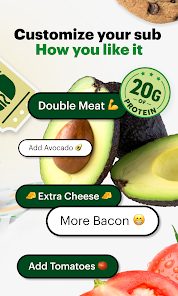
The Subway® app allows you to create your perfect sandwich with its intuitive custom builder. Choose from a variety of breads, toppings, and sauces to craft a meal that suits your taste preferences, all while ensuring that every bite is just how you like it.

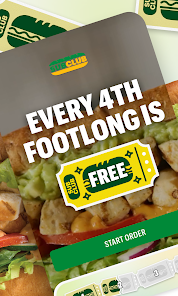
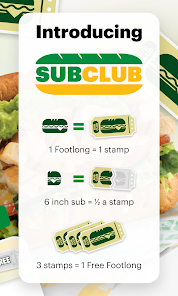
Exclusive Deals & Offers

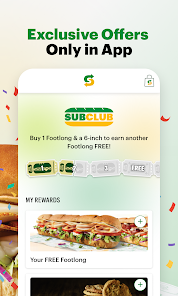
The app frequently provides exclusive deals and promotions for users, ensuring you get the best value for your meals. By signing up, you can unlock special discounts that make enjoying your favorite subs even more affordable and rewarding.

Nutritional Information Access

Stay informed about your meal choices with easy access to nutritional information directly in the app. This feature helps you make healthier decisions by providing details about calories, ingredients, and allergen information, allowing you to enjoy your meal with peace of mind.

Order Ahead Convenience

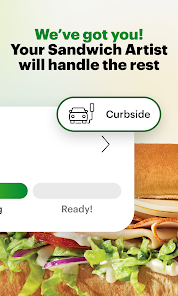
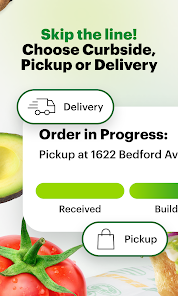
With the Subway® app, you can easily place your order ahead of time and skip the line at your local store. This feature is perfect for busy days when you need a quick meal without the wait, allowing you to grab your food and go.

Pros & Cons

Pros
  • Freshly baked bread daily for superior taste
  • Customizable sandwiches to suit your preferences
  • Healthy options with fresh vegetables and lean proteins
  • Quick service for convenient meals on the go
  • Variety of flavors to satisfy every craving
Cons
  • Limited menu variety compared to other fast food chains
  • Ingredients can be inconsistent in freshness
  • High sodium content in many offerings
  • Service can be slow during peak hours

Real Experience Using Subway®

Application Scenarios

The Subway® app is designed to enhance the customer experience at Subway restaurants by providing a convenient platform for ordering food. Users can order ahead for pickup or delivery, making it particularly useful during busy lunch hours or when you're on the go. The app is ideal for a variety of scenarios, including quick meals at work, family dinners, or late-night cravings. Customized meal options allow users to tailor their sandwiches, salads, and other menu items to individual tastes, accommodating various dietary preferences. Additionally, the app is perfect for those who enjoy exploring new menu items, as it regularly features promotions and limited-time offers. Whether you're a frequent visitor or an occasional customer, the app streamlines the ordering process and enhances the overall Subway experience.

User Experience

The user experience of the Subway® app is generally positive, with a clean and intuitive interface that makes navigation straightforward. Users can easily access the menu, customize their orders, and save favorite items for quick reordering. The app provides clear visuals and descriptions of each menu item, helping customers make informed choices. However, some users have reported occasional glitches and delays during peak hours, which can be frustrating. On the positive side, the app integrates well with mobile payment options, allowing for seamless transactions. Push notifications keep users informed about special deals and rewards, adding to the overall engagement with the brand. The loyalty program is another highlight, rewarding users with points for every purchase, which can be redeemed for free items.

Pricing

The Subway® app offers competitive pricing that aligns with in-store prices, ensuring users do not pay extra for the convenience of ordering online. The app frequently features promotions, such as discounts on specific menu items or deals for app users, which can lead to significant savings, especially for regular customers. Additionally, the loyalty program incentivizes users to order through the app by allowing them to accumulate points for free food. Overall, the pricing structure is designed to provide value while encouraging repeat business, making it a cost-effective choice for sandwich lovers.

Updates & Support

The Subway® app is regularly updated to enhance functionality and user experience. Recent updates have included improvements to the ordering process, bug fixes, and new features aimed at making the app more user-friendly. The support system is responsive, with a dedicated help section that addresses common issues and FAQs. Users can also contact customer service through the app for more specific inquiries, and feedback options are available to help the developers improve future versions. Overall, the commitment to maintaining and updating the app reflects Subway's dedication to enhancing customer satisfaction and adapting to user needs.

verified Security & Privacy Review

The Subway® app places a strong emphasis on user security and privacy. It employs industry-standard encryption protocols to protect sensitive information, such as payment details and personal data, during transmission. Users are encouraged to create strong passwords and utilize the app's additional security features, like two-factor authentication, to enhance account protection. In terms of data handling, the app adheres to strict privacy practices. It clearly outlines its data collection policies in the privacy policy, detailing what information is collected, how it is used, and with whom it may be shared. Users have control over their data, allowing them to manage preferences regarding notifications and data sharing. The Subway® app requests permissions necessary for its core functionalities, such as location access for finding nearby stores and enabling mobile ordering. However, users can customize these permissions in their device settings to limit access according to their preferences. Overall, Subway® demonstrates a commitment to maintaining user privacy while providing a convenient and secure experience.

Reviews

4.2

“Fresh ingredients and customizable options keep me coming back”

“Fast service and friendly staff every visit”

“Great value for a filling meal on the go”

“Love the variety of bread and toppings available”

“Always consistent quality and taste across locations”

FAQ

1

Does Subway® collect my personal data?

Yes, Subway® collects personal data such as your name, email, and order history to enhance your experience and provide personalized offers, but complies with privacy regulations.

2

Does Subway® offer a free trial or free version?

Subway® does not offer a specific free trial or free version, but the app can be downloaded and used without any initial payment to browse the menu and place orders.

3

Does Subway® require an internet connection?

Yes, Subway® requires an internet connection to place orders, access the menu, and receive real-time updates on your order status.

4

How can I contact support or send feedback for Subway®?

You can contact Subway® support through the app's help section, by visiting their official website, or by reaching out via their customer service phone number or social media channels.

5

How do I manage or cancel my Subway® subscription?

Since Subway® does not have subscription plans, you can simply stop using the app or opt-out of any promotional offers or rewards programs at any time.

How to use Subway®

1

How can I contact Subway® customer service?

You can reach Subway® customer service through the app's help section or by calling their customer support number listed on the website.

2

How do I activate my Subway® app account?

If prompted, follow the instructions in your email to verify your account and activate it. You may also need to set a password upon registration.

3

How do I find the customer number in the Subway® app?

The customer number can be found in your account settings or under the profile section of the Subway® app.

4

How do I log in to the Subway® app?

Open the app, tap on 'Log In', enter your email and password, then press 'Sign In' to access your account.

Editor's Choice