This site uses cookies to enhance your user experience. By clicking any link on this site you are giving your consent to our cookie policy. Read more
Reject
Accept All

Advertiser and Editorial Disclosures

Dunkin’

Dunkin’

verified Verified App

Developer: Dunkin' Brands, Inc.

  • category

    Category: Food & Drink

  • price

    Price: free

  • age rating

    Age Rating: Everyone

  • rating

    Rating: 4.6

  • download

    Downloads: 10,000,000+

  • version

    Version: 11.20.1.380

Screenshot 1
Screenshot 2
Screenshot 3
Screenshot 4
Screenshot 5
Screenshot 6

Features & Highlights

In-App Games

Engage with fun in-app games that give you a chance to win prizes and discounts while you enjoy your favorite beverages. These interactive features add an element of excitement to your Dunkin’ experience, keeping things fresh and entertaining.

Mobile Ordering

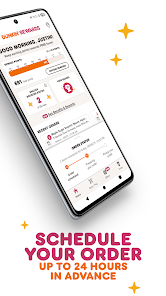
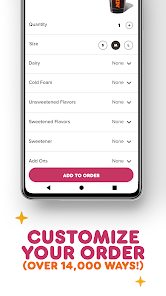
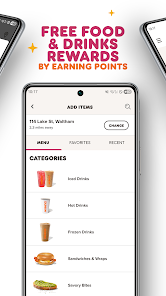
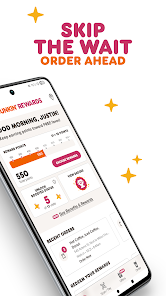
Skip the line and order your favorite Dunkin’ drinks and snacks ahead of time with the mobile ordering feature. Customize your order to perfection and pick it up at your convenience, making your coffee run faster and more enjoyable than ever.

Personalized Offers

Dunkin’ tailors promotions and offers based on your preferences, ensuring you get the best deals on the items you love. This personalized experience not only enhances your visits but also helps you discover new flavors you might enjoy.

Rewards Program

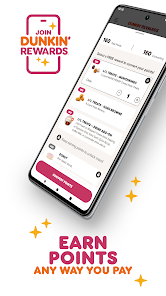
Earn points with every purchase through the Dunkin' Rewards program, allowing you to redeem them for free drinks and exclusive offers. The more you indulge in your favorite treats, the more rewarding it becomes, making each visit feel special.

Pros & Cons

Pros
  • Wide variety of coffee options available daily
  • Quick service for busy mornings
  • Affordable prices for quality beverages
  • Convenient locations for easy access
  • Tasty food items complement your drink choices
Cons
  • Limited menu options compared to competitors
  • Quality can vary by location
  • Higher sugar content in many products
  • Seating areas often crowded and noisy

Real Experience Using Dunkin’

Application Scenarios

The Dunkin' app is designed to enhance the customer experience for coffee and donut lovers on the go. Users can order their favorite beverages and snacks ahead of time, allowing them to skip the line at their local Dunkin' store. This is particularly useful during busy mornings or on weekends when foot traffic is at its peak. Additionally, the app features a store locator, helping users find the nearest Dunkin' locations based on their current GPS coordinates. For those who enjoy rewards, the app incorporates a loyalty program where users can earn points for every purchase, redeemable for free items. Whether you're commuting to work, running errands, or planning a coffee break with friends, the Dunkin' app seamlessly fits into various scenarios, making it a convenient choice.

User Experience

The user experience of the Dunkin' app is generally smooth and intuitive. Upon opening the app, users are greeted with a visually appealing interface that showcases popular items and promotions. The navigation is straightforward, allowing users to easily browse the menu, customize their orders, and check out with a few taps. One of the standout features is the ability to save favorite orders, making future purchases even quicker. However, some users have reported occasional glitches, such as slow loading times or issues during peak hours when the demand is high. Overall, the app's layout and functionality cater well to both new and returning customers, making the ordering process a breeze.

Pricing

The Dunkin' app offers competitive pricing consistent with in-store offers, ensuring users receive the same value whether they order in person or through the app. Additionally, the loyalty program adds significant value by allowing users to accumulate points for every dollar spent. These points can be redeemed for various rewards, including free beverages and snacks. While the app itself is free to download, users should keep in mind that regular menu prices apply to all orders, and special promotions are periodically available, providing opportunities for savings. Overall, the pricing structure aligns well with the brand's reputation for affordability.

Updates & Support

Dunkin' is committed to keeping the app updated with new features and improvements based on user feedback. Regular updates enhance functionality and address any bugs that may arise. Users can easily find information about the latest app features and fixes through the app store or within the app itself. In terms of support, Dunkin' provides multiple channels for assistance, including a dedicated help section within the app, a customer service hotline, and social media platforms. This ensures that users can quickly resolve any issues or inquiries they may have, contributing to a positive overall experience.

verified Security & Privacy Review

The Dunkin’ app prioritizes user security and privacy through various measures. It employs encryption protocols to protect sensitive data during transmission, ensuring that personal information remains secure. Users are encouraged to create strong passwords and enable two-factor authentication for an additional layer of protection. In terms of privacy practices, Dunkin’ commits to transparency regarding data collection and usage. The app collects information such as location, purchase history, and preferences to enhance the user experience but provides options for users to manage their privacy settings. Users can review and modify permissions, allowing them to control what data is shared. Dunkin’ adheres to industry standards for data handling and complies with relevant privacy regulations. The app does not sell personal data to third parties, focusing instead on using it to improve services and offer personalized promotions. Overall, while the Dunkin’ app collects necessary data to function effectively, it implements robust security measures and transparent practices to protect user privacy.

Reviews

4.6

“Great coffee, quick service every morning!”

“Love their seasonal flavors, always a treat!”

“Drive-thru is super convenient and fast.”

“Friendly staff, always makes my day better.”

“Consistent quality, my go-to breakfast spot!”

FAQ

1

Does Dunkin’ collect my personal data?

Yes, Dunkin’ collects personal data such as your name, email address, and order history to enhance your experience and provide personalized offers.

2

Does Dunkin’ offer a free trial or free version?

Dunkin’ does not offer a free trial, but the app is free to download and use for ordering and rewards without any subscription fees.

3

Does Dunkin’ require an internet connection?

Yes, an internet connection is required to use the Dunkin’ app for placing orders, accessing rewards, and receiving updates.

4

How can I contact support or send feedback for Dunkin’?

You can contact Dunkin’ support through the app’s help section or by visiting their official website, where you can find options for feedback and customer service assistance.

5

How do I manage or cancel my Dunkin’ subscription?

Since Dunkin’ does not have a subscription plan, there is no subscription to manage or cancel. You can simply stop using the app or opt out of the rewards program if desired.

How to use Dunkin’

1

How do I activate my Dunkin' account?

If you have a new account, follow the link in your registration email to activate it. If needed, you can also activate it through the app's settings.

2

How do I contact Dunkin' customer service?

You can contact Dunkin' customer service through their official website or by calling their customer service number, which can be found in the app under the "Help" section.

3

How do I find the customer number for Dunkin'?

The customer number for Dunkin' can be found in the app under the "Help" or "Contact Us" section for direct support.

4

How do I log in to the Dunkin' app?

To log in, open the app, tap on "Log In," enter your email and password, and then tap "Sign In."

Editor's Choice