This site uses cookies to enhance your user experience. By clicking any link on this site you are giving your consent to our cookie policy. Read more
Reject
Accept All

Advertiser and Editorial Disclosures

SunPass

SunPass

verified Verified App

Developer: Florida's Turnpike Enterprise

  • category

    Category: Travel & Local

  • price

    Price: free

  • age rating

    Age Rating: Everyone

  • rating

    Rating: 3.8

  • download

    Downloads: 1,000,000+

  • version

    Version: 6.5.8

Screenshot 1
Screenshot 2
Screenshot 3
Screenshot 4
Screenshot 5
Screenshot 6
Screenshot 7
Screenshot 8
Screenshot 9
Screenshot 10

Features & Highlights

Automatic Recharge

Never worry about running out of funds with SunPass's automatic recharge feature. When your account balance dips below a specified threshold, it automatically replenishes using your linked credit or debit card, ensuring you're always ready for your next journey without interruption.

Discounted Rates

SunPass users enjoy significant savings on tolls compared to cash payments. By using SunPass, you not only streamline your travel experience but also benefit from lower toll rates, making it a cost-effective choice for frequent travelers on Florida's toll roads.

Real-Time Account Management

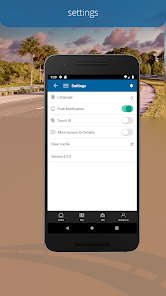
With the SunPass app, users can easily manage their accounts on the go. Check your balance, view transaction history, and adjust settings directly from your smartphone, making it convenient to stay on top of your toll expenses and account preferences anytime, anywhere.

Seamless Toll Payments

SunPass offers a hassle-free way to pay tolls electronically, eliminating the need for cash or coins. With a simple sticker or transponder, drivers can breeze through toll plazas without stopping, making travel more efficient and stress-free on Florida's highways.

Pros & Cons

Pros
  • Saves time at toll booths
  • Reduces traffic congestion
  • Offers discounted toll rates
  • Provides convenient online account management
  • Enhances travel efficiency and planning
Cons
  • Limited acceptance outside Florida toll roads
  • Requires upfront payment for transponders
  • Account management can be confusing for users
  • Inaccurate charges may occur occasionally

Real Experience Using SunPass

Application Scenarios

The SunPass app is designed to facilitate seamless travel across Florida’s toll roads, offering users a convenient way to manage their toll payments and accounts. It is particularly useful for frequent travelers, whether they are daily commuters, vacationers, or business professionals. Users can easily add funds to their SunPass accounts, check their account balances, and review toll history from the comfort of their mobile devices. The app is also advantageous for those who may be unfamiliar with Florida's toll systems, as it provides a clear overview of toll rates and locations where SunPass is accepted. Furthermore, the app enhances the overall travel experience by offering real-time updates on traffic conditions and toll prices, helping users plan their trips more efficiently.

User Experience

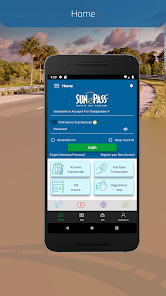
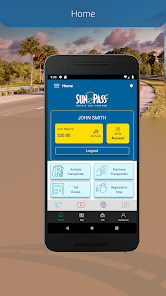
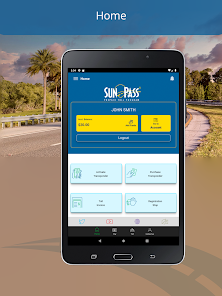
The user experience of the SunPass app is generally positive, with a clean and intuitive interface. Upon opening the app, users are greeted with a dashboard displaying their account balance and recent transactions, making it easy to navigate. The app's design is user-friendly, ensuring that even those who are not tech-savvy can manage their accounts without hassle. Users appreciate the quick loading times and the smooth transition between different sections of the app. Additionally, the ability to set up automatic payments adds a layer of convenience, allowing users to maintain a sufficient balance without needing to remember to top up manually. However, some users have reported occasional glitches, such as slow response times during peak travel seasons, which can be frustrating. Overall, the SunPass app effectively meets its primary purpose and offers a satisfactory user experience.

Pricing

Using the SunPass app is free; however, users must maintain a balance in their SunPass accounts to cover toll fees. The initial purchase of a SunPass transponder also incurs a one-time fee, which varies depending on the type of transponder. For regular users, maintaining a minimum balance is necessary to avoid any service interruptions. While the app does not charge a subscription fee, it's essential for users to keep track of their account balance and replenish it as needed. This pay-as-you-go model is beneficial for users who wish to control their spending on tolls, as they only pay for the services they use. Additionally, the app sometimes offers promotions or discounts for new users, making it a cost-effective solution for managing toll payments.

Updates & Support

The SunPass app receives regular updates aimed at improving functionality and addressing user feedback. These updates often include enhancements to the user interface, bug fixes, and new features designed to improve overall performance. Users can expect to see periodic notifications about available updates, which are easily downloadable through the app store. For support, the app includes a help section that provides answers to frequently asked questions and troubleshooting tips. Additionally, users can contact customer support through the app via email or phone, ensuring that any issues can be resolved quickly. Overall, the commitment to regular updates and responsive support contributes positively to the user experience, ensuring that the app remains functional and user-friendly.

verified Security & Privacy Review

The SunPass app prioritizes user security and privacy by implementing robust encryption protocols to protect sensitive information, such as payment details and personal data. The app uses Secure Socket Layer (SSL) technology to ensure that all data transmitted between the user's device and the servers is securely encrypted. User privacy is further safeguarded through transparent data handling practices. The app clearly outlines its privacy policy, detailing what information is collected and how it is used. SunPass collects essential data for account management and transaction processing, but it does not sell or share personal information with third parties without user consent.

Reviews

3.8

“Easy to use and convenient for tolls”

“Great savings on frequent trips”

“Customer service could be improved”

“App interface needs updates for better usability”

“Reliable and efficient for Florida travelers”

Compare APP

FAQ

1

Does SunPass collect my personal data?

Yes, SunPass collects personal information necessary for account management and toll processing, but it adheres to privacy regulations to protect user data.

2

Does SunPass offer a free trial or free version?

SunPass does not offer a free trial, but the app itself is free to download and use for managing your toll account.

3

Does SunPass require an internet connection?

Yes, an internet connection is required to access the SunPass app and utilize its features, such as managing your account and checking transactions.

4

How can I contact support or send feedback for SunPass?

Users can contact SunPass customer support through the app, the official website, or by calling the dedicated support hotline for assistance and feedback.

5

How do I manage or cancel my SunPass subscription?

Users can manage their accounts, including adding or removing vehicles and updating payment information, directly through the SunPass app or website; cancellation of services can also be processed through these platforms.

How to use SunPass

1

How can I contact customer service for the SunPass app?

You can reach SunPass customer service at 1-888-865-5352 for assistance with your app or account.

2

How can I reset my SunPass account password?

Use the ‘Forgot Password?’ link on the login screen, enter your email, and follow the instructions sent to your inbox.

3

How can I update my payment method in the SunPass app?

Go to 'Account Settings', select 'Payment Methods', and follow the prompts to add or update your payment information.

4

How do I activate my SunPass account?

To activate, download the app, select 'Activate SunPass', and follow the prompts to enter your account details.

5

How do I log in to my SunPass account?

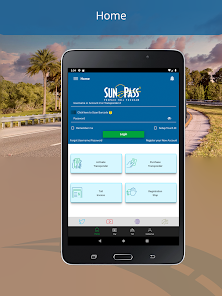
To log in, open the app, enter your email and password, then tap ‘Log In’ to access your account.

Editor's Choice