
 Home
Home  Apps
Apps  Games
Games  Windows
  Topics
  Terms of Service
  Cookies & Privacy Policy
  About us
 Buyer Guarantee
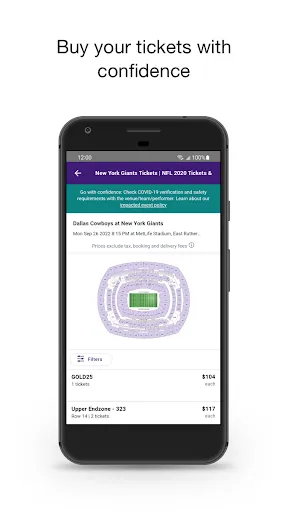
When you purchase tickets through StubHub, you can buy with confidence thanks to their Buyer Guarantee. This feature ensures that your tickets are valid and delivered on time, providing peace of mind as you prepare for your event.


StubHub
 3.2
3.2 
Category: Events

Price: 0

Age Rating: Everyone

Rating: 3.2

Available on: /

Updated on: Jun 17, 2026

When you purchase tickets through StubHub, you can buy with confidence thanks to their Buyer Guarantee. This feature ensures that your tickets are valid and delivered on time, providing peace of mind as you prepare for your event.
StubHub includes interactive seat maps that allow you to visualize your seating options before making a purchase. This feature helps you choose the best seats for your experience, so you can enjoy your event just the way you like it.
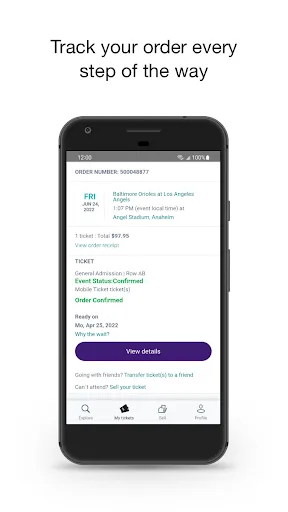
With StubHub's mobile ticketing feature, you can easily access your tickets directly from your smartphone. This means no more worrying about lost paper tickets, as everything is conveniently stored in the app, ensuring a hassle-free entry to your favorite events.
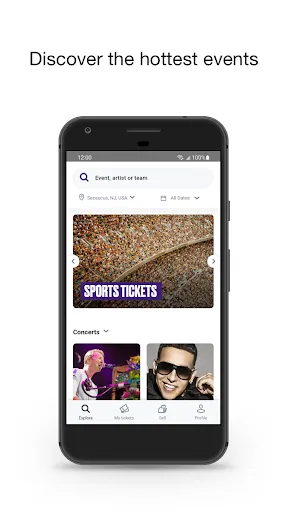
StubHub offers an extensive selection of live event tickets, from concerts to sports and theater productions. You can explore a variety of options, making it easy to find the perfect seats for the events you love, all in one place.

 Wide selection of tickets for concerts, sports, and theater events available. Easy-to-use platform for seamless ticket purchasing and selling. Secure transactions ensure buyer and seller protection. Access to real-time ticket availability and pricing updates. Mobile app for convenient ticket management on-the-go.
 High service fees can significantly increase ticket prices for buyers. Limited customer support may lead to frustrating experiences when issues arise. Sellers face restrictions that can complicate the ticket listing process.
 The StubHub app serves as a gateway for users to access live events such as concerts, sports games, and theater performances. Whether you're looking to catch your favorite band on tour, attend a local sports match, or explore the latest Broadway shows, StubHub has you covered. Users can easily search for events based on location, date, and type of entertainment, making it a versatile tool for both spontaneous plans and advanced bookings. The app is particularly useful for individuals who thrive on discovering new experiences, as it showcases a wide array of events across different genres and cities. Furthermore, the ability to buy and sell tickets directly within the app provides a comprehensive solution for both event-goers and sellers, making it a popular choice for fans eager to attend or sell their tickets.
Navigating the StubHub app is generally a smooth experience, thanks to its intuitive design and user-friendly interface. Users can easily filter search results and view detailed information about events, including seating charts and seller ratings. The ticket purchasing process is streamlined, allowing users to complete transactions quickly and securely. Additionally, the app offers personalized recommendations based on user preferences and past activity, enhancing the overall experience. However, some users have reported occasional glitches or slow loading times during peak event seasons, which can be frustrating. Nevertheless, the app's overall functionality and aesthetic appeal make it a go-to choice for many ticket buyers and sellers.
StubHub operates on a marketplace model, which means ticket prices can vary significantly based on demand, event popularity, and seating location. Users may find that prices range from budget-friendly options to premium seats that come with a hefty price tag. While StubHub does charge service fees, these are often clearly disclosed during the checkout process. Additionally, users can take advantage of promotions and discounts that are occasionally offered, making certain events more accessible. It's important for buyers to compare prices across different platforms, as they may find better deals elsewhere. However, the convenience of using a well-established platform like StubHub often outweighs minor price discrepancies.
StubHub is committed to keeping its app updated with the latest features and improvements. Regular updates ensure that users benefit from enhanced performance, bug fixes, and new functionalities, such as improved event tracking and notifications. The support system is relatively robust, offering users various channels to seek assistance, including live chat and email support. However, response times can vary, and some users have expressed a desire for quicker resolutions to their inquiries. Additionally, the extensive FAQ section within the app provides useful guidance for common issues, allowing users to troubleshoot problems independently. Overall, the combination of frequent updates and a responsive support system enhances the overall user experience.
Security & Privacy Review
 Google Play
  App Store


I did not receive my tickets in downloadable format. Despite trying for 20 hours over several days, Stubhub failed to resolve the matter so I could sell them. when I tried to delete my listing, I was prevented. So, I deleted my credit card, but it was then charged without my authorization. I was repeatedly told the seller would resend the tickets after screen shots showed that their system was not working. These were false assurances, aka lies. Now, they deny a refund. Fraud. No other word .
I sold a FIFA ticket on the platform back in January for an event taking place in June. The transaction was successfully completed. It is completely unacceptable that StubHub holds a seller's funds for six months, only to issue an email stating that the payout will not be processed until 8 to 10 days after the event concludes. Holding funds for this long, while simultaneously charging premium fees, is a terrible user experience that discourages sellers from using your platform in the future.
Purchased 3 baseball tickets. Stubhub told me I would receive an email from the seller confirming the delivery. I never received the email. Tried to contact Stubhub with no success as their responses come from an automatic chat. I openned a dispute with my bank and it would take 2 months to resolve, and way too late for the game date. I had to buy new tickets in the meantime in a different platform. Previous purchases from Stubhub were much better.
Be forewarned that despite having a FanProtect policy, they most definitely did not honor it in my case. Bought parking tickets, which stated the lot adjacent to the venue...But, once confirmed via email, location was actually 23 min walking distance away. Contacted live/phone support, 6 total agents. All told me my case was escalated. But, after 7 days of trying, realized they were just delaying me so I couldn't get a refund at all. Contacted credit card company & was refunded immediately.
I used StubHub's resale feature because I couldn't attend. The ticket sold. I then repeatedly contacted StubHub to obtain the ticket so I could transfer it to the buyer. The ticket was never made available to me, which prevented both my attendance and the transfer. I contacted them every day multiple times a day and they were incapable of solving my issue then when ahead and charged me for the amount I paid to purchase the ticket plus the amount that I tried to sell the ticket for.
Review Source: Google Play store public user reviews.
Yes, users can submit feedback and suggestions through the app or the customer support section on the StubHub website.
Yes, StubHub - Live Event Tickets collects personal data to enhance user experience, process transactions, and improve services, as outlined in their privacy policy.
While some features may be accessible offline, such as viewing previously downloaded tickets, most functionalities require an internet connection to operate effectively.
Since there is no subscription to cancel, users can simply stop using the app or delete it from their devices at any time.
StubHub - Live Event Tickets does not require a subscription fee; it operates on a pay-per-transaction basis for ticket purchases and sales.
Unfortunately, customer numbers cannot be changed. If you have concerns, please contact StubHub customer service for assistance.
You can reach StubHub customer service through their website's help center, or by calling their customer support number for immediate assistance.
To activate your StubHub account, check your email for the activation link sent during registration and follow the instructions provided.
You can contact customer service through live chat or by calling their support number for help with account activation issues.
Click on the "Forgot Password?" link on the login page and follow the prompts to reset your password via email.

SeatGeek – Tickets to Events

Fever: Events & Tickets

Vivid Seats | Event Tickets

TickPick - Live Event Tickets

Gametime - Last Minute Tickets

Peerspace - Rent Unique Venues

Church Directory

Ticketmaster-Buy, Sell Tickets

Tixr: Live Event Tickets

Cocomelon

Calculator

Microsoft Word: Edit Documents












