This site uses cookies to enhance your user experience. By clicking any link on this site you are giving your consent to our cookie policy. Read more
Reject
Accept All

Advertiser and Editorial Disclosures

Fever: Events & Tickets

Fever: Events & Tickets

verified Verified App

Developer: Fever Labs

  • category

    Category: Events

  • price

    Price: free

  • age rating

    Age Rating: Teen

  • rating

    Rating: 4.7

  • download

    Downloads: 10,000,000+

  • version

    Version: 5.183.2

Screenshot 1
Screenshot 2
Screenshot 3
Screenshot 4
Screenshot 5
Screenshot 6

Features & Highlights

Curated Local Events

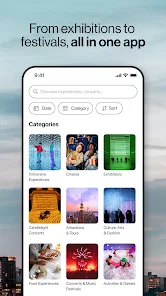
Fever: Events & Tickets offers a personalized selection of handpicked events tailored to your interests. Whether you're into concerts, art exhibits, or unique experiences, you'll discover exciting activities happening right in your neighborhood. It's a great way to explore and engage with your local community like never before.

Exclusive Offers & Discounts

Enjoy access to exclusive deals and discounts on various events with Fever. The app regularly features special promotions that can save you money while enhancing your experience. It's a fantastic way to enjoy more events without breaking the bank, making entertainment more accessible.

Personalized Recommendations

Fever utilizes smart algorithms to suggest events that align with your preferences and past activities. This means you won't miss out on hidden gems or trending events that suit your tastes. Get ready to discover new experiences that you might not have found otherwise!

Seamless Ticket Booking

With Fever, purchasing tickets is a breeze. The app provides an intuitive interface that allows you to quickly find and book tickets for your favorite events. Say goodbye to long queues and uncertainty, as you can secure your spot with just a few taps on your device.

Pros & Cons

Pros
  • Discover unique local events tailored to your interests
  • Easily purchase tickets through a user-friendly app
  • Stay updated with real-time notifications and reminders
  • Access exclusive deals and discounts on popular events
  • Connect with friends for group outings and shared experiences
Cons
  • Limited availability of popular events can lead to disappointment.
  • High service fees can increase overall ticket prices.
  • Customer support may be slow to respond, causing frustration.

Real Experience Using Fever: Events & Tickets

Application Scenarios

Fever: Events & Tickets is an indispensable app for anyone looking to explore local events, concerts, and activities. Whether you're planning a night out with friends, a date, or simply seeking new experiences, Fever serves as your personal guide to what's happening in your city. The app is particularly useful for those who enjoy discovering hidden gems, unique events, and exclusive offers. From immersive theater performances to food festivals and local art shows, Fever curates a diverse range of experiences tailored to your interests. Additionally, the app can be used for planning group outings, allowing users to easily share events and coordinate with friends, making it a go-to tool for social gatherings.

User Experience

The user experience on Fever is intuitive and engaging. The app features a clean, modern interface that makes navigation seamless. Users can easily browse events by categories such as music, food, or family activities, and the personalized recommendations based on past behavior add a touch of customization. Booking tickets is straightforward, with a simple checkout process that includes various payment options. Users have reported feeling a sense of excitement as they explore the curated list of events, often discovering activities they would not have found elsewhere. Furthermore, the interactive map feature allows users to see event locations at a glance, enhancing the overall experience. Notifications about upcoming events and last-minute deals keep users informed and ensure they never miss out on exciting opportunities.

Pricing

Fever offers a range of pricing options that cater to different budgets. While many events listed on the app are free or low-cost, premium events may have higher ticket prices reflecting the unique experiences they offer. The app occasionally runs promotions and discounts, making it easy for users to find affordable options. Furthermore, Fever's pricing transparency ensures that users know exactly what they will pay, with no hidden fees. This combination of free, budget-friendly, and premium experiences allows users to enjoy the app without feeling financially constrained.

Updates & Support

Fever is committed to providing a high-quality user experience, which is reflected in their regular updates. The app frequently introduces new features, improved navigation, and enhanced event discovery tools, ensuring that users have access to the latest functionalities. Customer support is readily available through the app, with a responsive support team that addresses user inquiries and concerns promptly. The extensive FAQ section provides answers to common questions, enhancing user satisfaction. Overall, Fever demonstrates a dedication to continuous improvement, making it a reliable choice for event discovery and ticket purchasing.

verified Security & Privacy Review

The Fever: Events & Tickets app prioritizes user security and privacy by implementing robust data protection measures. It utilizes encryption protocols to safeguard sensitive information during transmission, ensuring that user data remains confidential. The app’s privacy policy is transparent, detailing how personal information is collected, used, and shared with third parties, which helps users understand their rights and options. Upon installation, Fever requests specific permissions, such as access to location services, which enhance the user experience by providing personalized event recommendations. However, users have the option to limit these permissions, maintaining control over their data. The app also allows users to manage their preferences regarding notifications and marketing communications, further reinforcing its commitment to user autonomy. Fever adheres to industry standards for data handling and regularly updates its security practices to address emerging threats. Overall, the app demonstrates a strong commitment to protecting user privacy while facilitating a seamless event discovery and ticketing experience.

Reviews

4.7

“Great selection of events, easy to find!”

“User-friendly interface, love the ticket options!”

“Fantastic experience, seamless booking process!”

“Awesome deals on local events, highly recommend!”

“Quick customer support, resolved my issue promptly!”

FAQ

1

Can I submit suggestions or feedback to Fever: Events & Tickets?

Yes, users can submit suggestions or feedback through the app's support section or via the official website to help improve the service.

2

Does Fever: Events & Tickets collect my personal data?

Yes, Fever: Events & Tickets collects certain personal data to enhance user experience, such as location and preferences, but it adheres to privacy regulations to protect user information.

3

Does Fever: Events & Tickets support offline use?

Some features of Fever: Events & Tickets may be accessible offline, but an internet connection is generally required to browse events and purchase tickets.

4

How do I cancel my Fever: Events & Tickets subscription?

To cancel a subscription, users can go to their account settings within the app or through their app store settings, depending on how they initially subscribed.

5

How much does a subscription to Fever: Events & Tickets cost?

Fever: Events & Tickets typically does not require a subscription fee, but it may offer premium features or experiences for purchase.

How to use Fever: Events & Tickets

1

Can I log in using my social media account?

Yes, you can log in using your Facebook or Google account if you linked them during registration.

2

How can I activate my Fever account?

To activate your account, click the link sent to your email upon registration. If you didn’t receive it, check your spam folder or contact Customer Service.

3

How can I contact Customer Service for help with my account?

You can reach our Customer Service via the help section in the app or website, and they will assist you promptly.

4

How do I contact Customer Service if I have an issue with my ticket?

You can contact Customer Service through the app's help section, where you can submit your query for support.

5

How do I log in to my Fever account?

To log in, open the app or website and enter your email and password. If you have issues, try resetting your password.

Editor's Choice