This site uses cookies to enhance your user experience. By clicking any link on this site you are giving your consent to our cookie policy. Read more
Reject
Accept All
Steam

Steam

verified Verified App

Developer: Valve Corporation

  • category

    Category: Entertainment

  • price

    Price: free

  • age rating

    Age Rating: Teen

  • rating

    Rating: 3.0

  • download

    Downloads: 100,000,000+

  • version

    Version: 3.10.7

Screenshot 1
Screenshot 2
Screenshot 3
Screenshot 4
Screenshot 5
Screenshot 6
Screenshot 7
Screenshot 8
Screenshot 9
Screenshot 10
Screenshot 11
Screenshot 12
Screenshot 13

Features & Highlights

Community Features

Steam fosters a vibrant community through forums, user reviews, and game discussions. Players can connect with others, share tips, and even join multiplayer sessions, creating a social gaming atmosphere that enhances the overall enjoyment of the platform.

Frequent Sales and Discounts

Steam is well-known for its frequent sales and discounts, offering gamers the chance to snag their favorite titles at significantly reduced prices. Seasonal events like the Summer Sale and Winter Sale make it a prime destination for bargain hunters looking to expand their game library.

Game Library Management

Steam offers an extensive game library management system that allows users to organize and categorize their games effortlessly. With features like collections and tags, players can quickly find their favorite titles, making the gaming experience more streamlined and enjoyable.

Steam Workshop Integration

With Steam Workshop, developers and players can share and download user-generated content such as mods and custom levels. This integration encourages creativity and enhances gameplay, allowing users to experience games in new and exciting ways.

Pros & Cons

Pros
  • Wide selection of games across various genres
  • Regular sales and discounts for budget-friendly purchases
  • User-friendly interface enhances gaming experience
  • Robust community features for multiplayer engagement
  • Frequent updates and support from developers
Cons
  • Frequent sales can devalue games over time
  • Limited offline functionality affects accessibility
  • User reviews can be misleading or biased
  • Heavy client can consume significant system resources

Real Experience Using Steam

Application Scenarios

Steam is a versatile platform that caters to a wide range of gaming needs. Whether you are a casual gamer looking for the latest indie titles or a hardcore enthusiast eager to dive into AAA franchises, Steam has something for everyone. The platform serves as a digital storefront where users can purchase, download, and play games directly on their PCs. It also offers a vibrant community where gamers can connect, share experiences, and discuss their favorite titles. Beyond gaming, Steam includes features like game streaming, content creation tools, and even virtual reality support, making it an all-encompassing hub for gamers everywhere.

User Experience

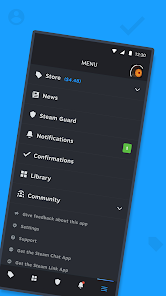
The user experience on Steam is largely positive, marked by a well-designed interface that is both intuitive and feature-rich. Upon launching the app, users are greeted by a personalized home screen that highlights new releases, trending games, and tailored recommendations based on their gaming history. Navigating through the vast library is seamless, thanks to efficient categorization and search functions. The built-in community features, such as forums, guides, and user-generated content, encourage interaction and enhance the overall gaming experience. However, some users may find the sheer volume of options a bit overwhelming, especially if they are new to the platform. The frequent sales and discounts also add excitement and value, allowing users to expand their libraries without breaking the bank.

Pricing

Steam's pricing model is primarily based on a pay-per-game system, where users purchase titles individually. The platform offers regular sales events, such as the Summer Sale and Winter Sale, where discounts can reach up to 90%, making it a budget-friendly option for gamers. Additionally, Steam provides a variety of free-to-play games, allowing users to enjoy quality gaming experiences without financial commitment. While some games include microtransactions for in-game purchases, many users appreciate the transparency of the pricing and the absence of hidden fees. Overall, Steam strikes a balance between affordability and quality, catering to gamers on different budgets.

Updates & Support

Steam is consistently updated to enhance performance and introduce new features. The development team is proactive in addressing bugs and optimizing the user experience, ensuring that the platform remains current in an ever-evolving gaming landscape. Users can easily access support through the Steam Help Center, which includes FAQs, user forums, and troubleshooting guides. Additionally, Steam provides a robust feedback system where users can report issues or suggest improvements. While some users have reported occasional delays in response times from support, the overall sentiment is that the platform is committed to providing assistance and improving user satisfaction.

verified Security & Privacy Review

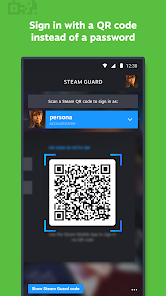
Steam maintains a robust security posture through Valve’s proprietary Steam Guard system. This multi-factor authentication (MFA) framework uses mobile-based TOTP codes and QR code sign-ins to prevent unauthorized access, even if account credentials are compromised. Data in transit is protected via industry-standard encryption, and Valve provides granular controls for account recovery, including physical backup codes and SMS-linked restoration. Privacy practices are outlined in a comprehensive policy that details the collection of personal information, such as billing addresses, IP addresses, and hardware configurations, primarily for transaction verification and regional licensing compliance. While Valve shares data with third-party service providers for payment processing and technical support, it strictly prohibits the use of this information for external marketing purposes. Users can manage their digital footprint by adjusting profile visibility settings—ranging from Public to Private—which controls access to game libraries, friend lists, and inventory data. Notably, while the platform provides high security for its core infrastructure, users must remain vigilant against social engineering and third-party malware, as Valve’s automated vetting processes have faced scrutiny regarding malicious community-contributed content.

Reviews

3.0

“Great platform for indie games and community features!”

“Frequent sales make gaming affordable and fun.”

“User-friendly interface, easy to navigate.”

“Excellent multiplayer options and game variety.”

“Customer support could be improved significantly.”

Editor's Choice