This site uses cookies to enhance your user experience. By clicking any link on this site you are giving your consent to our cookie policy. Read more
Reject
Accept All

Advertiser and Editorial Disclosures

Stack Team App

Stack Team App

verified Verified App

Developer: Team Mates Pty. Ltd.

  • category

    Category: Sports

  • price

    Price: free

  • age rating

    Age Rating: Everyone

  • rating

    Rating: 2.9

  • download

    Downloads: 1,000,000+

  • version

    Version: 7.6.1-rc.4

Screenshot 1
Screenshot 2
Screenshot 3
Screenshot 4
Screenshot 5
Screenshot 6
Screenshot 7
Screenshot 8
Screenshot 9
Screenshot 10
Screenshot 11

Features & Highlights

Customizable Team Pages

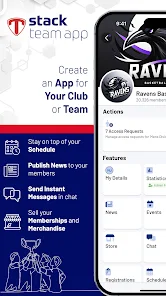
Stack Team App allows users to create personalized team pages that reflect their unique branding and identity. You can easily add logos, colors, and other elements to make your team's presence stand out, fostering a sense of belonging and pride among members.

Event Management Tools

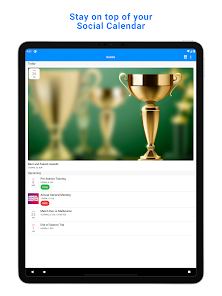
Organize and manage events effortlessly with Stack Team App's built-in event management features. From scheduling games to tracking RSVPs, you can streamline the entire process, making it easier for team members to participate and stay informed about upcoming activities.

Integrated Scheduling

With integrated scheduling capabilities, Stack Team App simplifies the process of setting practice times and game schedules. Users can view, manage, and receive reminders about upcoming events, ensuring that everyone is on the same page and fostering better attendance and participation.

Real-Time Communication

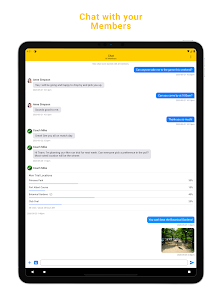
Stay connected with your team through instant messaging and notifications. Stack Team App provides a seamless communication platform that keeps everyone in the loop, ensuring that important updates and messages are shared in real-time, enhancing collaboration and teamwork.

Pros & Cons

Pros
  • Enhances team communication with real-time messaging and updates
  • Streamlines event scheduling to keep everyone informed and organized
  • Facilitates easy sharing of documents and resources among team members
  • Boosts engagement with customizable features tailored to your team’s needs
  • Offers secure access to information, ensuring privacy and data protection
Cons
  • Limited customization options may hinder branding efforts for teams.
  • User interface can be overwhelming for new users, causing confusion.
  • Integration with other tools is often lacking, reducing overall functionality.

Real Experience Using Stack Team App

Application Scenarios

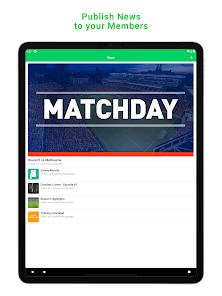
Stack Team App proves to be an invaluable tool for various scenarios, especially for sports teams, community groups, and organizations looking to streamline communication and coordination. Coaches and team managers can easily schedule practices, games, and events, ensuring that all members are informed and engaged. The app allows for the creation of multiple teams, making it convenient for multi-sport athletes or managers handling several groups simultaneously. Parents can stay in the loop regarding their children’s activities, receive real-time updates, and communicate with other parents, enhancing the sense of community. Additionally, organizations can use the app for managing events, from planning to execution, keeping everyone on the same page.

User Experience

The user experience of Stack Team App is notably smooth and intuitive. Upon signing up, users are greeted with a clean and organized interface, making navigation straightforward. The app's design allows users to easily access schedules, announcements, and team discussions without feeling overwhelmed. Notifications are timely and customizable, ensuring that users are alerted about important updates without being bombarded by irrelevant information. Furthermore, the app supports multimedia sharing, so users can upload photos and videos, enriching the team's shared experience. Users have reported a sense of camaraderie fostered by the app, as it encourages interaction and enhances team spirit through shared achievements and communication.

Pricing

One of the standout features of Stack Team App is its pricing structure, which is incredibly user-friendly. The app is free to download and offers a robust set of features without any hidden fees. This makes it accessible for teams and organizations of all sizes, from youth leagues to professional levels. While there are optional in-app purchases available for additional features, the core functionalities are sufficient for most users. This free model allows teams to focus on building their community and improving their coordination without the financial burden often associated with similar apps.

Updates & Support

Stack Team App is regularly updated to enhance user experience and address any emerging issues. The developers are attentive to user feedback, often rolling out enhancements based on community suggestions. Users can easily access support through the app, with a dedicated help section that provides answers to frequently asked questions and troubleshooting guides. Additionally, the app maintains a strong online presence, making it easy for users to report bugs or seek assistance directly. This level of support contributes to a positive experience, ensuring that users can make the most out of the app's features without prolonged disruptions.

verified Security & Privacy Review

The Stack Team App prioritizes user security and privacy, implementing robust measures to protect personal information. The app employs encryption protocols to safeguard data transmitted between users and the server, ensuring that sensitive information remains confidential. Users are required to grant specific permissions upon installation, including access to location and contacts, which are essential for facilitating team communication and coordination. However, users can manage these permissions through their device settings, allowing for greater control over what information is shared. Stack Team App follows strict data handling practices, collecting only the information necessary to enhance user experience. The app's privacy policy outlines how user data is utilized, emphasizing that personal information is not sold or shared with third parties without consent. Regular updates and security patches further strengthen the app’s defense against potential vulnerabilities. Overall, Stack Team App demonstrates a commitment to maintaining user trust by prioritizing security and transparency in its privacy practices, making it a reliable choice for team management.

Reviews

2.9

“Great for team communication and coordination!”

“User-friendly interface makes scheduling easy.”

“Reliable for managing team events and updates.”

“Love the notifications for game reminders.”

“Perfect for organizing sports teams efficiently.”

FAQ

1

Can I submit suggestions or feedback to Stack Team App?

Yes, users can submit suggestions or feedback through the app's support section or by contacting their customer service team directly.

2

Does Stack Team App collect my personal data?

Stack Team App collects personal data necessary for account creation and usage, but it prioritizes user privacy and data protection.

3

Does Stack Team App support offline use?

Yes, Stack Team App allows certain features to be accessed offline, enabling users to stay connected even without an internet connection.

4

How do I cancel my Stack Team App subscription?

You can cancel your subscription by going to your account settings within the app and following the cancellation process outlined there.

5

How much does a subscription to Stack Team App cost?

The subscription cost varies based on the features needed, but basic functionality remains free for users.

How to use Stack Team App

1

Can I change my customer number if needed?

Unfortunately, customer numbers cannot be changed. For any concerns, please reach out to customer service for further assistance.

2

How can I contact customer service for help with my Stack Team App?

You can reach our customer service via the help section in the app or email support

3

How can I ensure my account is activated successfully?

After clicking the activation link in your email, you should see a confirmation message. If you have issues, contact customer service for help.

4

How do I log in to my Stack Team App account?

To log in, open the app and enter your registered email and password. If you encounter issues, use the 'Forgot Password' link.

5

I forgot my customer number; how can I retrieve it?

You can retrieve your customer number by checking the welcome email you received upon registration or contacting customer service for help.

Editor's Choice