This site uses cookies to enhance your user experience. By clicking any link on this site you are giving your consent to our cookie policy. Read more
Reject
Accept All

Advertiser and Editorial Disclosures

SmartRent

SmartRent

verified Verified App

Developer: SmartRent

  • category

    Category: House & Home

  • price

    Price: free

  • age rating

    Age Rating: Everyone

  • rating

    Rating: 4.4

  • download

    Downloads: 500,000+

  • version

    Version: 4.8.2

Screenshot 1
Screenshot 2
Screenshot 3
Screenshot 4
Screenshot 5
Screenshot 6
Screenshot 7
Screenshot 8
Screenshot 9
Screenshot 10
Screenshot 11
Screenshot 12

Features & Highlights

Automated Alerts & Notifications

Users receive automated alerts and notifications for maintenance requests, security breaches, and other important updates. This keeps residents informed and engaged while empowering property managers to respond quickly to any situation, resulting in a smoother living environment.

Real-Time Monitoring

SmartRent offers real-time monitoring of property systems, ensuring that any issues are detected and addressed promptly. This proactive approach not only helps in maintaining the property but also enhances the overall resident experience by minimizing downtime and disruptions.

Remote Access Control

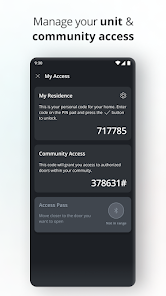
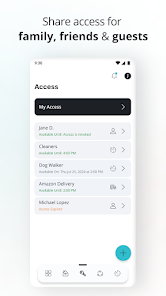
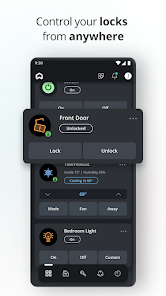
With SmartRent, property managers can grant remote access to residents and service providers, eliminating the need for physical keys. This feature enhances security and simplifies the management process, making it easier for everyone involved to access their units when needed.

Smart Home Integration

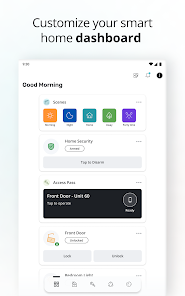
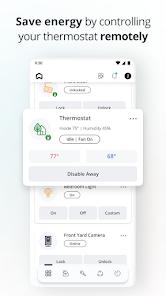
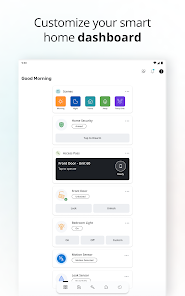
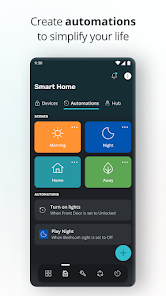
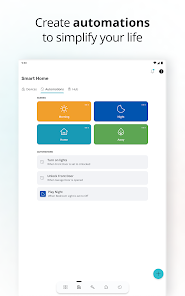
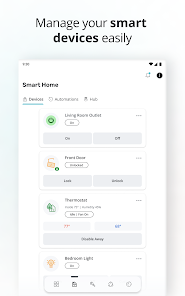
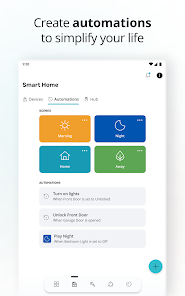
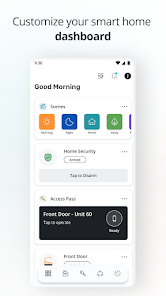
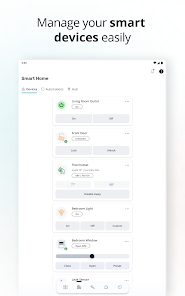
SmartRent seamlessly integrates with various smart home devices, allowing users to control lighting, thermostats, and security systems all from one app. This interconnectedness enhances convenience and energy efficiency, giving residents a modern living experience that is both comfortable and secure.

Pros & Cons

Pros
  • SmartRent enhances property management efficiency through automated systems.
  • It offers seamless integration with existing property technologies.
  • Residents enjoy convenient, secure access control for their homes.
  • Energy management features help reduce utility costs significantly.
  • The platform provides real-time data insights for informed decision-making.
Cons
  • Limited compatibility with existing home automation systems can hinder integration efforts.
  • Higher upfront costs may deter budget-conscious renters and landlords alike.
  • Dependence on internet connectivity can lead to functionality issues during outages.

Real Experience Using SmartRent

Application Scenarios

SmartRent is designed to enhance the living experience for residents in rental properties. It serves a variety of scenarios, from managing smart home devices to facilitating communication with property management. For instance, tenants can control their smart locks, lights, and thermostats all from a single application, making it easier to manage their home environment. Additionally, the app allows for seamless maintenance requests, enabling residents to report issues with just a few taps. This functionality is particularly useful in emergencies, ensuring that urgent repairs can be addressed promptly. Moreover, SmartRent's integration with community features means users can stay informed about events or announcements from their property managers, creating a more connected living experience.

User Experience

The user experience of SmartRent is intuitive and streamlined, which is crucial for users who may not be tech-savvy. Upon opening the app, users are greeted with a clean interface that categorizes features logically. Navigating through the app is straightforward, and users can easily access their smart home devices, maintenance requests, and community updates. The onboarding process is also commendable; new users are guided through the setup without overwhelming them with information. Feedback from users indicates that they appreciate the responsive design and how quickly the app performs tasks. However, some users have reported occasional glitches, particularly when syncing with smart devices, which can be frustrating. Overall, the app's design and functionality largely contribute to a positive user experience.

Pricing

SmartRent operates on a subscription model that typically varies depending on the property management's agreement with the service. For residents, there are often no direct costs associated with using the app, as it is usually provided as a complimentary service by their landlords. This makes SmartRent an appealing option for renters looking to enhance their living spaces without incurring additional charges. However, some advanced smart home features may require additional fees, which can vary based on the specific hardware and services chosen. It's advisable for users to clarify with their property management regarding any potential costs before fully committing to the app’s features.

Updates & Support

SmartRent is continually evolving, with regular updates aimed at improving functionality and user experience. These updates often include new features, bug fixes, and performance enhancements based on user feedback. The support team is accessible through the app, offering assistance via chat and email, which many users have found helpful when troubleshooting issues. Additionally, the app's help section is well-organized, providing guides and FAQs that can assist users in resolving common problems independently. Overall, the commitment to regular updates and responsive customer support enhances user satisfaction and drives the overall effectiveness of the SmartRent experience.

verified Security & Privacy Review

SmartRent places a strong emphasis on security and privacy, ensuring that users can manage their smart home devices with confidence. The app utilizes end-to-end encryption to safeguard user data, protecting sensitive information from unauthorized access during transmission. SmartRent adheres to strict data protection protocols, complying with industry standards to maintain user privacy. The app requires certain permissions to function effectively, such as access to location services and device notifications. Users are informed about these permissions during the setup process, promoting transparency in how their data will be used. SmartRent allows users to customize their privacy settings, enabling them to control what information is shared and with whom. User data handling is approached with care; SmartRent does not sell personal data to third parties. Instead, data is utilized solely for enhancing user experience and improving service functionalities. Regular updates and security patches ensure that the app remains resilient against potential threats, making SmartRent a reliable choice for those seeking smart home management solutions.

Reviews

4.4

“User-friendly interface makes managing smart home easy”

“Reliable performance with quick response times”

“Customization options are great for personalizing settings”

“Occasional connectivity issues, but overall a solid app”

“Excellent support team, very helpful and responsive”

FAQ

1

Can I submit suggestions or feedback to SmartRent?

Yes, users can submit suggestions or feedback through the app or by contacting customer support to help improve the service.

2

Does SmartRent collect my personal data?

Yes, SmartRent collects personal data to provide services, improve user experience, and for operational purposes, but it adheres to privacy policies to protect user information.

3

Does SmartRent support offline use?

SmartRent primarily requires an internet connection to function, but some features may be accessible offline depending on the app version and device capabilities.

4

How do I cancel my SmartRent subscription?

To cancel your SmartRent subscription, you typically need to contact your property management company directly, as subscriptions are often tied to their services.

5

How much does a subscription to SmartRent cost?

Subscription costs for SmartRent can vary based on the property management company and the specific features offered; users should check with their property manager for details.

How to use SmartRent

1

Can I log in on multiple devices at once?

Yes, you can log in to your SmartRent account on multiple devices simultaneously without any issues.

2

Can I update my customer number through the app?

No, customer numbers cannot be updated through the app. Please contact customer service for assistance with any changes needed.

3

How can I contact SmartRent customer service?

You can reach SmartRent customer service by calling our support line or using the chat feature in the app. We’re here to help!

4

How do I activate my SmartRent account?

To activate your account, follow the link sent to your email during registration and complete the setup process. If you need help, contact customer service.

5

How do I change my customer number if needed?

Customer numbers are unique identifiers. To change it, please contact customer service for guidance and support.

Editor's Choice