
 Home
Home  Apps
Apps  Games
Games  Windows
  Topics
  Terms of Service
  Cookies & Privacy Policy
  About us
 Instant ID Cards
Safeco Mobile allows you to access your insurance ID cards digitally. No more fumbling through your wallet; simply pull up your card on your device whenever needed, making it easy to prove your coverage whenever you're asked.


Safeco Insurance Company of America
 4.7
4.7 
Category: Finance

Price: free

Age Rating: Everyone

Rating: 4.7

Available on: /

Updated on: Jun 12, 2026
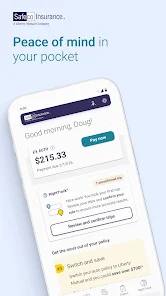
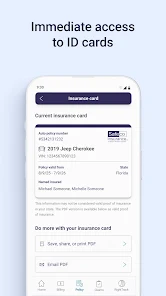
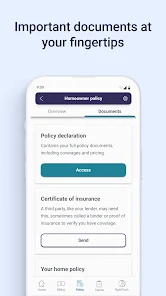
Safeco Mobile allows you to access your insurance ID cards digitally. No more fumbling through your wallet; simply pull up your card on your device whenever needed, making it easy to prove your coverage whenever you're asked.
Easily manage your insurance policies with Safeco Mobile. You can view coverage details, make changes, and even check payment history, all from the convenience of your mobile device, putting you in control of your insurance needs anytime, anywhere.
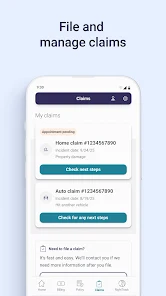
Safeco Mobile makes it easy to file claims directly from your smartphone. With just a few taps, you can submit necessary information and photos, streamlining the process and ensuring you get the help you need without the hassle of paperwork.
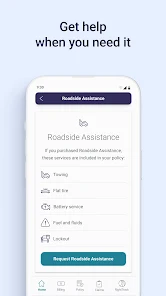
In case of emergencies, Safeco Mobile offers quick access to roadside assistance. Whether you need a tow, fuel delivery, or help with a flat tire, you can request help in seconds, ensuring peace of mind when you’re on the road.

 Convenient access to insurance on-the-go User-friendly interface for easy navigation Quick claims process for faster resolutions Personalized policy management at your fingertips Real-time updates keep you informed anytime
 Limited customer service options available App may experience technical glitches Navigation can be confusing for users Coverage may not meet everyone's needs
 The Safeco Mobile app is designed to cater to a variety of insurance needs, offering users the ability to manage their policies, file claims, and access important documents from the convenience of their smartphones. Whether you're a busy professional on the go, a parent juggling multiple responsibilities, or simply someone who prefers the ease of digital management, the app provides a seamless experience. Users can easily navigate through their auto, home, or renters insurance policies, ensuring that all vital information is accessible at their fingertips. Additionally, the app is particularly beneficial during emergencies; for instance, if you’re involved in an accident, you can quickly file a claim by uploading photos and providing details directly through the app. This immediate access to resources and support is invaluable for users who want to resolve issues promptly and efficiently.
The user experience of the Safeco Mobile app is notably intuitive, with a clean and organized interface that promotes easy navigation. Users report that logging in is straightforward, and the dashboard provides a clear overview of all active policies and their relevant details. The app incorporates helpful features such as push notifications for policy updates and reminders for upcoming payments, ensuring that users stay informed without having to constantly check for changes. Moreover, the claims process is simplified with step-by-step guidance, making it less daunting for those unfamiliar with filing insurance claims. However, some users have expressed that occasional bugs and slow loading times can detract from the overall experience. Despite this, the app's functionality generally meets expectations, especially for managing insurance on-the-go.
Safeco Mobile itself is free to download and use, which is a significant advantage for users looking to manage their insurance without incurring additional costs. However, it’s essential to note that the actual insurance policies available through Safeco vary in pricing based on individual needs, coverage options, and risk assessments. Users can obtain quotes directly through the app, making it easier to compare different policy options and tailor coverage to their budget. This flexibility allows users to find affordable solutions without compromising on essential coverage, making it a cost-effective choice for many.
The Safeco Mobile app is regularly updated to enhance its functionality and user experience. The development team is actively working to fix bugs and improve performance based on user feedback, which is a promising sign for potential users. Additionally, the app includes a dedicated support feature that connects users with customer service representatives for any queries or issues. Users appreciate the availability of resources such as FAQs and live chat options, providing them with quick answers when needed. Overall, the commitment to updates and customer support reinforces Safeco's dedication to delivering a reliable and user-friendly mobile insurance management solution.
Security & Privacy Review


Would give zero stars if possible. This app is rigged to weigh things as badly as possible in order to save money for the insurance company. It will take your worst score & treat that as the average. 10/10 do NOT recommend, unless you are saving money simply for participating, completely independent of your driving score. Do better, Safeco. As other users have mentioned, interface is easy to use. However, app drains phone battery & doesn't work with battery saver mode.
App is great,but the customer service is not. Policy increased almost $500 randomly. I received a notice of "a change" 3 months after it started. I was told I never submitted a form. But it was not a part of my initial paperwork, nor was it ever sent to me. I'm looking at my dashboard, email, spam folder, junk folder, and nothing outside of my welcome packet, payment reminders, receipts & the change email. They removed a discount that they refuse to take back to inception. Lost a customer.
I can't log in the app using my Samsung phone. The app has a continuous loop of asking me to log in and verifying. I gave up. Fix your app. Get rid of multiple layers of security. It is an insurance app, not a bank account. No need for this. Especially if it doesn't work. Also, I can't make any coverage or billing changes with the app. So basically useless.
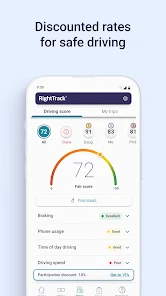
App is ok. Nice to have digital insurance cards so easily available. RightTrack is an absolute scam and these people should be barred from using it. It is impossible to obtain a score high enough for their *up to 30%* claim. False advertising at its finest. Sign up, drive the minimum distance with zero events, then be a passenger the rest of the time. You'll get your discount and maybe if enough people do it, they'll make a better program and stop stealing from and punishing it's customers.
This app will track EVERYTHING. If you put your phone in your pocket, it will count as a "drive". One "drive" at night gives puts you in the yellow. And they pretend they don't know of the app being that sensitive, although I have read the complaints about its inaccuracy. And instead of them trying to fix it, they will just try to convince you to keep it for the whole 90 days. I have already received a notification that there will be a bill increase; I'm only at 60 days. No explanation.
Review Source: Google Play store public user reviews.
Yes, Safeco Mobile collects personal data necessary for providing services, such as your name, contact information, and policy details, but it adheres to privacy regulations.
Safeco Mobile is free to download and use, but some features may require an active insurance policy or subscription.
Yes, Safeco Mobile requires an active internet connection to access features and services, as it relies on cloud-based data.
You can contact Safeco Mobile support through the app by navigating to the help section, or by visiting the Safeco Insurance website for additional contact options.
You can manage or cancel your subscription through your account settings in the app or by contacting Safeco's customer support for assistance.
You can access customer service by tapping the "Help" or "Contact Us" section within the app. This will provide you with options to call or chat with a representative.
If prompted, follow the on-screen instructions to activate your app using your policy number and personal information. This may include verification via email or SMS.
Open the app, enter your username and password, then tap "Log In." If you don’t have an account, you can create one directly in the app.
You can find the customer service number in the app under the "Contact Us" section or on the Safeco website for assistance.
Big update! Safeco is now Liberty Mutual. Safeco customers can use the Liberty Mutual app and sign in with their existing Safeco login credentials.
 Google Play
  App Store






























