This site uses cookies to enhance your user experience. By clicking any link on this site you are giving your consent to our cookie policy. Read more
Reject
Accept All

Advertiser and Editorial Disclosures

Recipe Keeper

Recipe Keeper

verified Verified App

Developer: Tudorspan Limited

  • category

    Category: Food & Drink

  • price

    Price: free

  • age rating

    Age Rating: Everyone

  • rating

    Rating: 4.7

  • download

    Downloads: 1,000,000+

  • version

    Version: 3.45.1.0

Screenshot 1
Screenshot 2
Screenshot 3
Screenshot 4
Screenshot 5
Screenshot 6
Screenshot 7
Screenshot 8

Features & Highlights

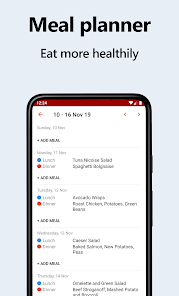
Built-In Meal Planner

The app includes a handy meal planner that lets you schedule your meals for the week. You can drag and drop recipes into your planning calendar, making it convenient to organize your cooking and grocery shopping. This feature helps you stay on track with your meal prep and saves time during busy weeks.

Ingredient Scale Adjustment

With Recipe Keeper, adjusting ingredient quantities is a breeze. Whether you're cooking for one or a large gathering, simply scale your ingredients up or down with a swipe, ensuring you have just the right amount for your needs. This feature helps minimize waste and enhances your cooking experience.

Smart Recipe Organization

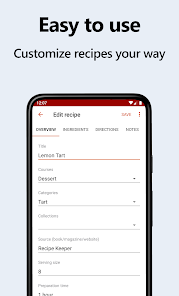
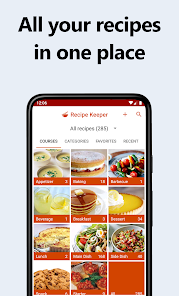
Recipe Keeper makes it easy to categorize and organize your favorite recipes. You can create custom folders and tags, allowing you to quickly find what you're looking for, whether it's a family favorite or a new dish you want to try. Say goodbye to messy recipe collections and hello to seamless organization.

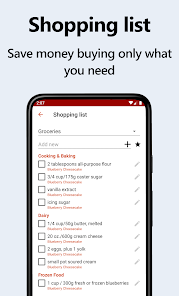
User-Friendly Grocery List

Recipe Keeper automatically generates a grocery list based on your selected recipes, making shopping effortless. You can customize the list to add or remove items as needed, ensuring you have everything on hand for your culinary creations. This feature streamlines meal preparation and helps you shop efficiently.

Pros & Cons

Pros
  • Easily organize your favorite recipes in one place
  • Quickly search for recipes by ingredients or keywords
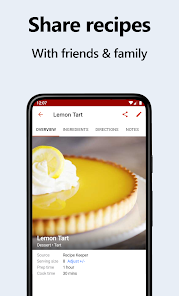
  • Share recipes effortlessly with friends and family
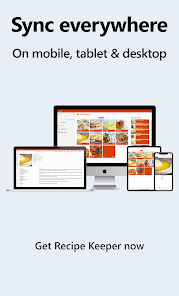
  • Access recipes from any device, anytime, anywhere
  • Save time with meal planning and grocery lists
Cons
  • Limited search functionality can hinder recipe discovery
  • Syncing issues may lead to data loss
  • User interface may feel outdated for some users
  • Lacks integration with grocery delivery services

Real Experience Using Recipe Keeper

Application Scenarios

Recipe Keeper is the perfect app for home cooks, culinary enthusiasts, and anyone looking to streamline their meal planning. Whether you are preparing a family dinner, hosting a gathering, or simply trying to eat healthier, Recipe Keeper provides a versatile platform to store and organize your favorite recipes. Users can create personalized collections based on dietary preferences, occasions, or cuisines, making it easy to find inspiration for any meal. Additionally, the app’s meal planning feature allows you to schedule meals for the week ahead, ensuring that you have all the necessary ingredients on hand, thereby reducing waste and saving time during busy weekdays.

User Experience

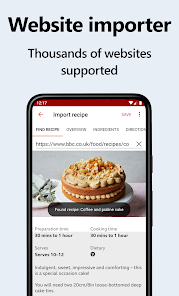
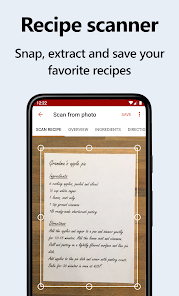
The user experience of Recipe Keeper is intuitive and user-friendly, making it accessible for all skill levels. Upon opening the app, users are greeted with a clean interface that allows for easy navigation through different sections, such as recipes, meal plans, and shopping lists. The recipe input feature is particularly noteworthy, allowing users to upload recipes via photos or text, and even enabling the extraction of ingredients from uploaded images. This seamless integration enhances the overall cooking experience, as users can quickly search for ingredients or recipes using keywords. The app also supports sharing features, allowing users to send recipes to friends and family via social media or direct messaging, fostering a sense of community among home cooks.

Pricing

Recipe Keeper offers a flexible pricing model that caters to various user needs. The app is available for free with basic features, which is perfect for casual users who want to manage a small collection of recipes. For those seeking a more comprehensive experience, the premium version is available through a subscription model. This includes advanced features such as unlimited recipe storage, enhanced meal planning tools, and access to an extensive database of recipes from renowned chefs. The pricing is competitive with similar apps, making it a worthwhile investment for avid cooks who want to enhance their culinary journey.

Updates & Support

Regular updates are a hallmark of Recipe Keeper, ensuring that the app evolves with user feedback and emerging culinary trends. The developers are committed to enhancing functionality and introducing new features that meet the demands of modern cooking. Users can easily access support through the app, with options for FAQs, in-app tutorials, and direct customer service contact. The active community forum also allows users to share tips and tricks, fostering a collaborative environment. Overall, Recipe Keeper is dedicated to providing continuous improvement and support, making it a reliable companion in the kitchen.

verified Security & Privacy Review

The Recipe Keeper app demonstrates a strong commitment to user security and privacy. It employs robust encryption protocols to protect sensitive data, ensuring that recipes and user information remain secure from unauthorized access. The app’s privacy policy is transparent, detailing how user data is collected, utilized, and shared. In terms of permissions, Recipe Keeper requests only essential access, such as storage for saving recipes and camera access for scanning ingredients. This approach minimizes the risk of unnecessary data exposure. Users have the option to manage their preferences regarding data sharing, allowing for greater control over personal information. Additionally, Recipe Keeper implements regular security updates to address potential vulnerabilities, demonstrating an ongoing commitment to safeguarding user data. The app does not sell user information to third parties, further reinforcing its dedication to privacy. Overall, Recipe Keeper strikes a commendable balance between functionality and security, making it a trustworthy choice for users looking to store and manage their culinary creations.

Reviews

4.7

“User-friendly interface makes cooking a breeze”

“Love the easy recipe organization feature”

“Perfect for saving family recipes securely”

“Great for meal planning and grocery lists”

“Syncs perfectly across devices, very convenient”

FAQ

1

Does Recipe Keeper collect my personal data?

Recipe Keeper respects user privacy and does not collect personal data unless users explicitly provide it for features like account creation or support.

2

Does Recipe Keeper offer a free trial or free version?

Yes, Recipe Keeper offers a free version with basic functionalities, as well as a premium subscription that unlocks additional features.

3

Does Recipe Keeper require an internet connection?

Recipe Keeper can be used offline, but an internet connection is required for features such as syncing between devices and accessing online recipe sources.

4

How can I contact support or send feedback for Recipe Keeper?

You can contact Recipe Keeper support through the app's help section or by visiting their official website, where you can also submit feedback.

5

How do I manage or cancel my Recipe Keeper subscription?

You can manage or cancel your Recipe Keeper subscription through your app store account settings or directly within the app under the subscription management section.

How to use Recipe Keeper

1

How can I contact Customer Service for the Recipe Keeper app?

You can reach Customer Service through the app's settings menu or visit our website for support options.

2

How do I activate my Recipe Keeper app?

To activate, download the app, open it, and either log in with your existing account or create a new one to start.

3

How do I log in to my Recipe Keeper account?

Open the app and click 'Log In.' Enter your registered email and password to access your account.

4

Is activation necessary for Recipe Keeper?

Yes, after downloading the app, you need to activate it by logging in or creating an account.

5

What is the Customer Number for Recipe Keeper support?

You can find the Customer Number in the app under 'Help' or on our official website's contact page.

Editor's Choice