This site uses cookies to enhance your user experience. By clicking any link on this site you are giving your consent to our cookie policy. Read more
Reject
Accept All
PS Remote Play

PS Remote Play

verified Verified App

Developer: PlayStation Mobile Inc.

  • category

    Category: Entertainment

  • price

    Price: free

  • age rating

    Age Rating: Everyone

  • rating

    Rating: 2.8

  • download

    Downloads: 10,000,000+

  • version

    Version: 8.5.1

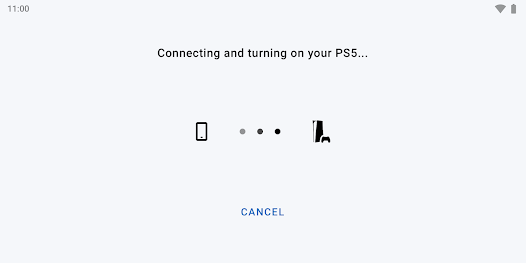
Screenshot 1
Screenshot 2
Screenshot 3
Screenshot 4
Screenshot 5
Screenshot 6

Features & Highlights

Full Control Features

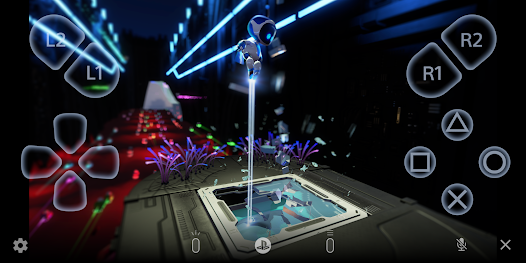
PS Remote Play offers a comprehensive control scheme that mimics the console experience, allowing you to use on-screen controls or connect a DualShock or DualSense controller for added precision. This ensures that your gameplay remains smooth and responsive, even when you're away from your console.

Mobile Gaming Experience

With PS Remote Play, you can enjoy your favorite PlayStation games on your mobile devices, allowing for a seamless gaming experience wherever you are. Simply connect to a reliable Wi-Fi network, and dive into your game library right from your smartphone or tablet, making gaming more accessible than ever.

Multiple Device Support

Whether you’re using a PlayStation console, PC, or mobile device, PS Remote Play has you covered. The app supports a range of platforms, ensuring you can connect and play your games from virtually anywhere, so you never miss a moment of your gaming adventures.

Online Multiplayer Capability

Connect with friends and join multiplayer games from your mobile device using PS Remote Play. You can engage in competitive or cooperative gameplay without needing to be physically present at your console, making it easy to stay connected with your gaming community.

Pros & Cons

Pros
  • Play anywhere with Wi-Fi connectivity
  • Access your PS games on mobile devices
  • Seamless transition between console and remote play
  • Share gaming experiences with friends easily
  • Enjoy flexible gaming schedules anytime, anywhere
Cons
  • Requires a stable internet connection for optimal performance
  • Limited game compatibility with certain titles unavailable
  • Input lag can affect gameplay experience negatively
  • Dependent on device performance and battery life

Real Experience Using PS Remote Play

Application Scenarios

PS Remote Play is a versatile application designed for gamers who want to enjoy their PlayStation games away from their console. Whether you're at home in a different room or on the go, this app allows you to stream your PS4 or PS5 games directly to your mobile device, tablet, or PC. Imagine being able to continue your gaming session while waiting for a friend, or even during a lunch break at work. The app supports a wide range of scenarios, allowing you to play games with friends over a shared network or even challenge yourself solo. Additionally, it’s perfect for parents who want to keep an eye on their children while still enjoying their own gaming experience.

User Experience

The user experience with PS Remote Play is generally seamless, thanks to its intuitive interface and straightforward setup. Users can easily connect their devices to their PlayStation console, provided they have a stable internet connection. The app offers customizable control options, enabling players to choose between touchscreen controls or pairing with a DualShock or DualSense controller for a more authentic gaming experience. However, the performance can vary based on your network speed; a strong Wi-Fi connection is recommended for optimal gameplay. Most users report minimal lag and decent graphics quality, though some may experience latency issues in high-action games. Overall, the convenience of gaming anywhere makes it a valuable addition to the PlayStation ecosystem.

Pricing

One of the standout features of PS Remote Play is that it is completely free to download and use. There are no hidden fees or subscriptions required to access your games, making it an attractive option for gamers looking to maximize their PlayStation experience without additional costs. However, it’s essential to consider that while the app itself is free, users will still need to invest in a PlayStation console and games to utilize the service fully. The absence of a pricing model for the app makes it accessible to all PlayStation owners, providing excellent value.

Updates & Support

PS Remote Play is regularly updated to enhance performance and introduce new features, ensuring compatibility with the latest PlayStation console updates. Sony actively listens to user feedback, making adjustments based on community suggestions and addressing common issues. The support resources available, including an extensive FAQ section and community forums, help users troubleshoot problems efficiently. Should you encounter any technical difficulties, Sony's customer support is readily accessible, providing a reliable lifeline for users needing assistance. Overall, the continuous updates and robust support system contribute to a positive user experience, keeping gamers engaged and satisfied.

verified Security & Privacy Review

The PS Remote Play app prioritizes user security and privacy by implementing robust data encryption and secure authentication methods. When users connect to their PlayStation consoles, the app establishes a secure connection to protect sensitive information from potential threats. In terms of permissions, the app requires access to the device's network and storage to function effectively. Users should be aware that while the app may request access to their microphone and camera for voice chat or streaming features, these permissions are optional and can be managed through the device settings. This ensures that users maintain control over their personal data. Sony's privacy policy outlines how user data is collected, used, and shared. The company commits to protecting personal information and only utilizing it to enhance the user experience, such as offering tailored recommendations or improving service performance. Overall, PS Remote Play demonstrates a commitment to maintaining user privacy and data security, making it a reliable choice for gamers looking to connect remotely to their consoles.

Reviews

2.8

“Great for gaming on the go!”

“Connection can be unstable sometimes.”

“User-friendly interface and easy setup.”

“Perfect for remote play with friends.”

“Graphics quality is impressive for mobile streaming.”

Editor's Choice