This site uses cookies to enhance your user experience. By clicking any link on this site you are giving your consent to our cookie policy. Read more
Reject
Accept All
Pro Guitar Tuner

Pro Guitar Tuner

verified Verified App

Developer: ProGuitar

  • category

    Category: Entertainment

  • price

    Price: free

  • age rating

    Age Rating: Everyone

  • rating

    Rating: 4.1

  • download

    Downloads: 10,000,000+

  • version

    Version: 6.0.9

Screenshot 1
Screenshot 2
Screenshot 3
Screenshot 4
Screenshot 5
Screenshot 6
Screenshot 7
Screenshot 8
Screenshot 9
Screenshot 10

Features & Highlights

Custom Tuning Options

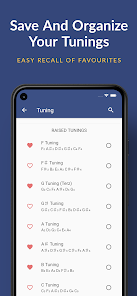
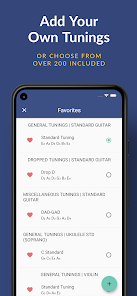
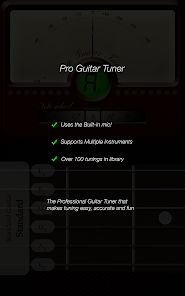
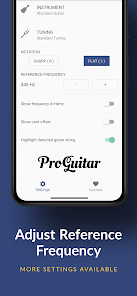
Tailor your tuning experience with custom settings that allow you to create and save unique tuning profiles. Whether you need standard tuning or something more specialized, Pro Guitar Tuner has you covered, giving you the freedom to explore new sounds.

Multiple Instrument Support

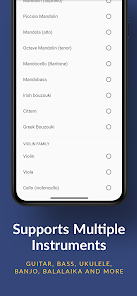
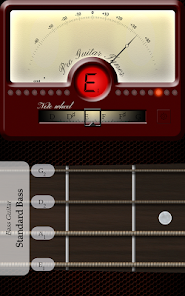
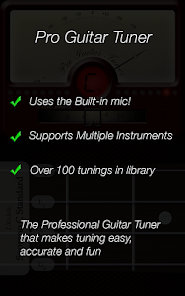
Not just for guitars, this app accommodates various stringed instruments, including basses and ukuleles. This versatility allows musicians to switch between instruments without needing separate tuners, making it a convenient tool for multi-instrumentalists.

Precision Tuning

Pro Guitar Tuner offers highly accurate tuning capabilities, ensuring your guitar sounds its best. With advanced algorithms, it detects pitch with precision, making it ideal for both beginners and seasoned musicians looking for reliable tuning support.

User-Friendly Interface

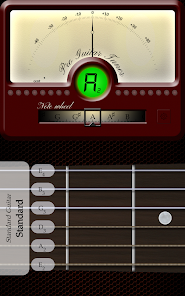
The intuitive design of Pro Guitar Tuner makes it easy to navigate through different tuning options. With clear visuals and straightforward controls, users can quickly find their way around the app, allowing them to focus on what really matters—playing music.

Pros & Cons

Pros
  • Accurate tuning for perfect pitch every time
  • User-friendly interface for quick adjustments
  • Supports various instruments beyond guitars
  • Real-time feedback for instant tuning results
  • Portable app for tuning anywhere, anytime
Cons
  • Limited tuning options for non-standard instruments
  • Requires internet access for full functionality
  • May drain battery quickly on mobile devices
  • Interface can be cluttered and confusing

Real Experience Using Pro Guitar Tuner

Application Scenarios

Pro Guitar Tuner is designed to cater to a wide range of users, from complete beginners to seasoned musicians. Whether you are practicing alone, jamming with friends, or performing live on stage, this app proves to be an invaluable tool. The app is particularly useful for guitarists looking to quickly tune their instruments before a performance or practice session. However, its versatility extends beyond just guitars; it also supports various string instruments, including bass guitars, violins, and ukuleles. With its precise tuning capabilities, you can rely on Pro Guitar Tuner to ensure your instrument always sounds its best, regardless of the setting.

User Experience

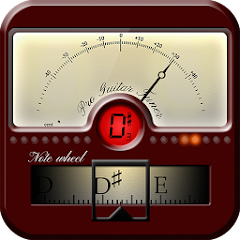
The user interface of Pro Guitar Tuner is clean and intuitive, making it easy for anyone to navigate, regardless of their technical proficiency. Upon launching the app, users are greeted with a simple visual interface that displays the note being played and its corresponding pitch. The real-time feedback is impressive, allowing players to see whether their instrument is in tune or requires adjustment. The app also offers various tuning modes, such as standard, drop D, and open tunings, providing flexibility for different genres and playing styles. Many users report that the microphone sensitivity is top-notch, accurately detecting pitches even in noisy environments. Overall, the app delivers a smooth and enjoyable user experience, making tuning an effortless task.

Pricing

Pro Guitar Tuner adopts a freemium pricing model, allowing users to download and utilize basic features at no cost. However, for those seeking advanced functionalities, such as custom tunings and additional instrument support, a premium version is available for a reasonable one-time fee. This pricing strategy is appealing, as it allows users to explore the app’s capabilities before committing to a purchase. Many users find that the premium features are well worth the investment, especially for musicians who frequently perform or record.

Updates & Support

The developers of Pro Guitar Tuner are committed to providing regular updates to enhance functionality and user experience. Many users have noted that the app receives timely improvements based on user feedback. Additionally, the support system is responsive, with a dedicated FAQ section addressing common queries and issues. Users can also reach out to the support team for personalized assistance, ensuring that any problems are resolved quickly. This commitment to customer service contributes significantly to the overall satisfaction of the app’s user base, fostering a loyal community of musicians.

verified Security & Privacy Review

Pro Guitar Tuner takes user security and privacy seriously, implementing robust measures to protect sensitive information. The app does not require an account, minimizing the collection of personal data. As a result, users can enjoy its features without the need to provide personal identifiers. In terms of permissions, Pro Guitar Tuner requests access only to essential device functions necessary for its operation. This typically includes microphone access to capture sound for tuning purposes. The app does not ask for unnecessary permissions, which helps reduce potential vulnerabilities. Pro Guitar Tuner adheres to standard privacy practices, ensuring that any data temporarily processed during usage is not stored or shared with third parties. The absence of ads further enhances the user experience, as it eliminates the risk of data tracking commonly associated with advertisement-based models. Overall, Pro Guitar Tuner demonstrates a commitment to user privacy, providing a secure environment for guitar enthusiasts to tune their instruments effectively.

Reviews

4.1

“Accurate tuning, easy to use and reliable!”

“Great for beginners and experienced guitarists alike.”

“User-friendly interface with clear sound feedback.”

“Perfect for quick tune-ups before gigs.”

“Love the chromatic tuning feature!”

Editor's Choice