This site uses cookies to enhance your user experience. By clicking any link on this site you are giving your consent to our cookie policy. Read more
Reject
Accept All
PlayStation App

PlayStation App

verified Verified App

Developer: PlayStation Mobile Inc.

  • category

    Category: Entertainment

  • price

    Price: free

  • age rating

    Age Rating: Teen

  • rating

    Rating: 3.6

  • download

    Downloads: 100,000,000+

  • version

    Version: 26.1.0

Screenshot 1
Screenshot 2
Screenshot 3
Screenshot 4
Screenshot 5
Screenshot 6
Screenshot 7
Screenshot 8
Screenshot 9
Screenshot 10
Screenshot 11
Screenshot 12
Screenshot 13
Screenshot 14
Screenshot 15
Screenshot 16
Screenshot 17
Screenshot 18

Features & Highlights

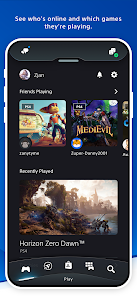
Friends and Activity Feed

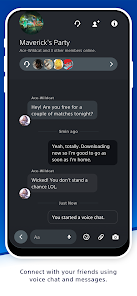
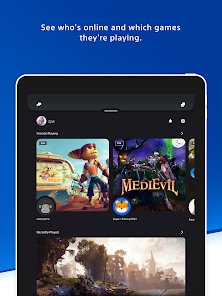
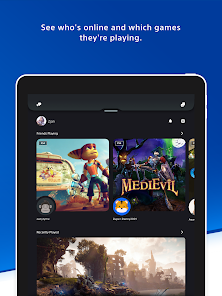
Stay connected with your gaming friends through a dynamic activity feed that showcases their recent achievements and gameplay. This feature allows you to celebrate their milestones, send messages, or even join them in their current games, fostering a vibrant gaming community.

Game Library Access

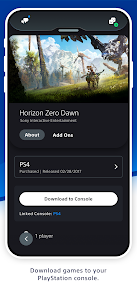
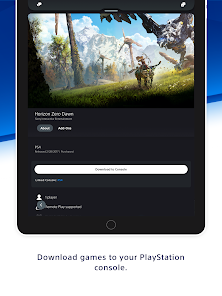
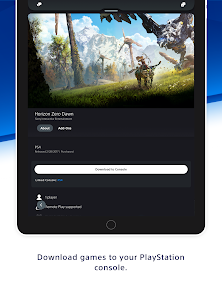
Easily browse and manage your entire PlayStation game library directly from the app. Whether you're looking to download new titles or revisit classics, the intuitive interface makes it simple to keep track of your games, ensuring you're always ready to jump back in whenever you want.

Game Notifications

Receive real-time notifications for game updates, upcoming events, and sales directly on your mobile device. This ensures you never miss a moment, whether it's a new game release or a limited-time offer, keeping you engaged and informed about the PlayStation ecosystem.

Remote Play Functionality

With Remote Play, you can stream your PlayStation games directly to your mobile device, allowing you to play anywhere with a Wi-Fi connection. This feature brings the console experience into your hands, making it easy to enjoy your favorite titles on the go.

Pros & Cons

Pros
  • Stay connected with friends and gaming communities easily
  • Access your game library anytime, anywhere with convenience
  • Receive real-time notifications for game updates and events
  • Manage downloads remotely to save time and space
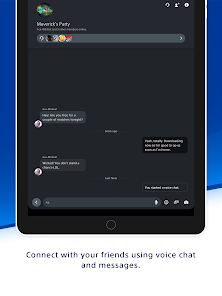
  • Join voice chats and discussions on the go effortlessly
Cons
  • Limited features compared to console experience
  • Frequent connectivity issues during gameplay
  • User interface can be confusing for new users
  • Notifications may be delayed or inconsistent

Real Experience Using PlayStation App

Application Scenarios

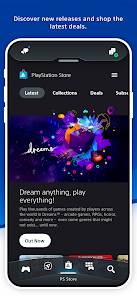
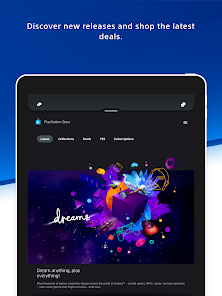
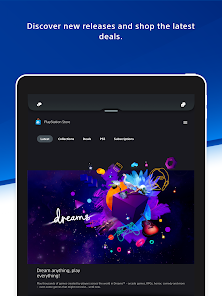
The PlayStation App serves as a multifunctional companion for gamers, enhancing their overall gaming experience. Whether you're waiting in line, commuting, or relaxing at home, the app allows you to stay connected with your gaming community. You can browse the PlayStation Store for the latest games and downloadable content, purchase titles directly from your mobile device, and even remotely download games to your console. This feature is particularly useful for those who want to maximize their gaming time. Additionally, the app facilitates communication with friends, enabling users to chat, send messages, and even create party chats on-the-go. For competitive gamers, the app provides access to game stats, trophies, and achievements, allowing users to track their progress and compare it with friends.

User Experience

The user experience on the PlayStation App is generally smooth and intuitive. The interface is well-designed, with clearly labeled sections that make navigation easy for both new and seasoned users. The app’s responsiveness is commendable, with quick loading times and seamless transitions between different functionalities. Notifications about game updates, friend requests, and activity feeds keep users engaged without overwhelming them. However, some users have reported occasional bugs, such as connectivity issues or crashes during gameplay sessions. Despite these minor inconveniences, the app effectively brings the PlayStation experience to mobile devices, allowing gamers to remain engaged with their favorite titles and friends.

Pricing

The PlayStation App is available for free, which makes it an attractive option for gamers looking to enhance their gaming experience without incurring additional costs. While the app itself is free to download and use, users can make in-app purchases through the PlayStation Store. This pricing model allows gamers to explore a wide range of content and services without a subscription fee, making it accessible to a large audience. The ability to purchase games and DLC directly through the app adds convenience, ensuring that players can quickly access new content as it becomes available.

Updates & Support

Regular updates to the PlayStation App demonstrate Sony's commitment to improving user experience and incorporating new features. These updates often include bug fixes, performance enhancements, and new functionalities based on user feedback. The support system is also robust, with a dedicated help center and forums where users can find solutions to common issues. Additionally, social media channels provide real-time updates and community engagement, ensuring that users feel connected and supported. Overall, the combination of regular updates and responsive support contributes to a positive user experience, making the PlayStation App a valuable tool for gamers.

verified Security & Privacy Review

The PlayStation App prioritizes user security and privacy, incorporating robust measures to safeguard personal information. The app employs encryption protocols to protect data during transmission, ensuring that sensitive details remain secure against unauthorized access. Additionally, it offers two-factor authentication, providing an extra layer of security for user accounts. In terms of permissions, the PlayStation App requires access to essential features such as the device’s storage, camera, and location services. Users are informed of these permissions during the installation process, allowing for informed consent. However, it is advisable for users to regularly review permissions and adjust them according to their comfort level. The app's privacy policy clearly outlines data collection practices, specifying that user data may be used for improving services, personalizing experiences, and facilitating customer support. Users have control over their data, with options to manage privacy settings and review collected information. Overall, the PlayStation App demonstrates a commitment to maintaining user privacy while delivering a comprehensive gaming experience.

Reviews

3.6

“Great for managing game downloads on the go!”

“User-friendly interface makes navigation easy.”

“Love the social features for connecting with friends.”

“Notifications keep me updated on game events.”

“Performance issues need improvement for smoother usage.”

Editor's Choice