This site uses cookies to enhance your user experience. By clicking any link on this site you are giving your consent to our cookie policy. Read more
Reject
Accept All

Advertiser and Editorial Disclosures

Planta: Plant & Garden Care

Planta: Plant & Garden Care

verified Verified App

Developer: Planta AB

  • category

    Category: House & Home

  • price

    Price: free

  • age rating

    Age Rating: Everyone

  • rating

    Rating: 4.2

  • download

    Downloads: 1,000,000+

  • version

    Version: 2.45.0

Screenshot 1
Screenshot 2
Screenshot 3
Screenshot 4
Screenshot 5
Screenshot 6
Screenshot 7

Features & Highlights

Care Guides & Tips

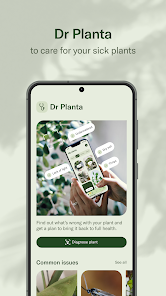
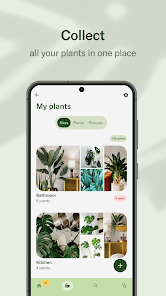
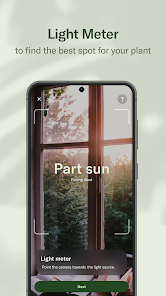
Planta offers a wealth of tailored care guides and tips for each plant in your collection. From optimal light conditions to fertilization schedules, the app equips you with the knowledge to nurture your greenery, ensuring they thrive in your home or garden.

Plant Identification Tool

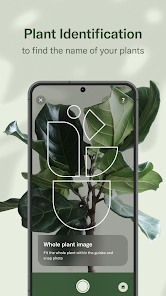
Easily identify plants with Planta's advanced recognition feature. Simply snap a photo, and the app will provide you with detailed information about the species, care tips, and potential issues, making it a breeze to expand your plant knowledge.

Progress Tracking

Keep track of your plants' health and growth with Planta's intuitive progress tracking feature. By logging your care routines and noting changes over time, you can celebrate milestones and make informed adjustments to your care practices, fostering a deeper connection with your plants.

Smart Watering Schedule

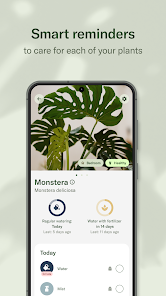
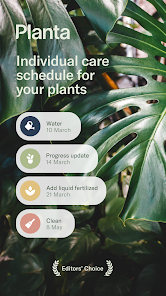
Planta helps you keep your plants hydrated with personalized watering reminders based on their specific needs. By considering factors like species, environment, and season, the app ensures your plants receive just the right amount of water, promoting healthy growth and vitality.

Pros & Cons

Pros
  • Planta offers personalized care tips tailored to each plant's needs.
  • Track your plants' growth progress with easy-to-use visual tools.
  • Receive timely reminders for watering, fertilizing, and repotting tasks.
  • Access a vast database of plants for quick identification and information.
  • Connect with a community of plant enthusiasts for support and inspiration.
Cons
  • Limited plant identification features may overlook certain species.
  • User interface can be confusing for beginners.
  • Subscription costs add up over time, leading to potential budget concerns.

Real Experience Using Planta: Plant & Garden Care

Application Scenarios

Planta: Plant & Garden Care is designed for a wide range of users, from novice plant owners to seasoned horticulturists. Users can employ the app for various scenarios, such as managing indoor houseplants, outdoor gardens, or even herb and vegetable patches. It serves as an essential tool for anyone looking to enhance their gardening skills, offering tailored care schedules based on the specific needs of each plant. Users can input their plant types and locations, and the app provides timely reminders for watering, fertilizing, and repotting. Its versatility allows gardeners to track their plants' health and growth, ensuring they can cultivate a thriving green space.

User Experience

The user experience of Planta is largely positive, characterized by an intuitive interface and seamless navigation. Upon opening the app, users are greeted with a clean layout that makes it easy to find information about their plants. The addition of a plant identification feature allows users to snap a photo of their plants, instantly receiving care guidelines tailored to that species. Users appreciate the personalized care calendar that helps them stay organized and accountable in maintaining their plants. Moreover, the community feature fosters engagement among plant enthusiasts, allowing users to share their experiences, tips, and success stories. Overall, Planta transforms the often-daunting task of plant care into a manageable and enjoyable experience.

Pricing

Planta operates on a freemium model, allowing users to access basic features without any cost. However, to unlock the full potential of the app, including the comprehensive plant library, personalized care schedules, and advanced features, users must subscribe to a premium plan. The pricing is competitive, with options for monthly and yearly subscriptions, providing flexibility for users. While some may find the premium subscription a bit costly, many agree that the wealth of information and support offered justifies the investment, especially for dedicated plant lovers looking to expand their gardening knowledge.

Updates & Support

Planta is committed to continuous improvement, frequently releasing updates that enhance user experience and add new features. The developers actively listen to user feedback, implementing requested functionalities that cater to the evolving needs of the gardening community. Support is readily available through in-app resources and a responsive customer service team, ensuring users can quickly resolve any issues they encounter. The active community forums provide additional support, where users can exchange advice and solutions, fostering a collaborative environment. Overall, the commitment to updates and support contributes significantly to the app’s reliability and user satisfaction.

verified Security & Privacy Review

The security and privacy practices of the Planta: Plant & Garden Care app appear to be robust, ensuring that user data is handled with care. The app implements encryption for data transmission, which helps protect sensitive information from unauthorized access. User accounts are secured with strong authentication methods, minimizing the risk of account breaches. In terms of permissions, Planta requires access to certain device features, such as location services for customized plant care recommendations. Users are informed about these permissions and have the option to grant or deny access based on their preferences. The app's privacy policy outlines how user data is collected, used, and shared, emphasizing a commitment to transparency. Planta does not sell user data to third parties, and users' personal information is used primarily for enhancing the app experience. Regular updates are provided to address any potential security vulnerabilities, ensuring that user data remains protected. Overall, Planta demonstrates a strong emphasis on data security and user privacy, making it a trustworthy choice for plant enthusiasts.

Reviews

4.2

“Easy to use and very informative!”

“My plants have never thrived better!”

“Great reminders for watering and care.”

“Love the plant identification feature!”

“User-friendly interface and helpful tips.”

FAQ

1

Can I submit suggestions or feedback to Planta - Care for your plants?

Yes, users are encouraged to provide feedback and suggestions, which can typically be submitted through the app or the official website.

2

Does Planta - Care for your plants collect my personal data?

Planta does collect some personal data to enhance user experience, but it adheres to privacy policies to protect user information.

3

Does Planta - Care for your plants support offline use?

Yes, Planta allows users to access certain features offline, although some functionalities may require an internet connection.

4

How do I cancel my Planta - Care for your plants subscription?

Users can cancel their Planta subscription through their account settings in the app or by following the cancellation process on the app store.

5

How much does a subscription to Planta - Care for your plants cost?

The cost of a subscription to Planta varies based on the plan chosen, with options for monthly or yearly payments.

How to use Planta: Plant & Garden Care

1

Can I change my customer number through my account settings?

Unfortunately, customer numbers cannot be changed. For any issues, please contact customer service for assistance.

2

Can I log in to my account from multiple devices?

Yes, you can log in to your Planta account from multiple devices using the same credentials.

3

How can I access customer service if I need help with my subscription?

You can access customer service through the app or our website. We’re here to help with any subscription-related questions.

4

How can I contact customer service for help with my Planta account?

You can reach customer service through the app or visit our website for support options.

5

How do I log in to my Planta account?

Simply open the app and enter your email and password to log in. If you forgot your password, use the 'Forgot Password' option.

Editor's Choice