This site uses cookies to enhance your user experience. By clicking any link on this site you are giving your consent to our cookie policy. Read more
Reject
Accept All

Advertiser and Editorial Disclosures

NetBenefits - Fidelity at Work

NetBenefits - Fidelity at Work

verified Verified App

Developer: Fidelity Investments

  • category

    Category: Finance

  • price

    Price: free

  • age rating

    Age Rating: Everyone

  • rating

    Rating: 4.4

  • download

    Downloads: 1,000,000+

  • version

    Version: 4.28.1

Screenshot 1
Screenshot 2
Screenshot 3
Screenshot 4
Screenshot 5
Screenshot 6
Screenshot 7
Screenshot 8

Features & Highlights

Investment Education Resources

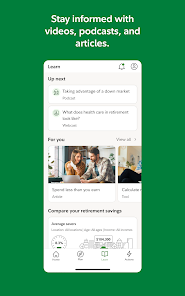
NetBenefits offers a wealth of educational resources to empower users in their investment decisions. From articles to videos, the platform provides insights on investment strategies, market trends, and personal finance tips, making it easier for users to feel confident in their choices.

Personalized Dashboard

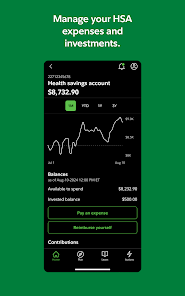
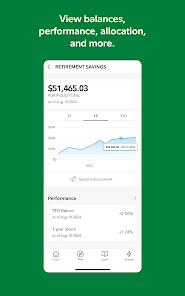
The NetBenefits app provides a customizable dashboard that allows users to view their financial information at a glance. With easy navigation, you can track your investments, retirement savings, and more, ensuring you stay informed about your financial health and make better decisions for your future.

Retirement Planning Tools

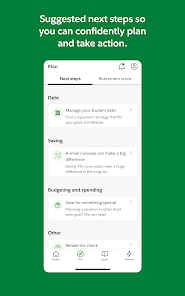
Equipped with robust retirement planning tools, the app helps users estimate their retirement needs and set achievable savings goals. Users can simulate various scenarios, helping them understand the impact of different saving strategies on their long-term financial security.

Secure Account Access

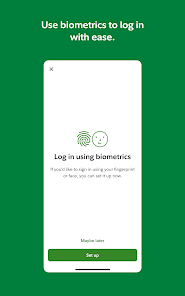
Security is a top priority with NetBenefits, offering users peace of mind through secure account access. The app features advanced security measures like biometric login and two-factor authentication, ensuring that your personal and financial information remains protected at all times.

Pros & Cons

Pros
  • Access to a comprehensive retirement planning tool for informed decision-making.
  • User-friendly interface makes managing benefits simple and efficient.
  • Retirement savings insights help maximize your financial potential.
  • Personalized investment guidance tailored to individual goals and needs.
  • Secure platform ensures your financial data is safe and protected.
Cons
  • User interface can be confusing for new users, complicating navigation.
  • Limited customer support hours may hinder timely assistance.
  • Some investment options may have high fees, affecting overall returns.

Real Experience Using NetBenefits - Fidelity at Work

Application Scenarios

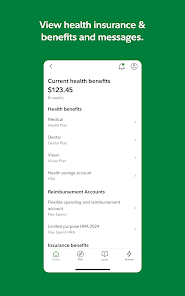
The NetBenefits app by Fidelity is designed for individuals who want to manage their workplace benefits and retirement plans efficiently. Users can leverage the app for various scenarios, such as tracking their 401(k) contributions, accessing health benefits information, and reviewing stock options provided by their employer. Employees can also use the app to simulate retirement scenarios, allowing them to visualize potential future savings and make informed decisions about their investment strategies. Furthermore, the app provides a platform for users to stay updated on market trends and investment performance, making it an essential tool for those engaged in financial planning.

User Experience

The user experience of the NetBenefits app is generally well-received, with a clean and intuitive interface that simplifies navigation. Users can easily access critical information, such as their account balances and transaction history, with just a few taps. The app's dashboard offers a snapshot of their financial health, making it easy to monitor progress toward retirement goals. Additionally, the app includes educational resources and personalized insights tailored to users' financial situations, enhancing the overall experience. However, some users have reported occasional glitches and slow loading times, which can detract from an otherwise positive experience. Overall, the app's functionality and design cater well to both novice and experienced investors.

Pricing

The NetBenefits app is free to download and use, making it accessible to a wide range of users. Since it is primarily a tool for managing employer-sponsored benefits and retirement plans, there are no additional subscription fees or hidden costs associated with its use. However, it is important to note that while the app itself is free, the investment options available within the app may carry management fees or other costs related to specific funds or plans. Users should review their individual benefit plans to understand any associated fees that may apply.

Updates & Support

Fidelity is committed to providing regular updates to the NetBenefits app to improve functionality and address user feedback. Users can expect ongoing enhancements, including bug fixes, performance improvements, and new features that align with evolving financial needs. For support, Fidelity offers a comprehensive help center within the app, featuring FAQs and troubleshooting guides. Users can also reach out to customer service through the app for more personalized assistance, ensuring that they receive timely help with any issues or inquiries. Overall, Fidelity’s dedication to updates and support helps maintain a reliable and user-friendly experience for app users.

verified Security & Privacy Review

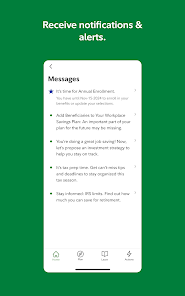
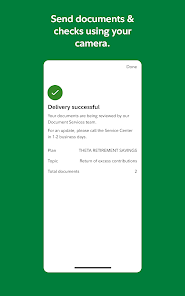
The NetBenefits app by Fidelity prioritizes user security and privacy, implementing robust measures to protect sensitive financial information. The app employs advanced encryption protocols for data transmission, ensuring that user data remains secure during interactions. Additionally, it requires strong authentication methods, including multi-factor authentication, to enhance account protection against unauthorized access. Fidelity's privacy practices are transparent, as outlined in their privacy policy. The app collects minimal personal information necessary for functionality and offers users control over their data, including options to manage preferences regarding data sharing and notifications. Permissions requested by the app are limited to those essential for its operation, such as access to device storage for document uploads. Fidelity is committed to compliance with relevant regulations, including the GDPR and CCPA, providing users with rights concerning their personal data. Overall, the NetBenefits app demonstrates a strong commitment to safeguarding user information while maintaining transparency and user control over privacy settings.

Reviews

4.4

“Easy to navigate and user-friendly interface.”

“Great for managing retirement accounts efficiently.”

“Helpful customer support when needed.”

“Mobile app makes access convenient.”

“Useful resources for financial planning and advice.”

Compare APP

FAQ

1

Can I submit suggestions or feedback to NetBenefits - Fidelity at Work?

Yes, users can submit suggestions or feedback through the app's support section, which typically includes options for contacting customer service or providing input directly.

2

Does NetBenefits - Fidelity at Work collect my personal data?

Yes, the app collects personal data to provide personalized services and improve user experience, but it adheres to strict privacy policies to protect your information.

3

Does NetBenefits - Fidelity at Work support offline use?

While some features may be accessible offline, a stable internet connection is typically required for full functionality and real-time updates.

4

How do I cancel my NetBenefits - Fidelity at Work subscription?

Since the app is free, there is no subscription to cancel; however, if you wish to stop using the app, you can simply uninstall it from your device.

5

How much does a subscription to NetBenefits - Fidelity at Work cost?

There is no subscription fee for using the app; it is provided at no cost to users.

How to use NetBenefits - Fidelity at Work

1

Can I activate my account from the NetBenefits mobile app?

Yes, you can activate your account directly through the NetBenefits mobile app by following the prompts after downloading it.

2

Can customer service help me reset my password for NetBenefits?

Absolutely! Customer service can guide you through the password reset process if you're having trouble.

3

How can I contact customer service for assistance with my NetBenefits account?

You can reach customer service by calling the number listed on the NetBenefits website or using the chat feature for quick support.

4

How do I activate my account on NetBenefits?

To activate your account, go to the NetBenefits website, click on "Activate Account," and follow the instructions provided.

5

How do I find my customer number quickly?

You can find your customer number on your account statements or by logging into your account, if already registered.

Editor's Choice