Home
Home  Apps
Apps  Games
Games  Windows
  Topics
  Terms of Service
  Cookies & Privacy Policy
  About us
 Security Wait Times
Stay ahead of the crowds with MyTSA's real-time security wait times feature. This tool allows you to check the estimated wait times at your airport, so you can plan your arrival and minimize stress before your flight.

TSA Mobile Team
 4.1
4.1 
Category: Travel & Local

Price: free

Age Rating: Everyone

Rating: 4.1

Available on: /

Updated on: Jun 15, 2026
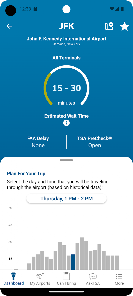
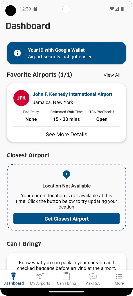
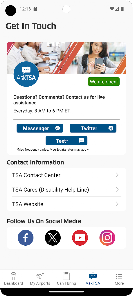
Stay ahead of the crowds with MyTSA's real-time security wait times feature. This tool allows you to check the estimated wait times at your airport, so you can plan your arrival and minimize stress before your flight.
Need assistance? MyTSA offers easy access to TSA contact information, ensuring you can reach out with any questions or concerns. This feature connects you with official channels, making it simple to get the help you need.
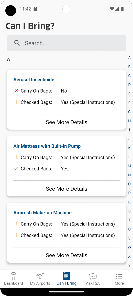
MyTSA provides up-to-date travel guidelines, helping you navigate the often confusing rules and regulations at airports. Whether it's about carry-on items or security procedures, this feature ensures you have the information you need for a smooth journey.
MyTSA is packed with helpful travel tips and resources to enhance your flying experience. From packing advice to navigating airport services, this feature equips you with the knowledge to make informed decisions and enjoy a hassle-free trip.

 Real-time flight updates keep you informed. Easy access to security wait times enhances planning. Personalized travel alerts tailored to your preferences. Securely store and manage your travel documents. User-friendly interface simplifies navigation and usage.
 Limited functionality compared to other travel apps User interface can be confusing for newcomers Frequent updates may disrupt user experience Lack of comprehensive airport information available
 The MyTSA app is designed to enhance the travel experience for users, particularly those who frequently fly within the United States. This app proves invaluable in various scenarios, such as preparing for a trip, navigating airport security, and staying updated on travel conditions. Before heading to the airport, travelers can utilize MyTSA to check wait times at security checkpoints, allowing them to plan their arrival accordingly. Additionally, the app provides detailed information on what items are permitted in carry-on luggage, helping travelers avoid potential issues during screening. For those concerned about flight delays or cancellations, the app offers real-time updates on flight status, ensuring users are always in the know about their travel plans.
User experience is a strong point for the MyTSA app. The interface is intuitive, making it easy for both tech-savvy users and those less familiar with mobile applications to navigate effortlessly. Upon opening the app, users are greeted with a clean design that prioritizes essential features, such as security wait times, travel tips, and airport information. The ability to personalize notifications allows users to receive alerts tailored to their specific travel needs. Furthermore, the app's search functionality is robust, enabling users to quickly find information on various topics, from airport amenities to TSA regulations. Overall, the app embodies a user-centric approach, ensuring that travelers have the tools they need at their fingertips.
Updates & Support The MyTSA app is regularly updated to ensure users have access to the latest information and features related to travel security and regulations. Users can expect periodic enhancements that improve functionality and user experience, as well as updates that reflect changes in TSA policies. For support, the app provides a comprehensive FAQ section that addresses common queries, while users can also reach out to customer service for more specific concerns. The commitment to maintaining an efficient support system and rolling out timely updates ensures that travelers can rely on the app as a trustworthy companion on their journeys.
Security & Privacy Review


I'm not sure who updates the info for each airport to the app but recently flying out of Orlando (MCO) the time shown on the app was very inaccurate. It was more than double the time posted. Thankfully I gave myself some extra time after a horrible experience going through TSA there last year, which caused for a missed flight. All I can say is, Orlando, you're TSA check is absolutely horrendous. You really need to get it together and make your lines run better than what you've got.
Medeocre at best. I was getting too many notifications and always after i would need them most. That is, I had already checked through security when I got the notice of how long it would take. Also, when opening the app, it always took me to a screen full of ads and information unrelated to my flight that day. Too bad the app could not use GPS to figure out I was already in the airport. All in all, I see no real benefit to keeping this app on my phone.
This app save us significant time in Newark after our plane from Barcelona arrived late. By using the app, we made our flight back to LA just as they closed the doors and before they signed off. They were able to board us and we avoided being stuck in the post storm back up at Newark. Sometimes saving even a little time in line, in this case aout 15-20 minutes, makes a big difference. I will continue to use the app.
It's good to know what the expected wait times are at an airport. I have not used it but being able to apply for TSA precheck in the app seems like it would be useful. The app is also helpful for some other basic info about the airports, and reminders of rules and regulations. Having maps of the airport and the layout of the terminals would be helpful.
Only shows average wait times (i guess they're average? the graph isnt labeled... ). I think you have to be at the airport to see wait times, at which point it is useless information. edit: apparently what the graph is trying to show is the average wait time for the last 2 hours. its not clear at all from the graph which times are just today and which are averages from a larger time period. i spoofed my gps location and played around, but couldnt get anything very useful out of this app.
Review Source: Google Play store public user reviews.
MyTSA may collect certain user data to enhance app functionality and user experience, but it does not require personally identifiable information for basic use.
MyTSA is available as a free app with no trial period, allowing users to access its features without any cost.
Yes, MyTSA requires an internet connection to access real-time data such as security wait times and updates.
You can contact MyTSA support or send feedback through the app’s support section, which typically includes options for reaching out via email or an online form.
Since MyTSA does not have a subscription model, there is no need to manage or cancel any subscription. Users can simply uninstall the app if they choose not to use it anymore.
Yes, log in and navigate to your profile settings to update your contact information.
You can reach customer service through the app's "Help" section or by visiting the TSA website for support options.
Go to your device's settings, find the MyTSA app, and enable notifications in the app settings.
Feedback can be submitted through the app’s “Feedback” section or via the TSA website.
The customer service number is available in the app under "Contact Us" or on the TSA website.
Welcome to the new TSA PreCheck® benefits tab. With the ease of one selection, this new tab provides users any and all information regarding TSA PreCheck® benefits and enrollment providers.• Added “TSA PreCheck®” benefits information tab• Added gateway feature to Chat with Ace• Added alert banners for important notifications• Updates to “Dashboard” and “AskTSA” tabs• UI enhancements• Bug fixes and accessibility enhancements

Upside: Cash Back - Gas & Food

Airbnb

Expedia: Hotels, Flights, Cars

Google Earth

Vrbo Vacation Rentals
U-Haul

United Airlines

Southwest Airlines: Travel App

GasBuddy: Find & Pay for Gas

Frontier Airlines

Priceline: Hotel, Flight & Car

Hilton Honors: Book Hotels
 Google Play
  App Store