This site uses cookies to enhance your user experience. By clicking any link on this site you are giving your consent to our cookie policy. Read more
Reject
Accept All

Advertiser and Editorial Disclosures

My BMW

My BMW

verified Verified App

Developer: BMW

  • category

    Category: Travel & Local

  • price

    Price: free

  • age rating

    Age Rating: Everyone

  • rating

    Rating: 4.9

  • download

    Downloads: 500,000+

  • version

    Version: 5.11.4

Screenshot 1
Screenshot 2
Screenshot 3
Screenshot 4
Screenshot 5
Screenshot 6
Screenshot 7

Features & Highlights

Charging Management

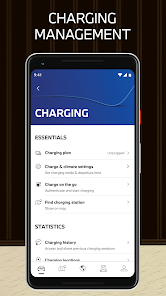
For electric vehicle owners, My BMW offers robust charging management tools. You can find nearby charging stations, monitor your battery status, and schedule charging times to take advantage of off-peak rates, ensuring your vehicle is always ready when you are without any hassle.

Personalized Driving Experience

The app allows you to customize your driving experience with tailored settings for comfort, navigation, and entertainment. By syncing with your preferences, My BMW helps create a seamless journey that reflects your unique style, making every drive enjoyable and efficient.

Remote Vehicle Access

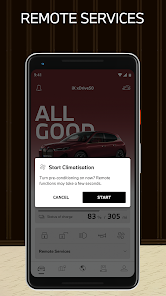
With My BMW, you can easily access your vehicle remotely, allowing you to lock or unlock your doors, check your fuel levels, and even locate your car in a crowded parking lot. This feature provides peace of mind and convenience at your fingertips, making it easier to manage your vehicle from anywhere.

Service Reminders & Updates

Stay on top of your vehicle's maintenance with My BMW's service reminders and updates. The app notifies you of upcoming service appointments and offers visibility into your vehicle's health, helping you keep your BMW in peak condition without missing a beat.

Pros & Cons

Pros
  • Seamless integration with your smartphone for convenience
  • Real-time vehicle status updates at your fingertips
  • Personalized settings enhance your driving experience
  • Access to navigation features for easier journeys
  • Remote control functions streamline vehicle management
Cons
  • Limited customization options available for users
  • High subscription costs for features and services
  • Inconsistent app performance and connectivity issues
  • Complex user interface can be confusing for some

Real Experience Using My BMW

Application Scenarios

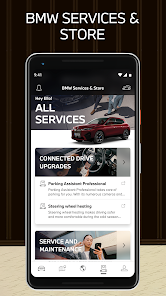
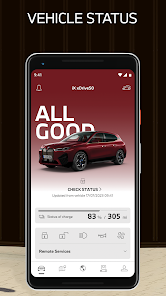
The My BMW app serves as a comprehensive digital companion for BMW vehicle owners, enhancing the overall driving experience through its various features. Users can conveniently access vehicle information, including fuel levels, mileage, and service status, all from their smartphones. The app is particularly beneficial for those who frequently rely on their car for commuting, providing real-time updates on vehicle health and reminders for upcoming service appointments. Additionally, the app supports remote functions like locking/unlocking doors and locating the vehicle—a must-have for urban dwellers who may forget where they parked. For electric vehicle owners, the app offers charging station locations and battery status, making it an essential tool for optimizing their driving experience.

User Experience

The user experience of the My BMW app is largely positive, characterized by a clean and intuitive interface that makes navigation seamless. Upon opening the app, users are greeted with a dashboard that presents key vehicle information at a glance. The app’s responsiveness is commendable, with minimal lag when switching between features. Most users appreciate the ability to customize notifications, allowing them to stay informed about their vehicle without feeling overwhelmed. However, some users have reported occasional bugs that can disrupt functionality, particularly with remote locking or unlocking features. Overall, the app excels in providing value to BMW owners, although ongoing improvements are necessary to resolve technical hiccups and enhance reliability.

Pricing

The My BMW app is free to download and is available for both iOS and Android devices. There are no hidden costs associated with the app itself, making it accessible to all BMW owners regardless of their model. While the app offers a wealth of features for free, some premium services may require a subscription or additional fees, particularly for advanced functionalities related to electric vehicles or specific model enhancements. Users should review the app's offerings carefully to ensure they understand which features are included at no cost and which may incur charges.

Updates & Support

BMW is committed to regularly updating the My BMW app to enhance user experience and introduce new features. Users can expect periodic updates that not only fix bugs but also improve performance and add functionalities based on user feedback. The app includes a support section where users can find FAQs, troubleshooting tips, and contact information for customer service. This proactive approach to support ensures that users have resources available should they encounter any issues. Additionally, the community forums provide a platform for users to share experiences and tips, fostering a sense of connection among BMW enthusiasts.

verified Security & Privacy Review

The My BMW app demonstrates a strong commitment to user security and privacy. It employs advanced encryption protocols to protect sensitive data during transmission and storage, ensuring that user information remains confidential. The app's privacy policy is transparent, clearly outlining how user data is collected, used, and shared. Users are informed about the types of data collected, including vehicle information and location data, which enhances trust. Permissions are carefully managed, with the app requesting access only to essential features necessary for its functionality. Users have the ability to customize permissions, allowing them to maintain control over their personal information. Additionally, the app provides options for users to manage their data preferences, including the ability to delete their account and associated data if desired. Overall, the My BMW app prioritizes user security and privacy, implementing robust measures to safeguard personal information while providing clear communication about data handling practices. This commitment to security reassures users that their data is in safe hands.

Reviews

4.9

“Great features, but occasional connectivity issues persist.”

“Love the remote start option, very convenient!”

“User-friendly interface, easy to navigate.”

“Battery status updates are helpful and timely.”

“Sleek design, but crashes sometimes during use.”

FAQ

1

Does My BMW collect my personal data?

Yes, My BMW may collect personal data to provide its services, improve user experience, and for marketing purposes, but users can manage their data preferences within the app.

2

Does My BMW offer a free trial or free version?

My BMW is free to download and use, but some premium features may require a subscription or in-app purchases.

3

Does My BMW require an internet connection?

Yes, My BMW requires an internet connection to access its features and services, as it connects to your vehicle and the BMW backend systems.

4

How can I contact support or send feedback for My BMW?

You can contact support or send feedback through the app's support feature, or visit the official BMW website for additional contact options and resources.

5

How do I manage or cancel my My BMW subscription?

You can manage or cancel your My BMW subscription through the app's settings or your account settings on the respective app store where you downloaded the app.

How to use My BMW

1

How can I contact customer service for the My BMW app?

You can reach customer service through the app's support section or by calling BMW's customer care number listed on their official website.

2

How do I activate features in the My BMW app?

To activate features, log in to the app, navigate to the relevant section, and follow the prompts to enable specific services or features. Some may require vehicle pairing.

3

How do I find my customer number for the My BMW app?

Your customer number can typically be found in your BMW vehicle documents or by logging into your BMW account online.

4

How do I log in to the My BMW app?

Open the app, enter your BMW account credentials, and tap 'Log In' to access your account. If you don't have an account, you can create one directly in the app.

Editor's Choice