This site uses cookies to enhance your user experience. By clicking any link on this site you are giving your consent to our cookie policy. Read more
Reject
Accept All

Advertiser and Editorial Disclosures

MSC for Me

MSC for Me

verified Verified App

Developer: MSC Cruises S.A.

  • category

    Category: Travel & Local

  • price

    Price: free

  • age rating

    Age Rating: Everyone

  • rating

    Rating: 4.7

  • download

    Downloads: 1,000,000+

  • version

    Version: 5.4.9

Screenshot 1
Screenshot 2
Screenshot 3
Screenshot 4
Screenshot 5
Screenshot 6
Screenshot 7
Screenshot 8

Features & Highlights

Onboard Services

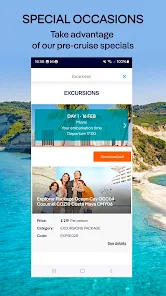
Easily access a variety of onboard services through the app, such as booking spa treatments, excursions, and dining reservations. The convenience of having everything at your fingertips means you can focus more on relaxation and fun rather than logistics, ensuring a smooth sailing experience.

Personalized Itinerary

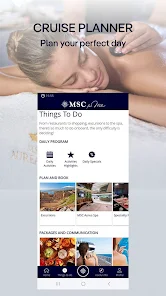
Craft your own personalized itinerary with the help of the MSC for Me app, allowing you to easily plan your days at sea and in port. With a user-friendly interface, you can select preferred activities, shows, and dining reservations tailored to your interests, making every moment enjoyable.

Real-Time Information

Stay updated with real-time information about your cruise, including itinerary changes, onboard activities, and dining options. The MSC for Me app ensures you never miss out on any exciting events or important announcements during your journey, enhancing your overall cruise experience.

Social Connectivity

Connect with fellow cruisers and share your experiences through the social features of the MSC for Me app. Whether you're looking to make new friends or coordinate meet-ups, the app helps foster a sense of community, making your cruise even more memorable.

Pros & Cons

Pros
  • Personalized experiences tailored to your preferences enhance your cruise enjoyment.
  • Access to exclusive offers and deals maximizes your savings on board.
  • Real-time notifications keep you informed about events and activities.
  • Seamless communication with crew ensures prompt assistance whenever needed.
  • Easy management of itineraries helps you make the most of your trip.
Cons
  • Limited availability of features can hinder user experience.
  • User interface may be confusing for some users.
  • Potential connectivity issues can disrupt seamless operation.

Real Experience Using MSC for Me

Application Scenarios

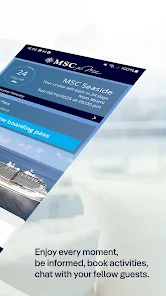
The MSC for Me app is a versatile tool designed for cruise enthusiasts and first-time travelers alike. It serves as a comprehensive guide to navigating MSC Cruises, making it easier for passengers to plan their journey before, during, and after their cruise experience. Users can explore ship decks, browse restaurant menus, and check daily itineraries right from their smartphones. The app also includes features like shore excursion bookings, onboard activities, and a personalized cruise planner, making it an essential companion for anyone looking to maximize their cruise experience. Whether you're lounging by the pool, enjoying a meal, or exploring a port of call, the MSC for Me app keeps all necessary information at your fingertips, ensuring you never miss out on any exciting opportunities.

User Experience

The user experience of the MSC for Me app is generally positive, with a clean and intuitive interface that is easy to navigate. Upon logging in, users are greeted with a dashboard that provides quick access to essential features such as onboard activities, dining options, and personal itineraries. The app's real-time notifications keep users updated on events, changes, or special offers, enhancing the overall cruise experience. Additionally, the interactive ship map is a standout feature, allowing users to locate amenities and events with ease. While some users have reported minor glitches or slow load times, the overall functionality and design of the app are well-received, making it a valuable resource for cruise travelers.

Pricing

The MSC for Me app is free to download and use, which adds to its appeal. There are no hidden fees associated with the app itself, and all the essential features are accessible without any additional cost. However, certain premium services, such as personalized shore excursions or specialty dining options, may incur extra charges once onboard. This transparent pricing model ensures that users can fully utilize the app's features without worrying about unexpected expenses, allowing for a more enjoyable and budget-friendly cruise experience.

Updates & Support

The developers of the MSC for Me app are committed to providing regular updates to enhance functionality and user experience. Users can expect periodic improvements, bug fixes, and new features based on user feedback. Customer support is readily available through the app, allowing users to report issues or seek assistance with ease. This proactive approach to updates and support demonstrates MSC’s dedication to ensuring a seamless cruise experience, further solidifying the app's role as an indispensable tool for travelers.

verified Security & Privacy Review

The MSC for Me app prioritizes user security and privacy, implementing robust measures to protect personal information. All data transmitted through the app is encrypted using advanced encryption protocols, ensuring that sensitive information remains secure during transmission. In terms of privacy practices, MSC for Me adheres to strict data protection regulations, transparently communicating its data collection and usage policies. Users are informed about the types of data collected, which primarily include location data and user preferences, enhancing the app's functionality while maintaining user control over their information. Regarding permissions, the app requests access to essential features such as location services and notifications. Users are given clear options to grant or deny these permissions, allowing for a customizable experience based on individual comfort levels with data sharing. The app’s user data handling practices are designed to minimize data retention, with personal information being stored only as long as necessary to provide services. Users can easily manage their data through the app’s settings, ensuring transparency and control over their personal information.

Reviews

4.7

“User-friendly interface makes planning activities easy”

“Great for tracking onboard events and schedules”

“Helpful features but occasional bugs”

“Excellent for navigation on the ship”

“Needs more personalization options for better experience”

FAQ

1

Can I submit suggestions or feedback to MSC for Me?

Yes, users can submit suggestions or feedback through the app's support section or directly through MSC Cruises' customer service channels.

2

Does MSC for Me collect my personal data?

Yes, MSC for Me collects personal data to enhance the user experience, but it adheres to privacy regulations and provides options for users to manage their data preferences.

3

Does MSC for Me support offline use?

Yes, MSC for Me supports limited offline use, allowing users to access certain features without needing an internet connection while on board.

4

How do I cancel my MSC for Me subscription?

Since MSC for Me does not require a subscription, there is no need to cancel; users can simply uninstall the app if they choose not to use it anymore.

5

How much does a subscription to MSC for Me cost?

There is no subscription fee for MSC for Me; it is free to use for all MSC Cruises guests.

How to use MSC for Me

1

Can I change my customer number?

Customer numbers are unique to each account and cannot be changed. For further assistance, please reach out to customer service.

2

How can I reach customer service for MSC for Me?

You can contact customer service through the app or visit the MSC website for assistance.

3

How do I activate my account if I didn't receive the activation email?

Check your spam folder for the email. If you still can't find it, request a new activation email through customer service.

4

How do I log in to my MSC for Me account?

Open the app or website, enter your email and password, then click 'Log In' to access your account.

5

I can't activate my account; what should I do?

Ensure you have the correct activation link from your email and follow the instructions provided. If issues persist, contact customer service.

Editor's Choice