This site uses cookies to enhance your user experience. By clicking any link on this site you are giving your consent to our cookie policy. Read more
Reject
Accept All

Advertiser and Editorial Disclosures

Graffiti Maker

Graffiti Maker

verified

TESYIO TECHNOLOGY INC.

2.9
Rating
1,000,000+ Downloads
1.15.4 Version
  • category

    Category: Entertainment

  • price

    Price: free

  • age rating

    Age Rating: Everyone

  • rating

    Rating: 2.9

  • available on

    Available on: /

  • updated on

    Updated on: Jan 17, 2024

Screenshot 1
Screenshot 2
Screenshot 3
Screenshot 4
Screenshot 5
Screenshot 6
Screenshot 7
Screenshot 8

Features & Highlights

Customizable Templates

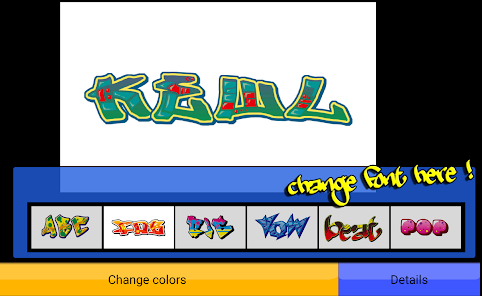
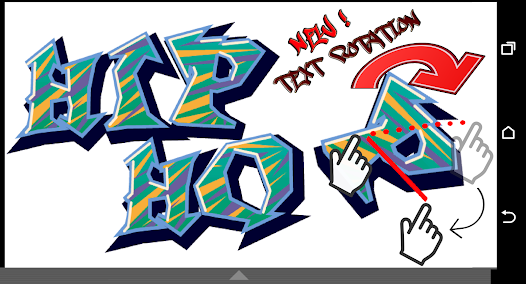
Graffiti Maker offers a wide array of customizable templates that cater to various styles and themes. Users can easily modify colors, fonts, and layouts, allowing them to create unique and personalized graffiti art that truly reflects their vision and creativity.

Extensive Color Palette

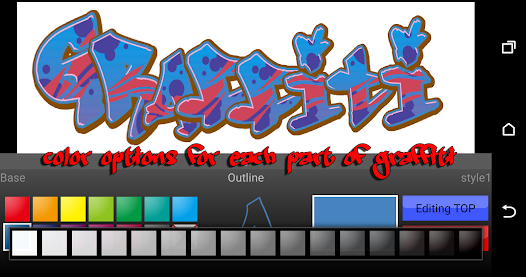
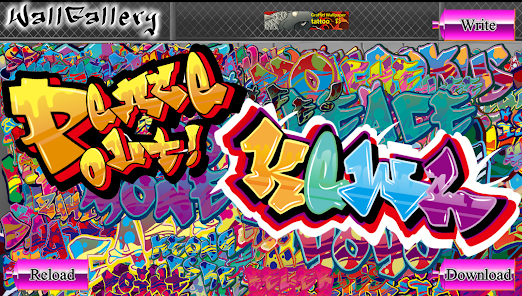
Graffiti Maker boasts an extensive color palette that enables users to experiment with different shades and tones. This feature encourages creativity and allows artists to find the perfect color combinations for their artwork, making each piece vibrant and eye-catching.

Intuitive Design Tools

The app is equipped with intuitive design tools that make it easy for anyone to create stunning graffiti art. With simple drag-and-drop functionality and user-friendly interfaces, even beginners can produce professional-looking designs without any steep learning curve.

Social Sharing Options

Once your masterpiece is complete, Graffiti Maker makes it easy to share your art with friends and followers. With integrated social sharing options, you can quickly post your creations on various platforms, showcasing your talent and inspiring others in the graffiti community.

Pros & Cons

Pros
  • Create stunning designs effortlessly
  • Customize styles to match your vision
  • User-friendly interface for quick navigation
  • Access vast library of templates
  • Perfect for artists and beginners alike
Cons
  • Limited customization options for designs.
  • Low resolution for printed materials.
  • May not appeal to all artistic styles.
  • Can promote vandalism perceptions unjustly.

Real Experience Using Graffiti Maker

Application Scenarios

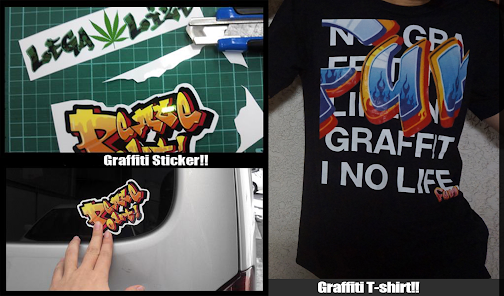
The Graffiti Maker app serves a variety of creative needs, making it a versatile tool for artists, designers, and anyone looking to add a splash of urban flair to their projects. Whether you are a street artist looking to mock up designs before hitting the streets, a social media influencer wanting to create eye-catching content, or a business owner in need of unique branding materials, this app caters to all. Users can create stunning graffiti-style artwork for posters, flyers, social media graphics, and even merchandise like t-shirts and mugs. The app also allows for customization, enabling users to incorporate their own images and text, making it an ideal choice for personalized gifts or promotional items.

User Experience

The user experience is one of the standout features of Graffiti Maker. The interface is intuitive, allowing users of all skill levels to navigate with ease. Users can choose from a wide range of brushes, colors, and textures to create their desired effects. The app also includes various templates and design elements that simplify the creative process. Feedback from users highlights the smooth performance and quick loading times, which are crucial for maintaining the creative flow. Additionally, the ability to save and share creations directly from the app adds convenience. Users appreciate the community aspect, where they can showcase their artwork and gain inspiration from others, fostering a supportive environment for budding graffiti artists.

Pricing

Graffiti Maker adopts a freemium model, allowing users to download and use the app for free with basic features. However, for those looking for an enhanced experience, premium features are available through a subscription plan. The pricing is competitive, offering monthly and yearly options that unlock advanced tools, exclusive templates, and additional design resources. Many users find that the investment is worthwhile, especially for those who create content regularly or use the app for professional purposes. For casual users, the free version still offers ample functionality to get started with graffiti art without any financial commitment.

Updates & Support

The development team behind Graffiti Maker is proactive in providing regular updates that introduce new features, fix bugs, and enhance overall performance. Users have praised the responsiveness of the support team, who are quick to address inquiries and provide assistance when needed. The app also includes a comprehensive FAQ section and tutorials, helping users to make the most of their experience. Overall, the commitment to continuous improvement and user support significantly enhances the value of the app, ensuring that it remains relevant and user-friendly in a fast-paced digital landscape.

verified Security & Privacy Review

The Graffiti Maker app prioritizes user security and privacy, implementing robust measures to protect personal information. The app requires minimal permissions, only accessing the camera and storage necessary for creating and saving graffiti designs. This limited access helps mitigate potential risks associated with data breaches. Data handling practices are transparent, with a clear privacy policy outlining how user information is collected, used, and stored. Graffiti Maker does not collect sensitive personal data, ensuring that users maintain control over their information. Additionally, any data shared with third parties is anonymized, further safeguarding user identities. User-generated content is stored locally on devices, which means that creativity remains private unless users choose to share their designs externally. The app employs encryption protocols for any data transmitted over the internet, ensuring that user information is secure from unauthorized access. Overall, Graffiti Maker demonstrates a strong commitment to protecting user data while providing a creative platform, making it a trustworthy choice for graffiti enthusiasts concerned about privacy and security.

User Reviews

  • Coastal Pacific Eco-Therapeutics
    2022/09/22

    Wasn't very impressive very few options and can't customize anything. User interface leaves much to be desired and feels like a relic of an app with functionality

  • Nick Smith
    2022/02/07

    This app is so unuser friendly. Tedious. Greedy. Disappointing. Top 10% of hated apps for me I think.

  • A Google user
    2018/10/19

    I have not downloaded it but i read the comets and some of them are not so good and when i download games i read the comets and that tells me if they are good or not so that's why i put a 1 star

  • Sadrina Mota Chavez (MollyFox420)
    2021/08/02

    Ik right i swear sometime i think some people can't comprehend what a game is and what a tool is this app is a learing app its not a game...

  • A Google user
    2019/09/22

    This is because of the jumping octopus that will block the screen,Until i concluded that it was virus and someone is always watchinh what youre doing evreyday

Review Source: Google Play store public user reviews.

FAQ

1

Does Graffiti Maker collect my personal data?

Graffiti Maker is committed to user privacy and does not collect personal data unless explicitly provided for account creation or support purposes.

2

Does Graffiti Maker offer a free trial or free version?

Yes, Graffiti Maker offers a free version with basic features, and users can opt for a free trial of the premium version to explore advanced functionalities.

3

Does Graffiti Maker require an internet connection?

Graffiti Maker can be used offline for most features, but some functionalities, like accessing additional content or sharing creations online, may require an internet connection.

4

How can I contact support or send feedback for Graffiti Maker?

Users can contact support or send feedback via the app's help section, through email, or by visiting the Graffiti Maker website for further assistance.

5

How do I manage or cancel my Graffiti Maker subscription?

You can manage or cancel your Graffiti Maker subscription through your account settings within the app or by visiting the subscription management section in your device's app store.

How to use Graffiti Maker

1

How can I contact customer service for the Graffiti Maker app?

You can reach customer service through the app's support section or by emailing support

2

How do I log in to the Graffiti Maker app?

Open the app, tap on 'Log In', enter your registered email and password, then click 'Submit'.

3

Is there an activation process for the Graffiti Maker app?

Yes, upon first use, you need to enter the activation code sent to your email to start using the app.

4

What is the customer number for Graffiti Maker app support?

The customer support number is 1-800-555-0199, available Monday to Friday.

What's New

Added GDPR Consent Message.

Editor's Choice