This site uses cookies to enhance your user experience. By clicking any link on this site you are giving your consent to our cookie policy. Read more
Reject
Accept All

Advertiser and Editorial Disclosures

GolfLogix Golf GPS + 3D Putts

GolfLogix Golf GPS + 3D Putts

verified Verified App

Developer: GolfLogix Golf GPS

  • category

    Category: Sports

  • price

    Price: free

  • age rating

    Age Rating: Everyone

  • rating

    Rating: 2.1

  • download

    Downloads: 1,000,000+

  • version

    Version: 10.0.5

Screenshot 1
Screenshot 2
Screenshot 3
Screenshot 4
Screenshot 5
Screenshot 6
Screenshot 7
Screenshot 8

Features & Highlights

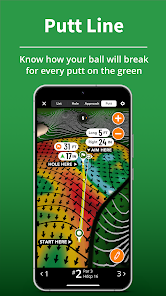
3D Putting Maps

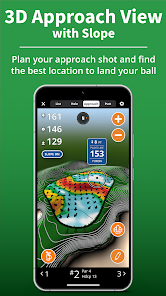
Experience the innovative 3D Putts feature, which provides detailed visualizations of greens and slopes, allowing you to read the terrain like never before. This tool enhances your putting strategy by showing breaks and elevations, ultimately improving your overall game and lowering your scores.

Advanced GPS Technology

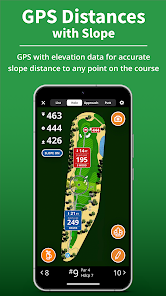
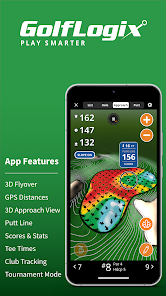
GolfLogix Golf GPS offers precise yardage measurements to the front, middle, and back of the green, helping you make informed decisions on every shot. With access to over 35,000 golf course maps, you can confidently navigate any course and optimize your performance.

Interactive Scorecard

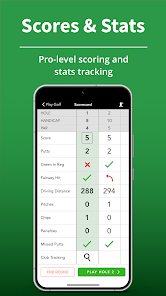
The interactive scorecard feature makes it easy to record your scores and track your progress throughout the round. You can share your scores with friends or competitors, adding a social aspect to your game while keeping track of your accomplishments and challenges on the course.

Stat Tracking

Keep track of your performance with comprehensive stat tracking that includes fairways hit, greens in regulation, and putts per round. This feature allows you to analyze your game over time, identify areas for improvement, and celebrate your progress as you strive to become a better golfer.

Pros & Cons

Pros
  • Accurate distance measurements enhance your overall game strategy and performance.
  • 3D putt visualization helps improve your putting skills and confidence.
  • Course maps provide detailed insights for better navigation and decision-making.
  • Intuitive interface allows for easy use on the course, even for beginners.
  • Track your performance over time to identify areas for improvement and growth.
Cons
  • Limited compatibility with older devices and systems may hinder user experience
  • Subscription costs can add up over time for continuous access
  • Occasional inaccuracies in course mapping can affect gameplay strategy

Real Experience Using GolfLogix Golf GPS + 3D Putts

Application Scenarios

GolfLogix Golf GPS + 3D Putts is designed to enhance every golfer's experience, whether you're a novice or a seasoned pro. Imagine standing on the tee of a challenging par 4, uncertain about the distance to the green. With this app, you can easily access precise GPS measurements to help you select the right club. The app is particularly useful during practice rounds, where you can familiarize yourself with the course layout and identify key hazards. Additionally, the 3D putting feature allows you to visualize the contours of the green, making it easier to strategize your putts. Whether you’re playing a casual round with friends or competing in a tournament, GolfLogix serves as an invaluable companion on the course.

User Experience

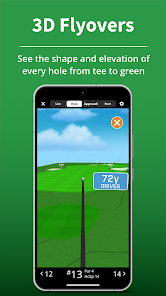
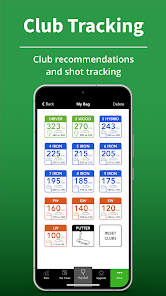
The user experience offered by GolfLogix is seamless and intuitive. Upon launching the app, users are greeted with a clean interface that showcases essential functions such as GPS tracking, scorekeeping, and shot tracking. Navigating through the app is straightforward, allowing golfers to quickly access their desired features without unnecessary distractions. The GPS accuracy is commendable, providing real-time updates that enhance strategic gameplay. Furthermore, the app’s 3D putting maps are an impressive feature, allowing users to analyze the green's slopes and breaks with clarity. Users have reported that the app significantly improves their game by enhancing their understanding of course layouts and putting techniques. Overall, the user experience is engaging, informative, and tailored to the needs of golfers.

Pricing

GolfLogix offers a competitive pricing model that caters to various budgets. The app is available for free with limited features, which allows users to explore its basic functionalities. For those seeking a more comprehensive experience, a subscription option is available, offering advanced features such as unlimited access to 3D putts and detailed course maps. Pricing plans are designed to be flexible, allowing users to choose between monthly and annual subscriptions. The investment in a premium subscription can pay off significantly for avid golfers looking to refine their skills and gain a competitive edge on the course.

Updates & Support

GolfLogix is committed to continuous improvement, regularly releasing updates that enhance app performance and user experience. These updates often include new course additions, improvements in GPS accuracy, and feature enhancements based on user feedback. The support team is responsive and readily available for assistance, providing help through various channels such as email and in-app messaging. Users can also access a comprehensive FAQ section that addresses common issues and queries, ensuring that golfers can make the most of their app experience. This commitment to support and updates demonstrates GolfLogix's dedication to enhancing the golfing experience for its users.

verified Security & Privacy Review

The GolfLogix Golf GPS + 3D Putts app prioritizes user security and privacy through a variety of measures. The app collects personal data, including location and usage statistics, to enhance the user experience and provide accurate golfing information. However, it ensures that all data collection practices are clearly outlined in its privacy policy, allowing users to make informed decisions about their data. The app requires permissions to access location services, which is essential for providing GPS functionality. Users have the option to manage these permissions in their device settings, ensuring control over their data. GolfLogix employs encryption protocols to safeguard sensitive information, minimizing the risk of unauthorized access. Additionally, the app does not sell user data to third parties, reinforcing its commitment to user privacy. Regular updates and security patches are implemented to protect against potential vulnerabilities. Overall, GolfLogix demonstrates a robust approach to data security and user privacy, fostering trust among its users while delivering valuable golfing insights.

Reviews

2.1

“Accurate yardages and great for course management”

“User-friendly interface enhances golfing experience”

“3D putts feature is a game changer”

“Helps improve putting skills significantly”

“Excellent value for money and very reliable”

FAQ

1

Can I submit suggestions or feedback to GolfLogix Golf GPS + 3D Putts?

Yes, users can submit suggestions or feedback through the app’s support feature or by contacting customer service, helping to improve future updates and features.

2

Does GolfLogix Golf GPS + 3D Putts collect my personal data?

Yes, GolfLogix Golf GPS + 3D Putts may collect personal data as outlined in its privacy policy, which users should review for details on data usage and protection.

3

Does GolfLogix Golf GPS + 3D Putts support offline use?

Yes, GolfLogix Golf GPS + 3D Putts allows users to download course maps for offline use, enabling access to GPS data even without an internet connection.

4

How do I cancel my GolfLogix Golf GPS + 3D Putts subscription?

Users can cancel their subscription through their app store account settings or directly within the app, depending on how they initially subscribed. Detailed instructions can usually be found in the app's help section.

5

How much does a subscription to GolfLogix Golf GPS + 3D Putts cost?

The subscription cost for GolfLogix Golf GPS + 3D Putts varies based on the plan selected, typically offering monthly or yearly options, which can be found on the app’s official website or within the app itself.

How to use GolfLogix Golf GPS + 3D Putts

1

Can I change my login email address?

Yes, you can change your login email in the account settings section of the app.

2

How can I activate my GolfLogix account?

To activate your account, follow the email link sent during registration and complete the setup process.

3

How can I update my payment information?

Log in to your account, go to the billing section, and follow the prompts to update your payment information.

4

How do I contact customer service for GolfLogix?

You can reach customer service by calling the number provided on our website or through the support section in the app.

5

How do I find my customer number?

Your customer number can usually be found in your account settings or on the confirmation email from your purchase.

Editor's Choice