This site uses cookies to enhance your user experience. By clicking any link on this site you are giving your consent to our cookie policy. Read more
Reject
Accept All
EZ Receipts Mobile

EZ Receipts Mobile

verified Verified App

Developer: HealthEquity Inc

  • category

    Category: Finance

  • price

    Price: free

  • age rating

    Age Rating: Everyone

  • rating

    Rating: 4.2

  • download

    Downloads: 1,000,000+

  • version

    Version: 7.1.0.100

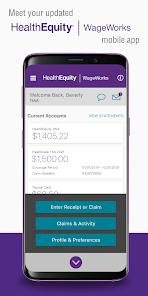
Screenshot 1
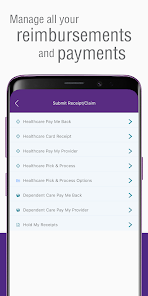
Screenshot 2
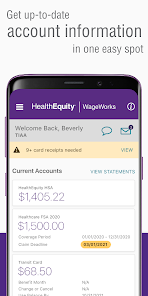
Screenshot 3
Screenshot 4
Screenshot 5
Screenshot 6

Features & Highlights

Cloud Backup Integration

EZ Receipts Mobile offers seamless cloud backup integration, ensuring your receipts and reports are securely stored and easily accessible from any device. This feature provides peace of mind, knowing that your important financial documents are safe, even if you lose your phone.

Custom Report Generation

Create tailored reports with ease using EZ Receipts Mobile's custom report generation feature. Whether you need a summary for tax purposes or a detailed analysis for business expenses, this tool gives you the flexibility to generate reports that meet your specific needs.

Expense Categorization

With built-in expense categorization, EZ Receipts Mobile helps you organize your spending effortlessly. You can assign categories to each receipt, which simplifies budgeting and reporting, allowing you to gain better insights into your financial habits.

Smart Receipt Scanning

EZ Receipts Mobile allows you to effortlessly scan and digitize your receipts using your smartphone camera. The advanced OCR technology accurately extracts key information, making expense tracking a breeze, so you can focus on what truly matters without the hassle of keeping paper receipts.

Pros & Cons

Pros
  • Easily capture receipts on the go.
  • Streamline expense tracking with minimal effort.
  • Generate reports quickly for hassle-free submissions.
  • Store receipts securely in the cloud.
  • Integrate seamlessly with popular accounting software.
Cons
  • Limited features compared to desktop version
  • Occasional syncing issues with data
  • User interface can be confusing
  • No offline access available

Real Experience Using EZ Receipts Mobile

Application Scenarios

EZ Receipts Mobile is designed to cater to a variety of users, from freelancers to small business owners, who need an efficient way to manage their expenses. Whether you are traveling for work, attending conferences, or simply keeping track of daily expenditures, this app provides a seamless solution. Users can quickly capture receipts using their mobile device’s camera, categorize expenses, and generate detailed reports for reimbursement or tax purposes. The app is especially beneficial for those who frequently deal with multiple currencies, as it allows users to convert and manage expenses in different currencies effortlessly.

User Experience

The user interface of EZ Receipts Mobile is intuitive and user-friendly, making it accessible for individuals of varying tech-savviness. Upon launching the app, users are greeted with a clean layout that allows for easy navigation. The receipt scanning feature is particularly impressive; it accurately captures images of receipts and extracts relevant information, minimizing manual entry. The categorization feature helps users organize their expenses, making it simple to track spending habits over time. Furthermore, the app’s reporting function enables users to export detailed reports in various formats, which is a significant time-saver during tax season or when submitting expenses for reimbursement. Overall, the user experience is enhanced by the app’s efficiency and its ability to provide a comprehensive overview of financial activities.

Pricing

EZ Receipts Mobile operates on a subscription model, making it affordable for users who require ongoing access to its features. The app offers a free trial period, allowing potential users to test its functionality before committing to a subscription. Following the trial, users can choose from various pricing tiers based on their needs, ensuring that there is an option suitable for both casual users and those who require more advanced features. This flexible pricing strategy makes it a competitive choice in the expense management market.

Updates & Support

The development team behind EZ Receipts Mobile is dedicated to continuous improvement, frequently releasing updates that enhance the app’s functionality and user experience. Users can expect regular updates that address any bugs and introduce new features based on user feedback. Additionally, the app provides robust customer support options, including an extensive FAQ section, email support, and user forums. This commitment to support ensures that users can easily resolve any issues they encounter, further enhancing the overall satisfaction with the app.

verified Security & Privacy Review

EZ Receipts Mobile prioritizes user security and privacy through a variety of robust measures. The app employs encryption protocols to secure sensitive financial data, ensuring that all transactions and stored information remain confidential. Users are encouraged to enable biometric authentication, such as fingerprint or facial recognition, which adds an extra layer of protection against unauthorized access. In terms of privacy practices, EZ Receipts Mobile is transparent about its data collection policies. The app only collects information necessary for its functionality, such as receipt images and expense details. Personal data is not shared with third parties without user consent, adhering to strict privacy regulations. The app requests minimal permissions, focusing primarily on camera access for scanning receipts and storage permissions for saving files. Users can manage these permissions easily within their device settings, allowing for greater control over their data. Overall, EZ Receipts Mobile demonstrates a strong commitment to safeguarding user information while providing a user-friendly experience.

Reviews

4.2

“User-friendly interface makes expense tracking easy and efficient.”

“Great for organizing receipts and simplifying reimbursements.”

“Fast and reliable, saves me a lot of time.”

“Excellent scanning feature captures receipts accurately.”

“Perfect for freelancers managing business expenses on-the-go.”

Editor's Choice