This site uses cookies to enhance your user experience. By clicking any link on this site you are giving your consent to our cookie policy. Read more
Reject
Accept All

Advertiser and Editorial Disclosures

Dayforce Wallet: On-demand Pay

Dayforce Wallet: On-demand Pay

verified Verified App

Developer: Dayforce

  • category

    Category: Finance

  • price

    Price: free

  • age rating

    Age Rating: Everyone

  • rating

    Rating: 4.8

  • download

    Downloads: 500,000+

  • version

    Version: 1.105.1

Screenshot 1
Screenshot 2
Screenshot 3
Screenshot 4
Screenshot 5
Screenshot 6

Features & Highlights

Financial Wellness Tools

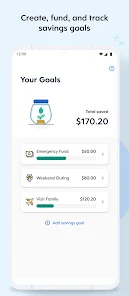
The app is equipped with financial wellness tools that empower users to track their spending and savings. These resources encourage better financial habits, helping users make informed decisions about their money and plan for the future effectively.

Flexible Payment Options

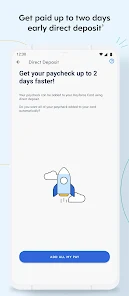
Dayforce Wallet offers flexible payment options, enabling users to choose how and when they receive their earnings. This versatility supports a more personalized financial experience, catering to different lifestyles and financial needs.

Instant Access

With Dayforce Wallet, employees can access their earned wages instantly, eliminating the wait until payday. This feature helps users manage their finances more effectively by allowing them to use their money when they need it most, whether it's for bills or unexpected expenses.

User-Friendly Interface

Designed with a user-friendly interface, Dayforce Wallet makes it easy for employees to navigate their earnings and payment options. The intuitive design ensures that users can quickly find what they need, making financial management less daunting.

Pros & Cons

Pros
  • Access earned wages anytime, reducing financial stress and unexpected expenses.
  • Empowers employees with greater control over their finances and cash flow.
  • Enhances workforce satisfaction by offering flexibility and instant access to pay.
  • Supports improved employee retention through attractive pay options.
  • Streamlines payroll processes, reducing administrative workload for employers.
Cons
  • Potential fees can reduce overall earnings for employees
  • Limited availability may restrict access for some users
  • Frequent withdrawals can lead to financial mismanagement for employees

Real Experience Using Dayforce Wallet: On-demand Pay

Application Scenarios

Dayforce Wallet: On-demand Pay is a versatile app designed to meet the needs of modern workers who seek flexibility in their financial management. It is particularly beneficial for employees who may find themselves in urgent need of funds before their scheduled payday. Whether you're a gig worker, part-time employee, or a full-time staffer, the app allows you to access earned wages instantly for various scenarios such as unexpected bills, emergency expenses, or simply to manage cash flow until the next paycheck. This feature is invaluable in today's fast-paced world where financial emergencies can arise unexpectedly.

User Experience

The user experience of Dayforce Wallet is intuitive and straightforward. The app's interface is clean, making it easy for users to navigate through their earnings and request on-demand pay. Users can easily track their earnings, view their work hours, and access their pay history with just a few taps. The withdrawal process is seamless, allowing users to transfer funds directly to their bank accounts or use a connected debit card. Many users have reported feeling empowered by the control they gain over their finances, eliminating the stress of waiting for payday. Additionally, customer feedback indicates high satisfaction with the app's performance, as it generally operates smoothly without significant bugs or issues.

Pricing

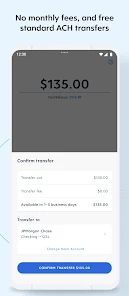
One of the standout features of Dayforce Wallet is its transparent pricing structure. The app does not charge users a monthly fee, making it accessible for all employees. Instead, there may be a nominal fee associated with each transaction when users opt to transfer their funds instantly. This pay-per-use model allows users to only incur costs when they actively use the service, which many find reasonable considering the convenience it offers. Additionally, employers who partner with Dayforce may have different arrangements, making it essential for employees to check with their companies about any potential costs involved.

Updates & Support

Dayforce Wallet is committed to providing continuous updates and improvements to enhance user experience. Regular updates often include bug fixes, performance enhancements, and new features based on user feedback. The support system is robust, with a dedicated customer service team available to assist users with any inquiries or issues they may have. Users can access help through the in-app support feature or via the website, where they can find comprehensive FAQs and guides. Overall, the combination of frequent updates and responsive support contributes to a positive user experience, ensuring that employees can rely on the app for their on-demand pay needs.

verified Security & Privacy Review

Dayforce Wallet prioritizes user security and privacy, implementing robust measures to protect sensitive information. The app leverages encryption technologies to safeguard financial transactions and personal data, ensuring that users' details remain confidential and secure during transmission. In terms of privacy practices, Dayforce Wallet adheres to stringent data protection regulations, providing users with transparency regarding data collection and usage. The app's privacy policy outlines how user data is collected, processed, and stored, allowing users to make informed decisions about their information. Regarding permissions, Dayforce Wallet requests access to certain device features, such as location services, to enhance user experience and functionality. Users have control over these permissions, enabling them to customize their privacy settings according to their preferences. Overall, Dayforce Wallet demonstrates a commitment to maintaining user privacy and data security, ensuring a trustworthy platform for on-demand pay services.

Reviews

4.8

“Convenient access to earned wages anytime I need.”

“User-friendly interface makes it easy to navigate.”

“Quick transactions and reliable service every time.”

“Helps manage my finances better between paydays.”

“Great tool for unexpected expenses and emergencies.”

FAQ

1

Can I submit suggestions or feedback to Dayforce Wallet: On-demand Pay?

Yes, users can submit suggestions or feedback through the app, typically via a feedback feature or by contacting customer support directly for any improvements or issues they may encounter.

2

Does Dayforce Wallet: On-demand Pay collect my personal data?

Yes, Dayforce Wallet: On-demand Pay collects personal data necessary for app functionality, such as user identification and transaction history, but it adheres to privacy policies to protect users' information.

3

Does Dayforce Wallet: On-demand Pay support offline use?

Dayforce Wallet: On-demand Pay typically requires an internet connection to access features and make transactions, so offline use may be limited.

4

How do I cancel my Dayforce Wallet: On-demand Pay subscription?

To cancel your Dayforce Wallet: On-demand Pay subscription, you should follow the instructions within the app or contact customer support for assistance with the cancellation process.

5

How much does a subscription to Dayforce Wallet: On-demand Pay cost?

There is no standard subscription fee for Dayforce Wallet: On-demand Pay, as costs can vary based on the employer's arrangement with the service, including potential transaction fees.

How to use Dayforce Wallet: On-demand Pay

1

Can I change my login information for Dayforce Wallet?

Yes, you can change your login information through the account settings after logging in. For further assistance, reach out to Customer Service.

2

How can I activate my Dayforce Wallet account?

To activate your account, follow the instructions in the activation email you received. If you need further assistance, contact Customer Service with your Customer Number.

3

How can I update my personal information in Dayforce Wallet?

You can update your personal information after logging in by going to account settings. If you need help, feel free to contact Customer Service.

4

How do I contact Customer Service for Dayforce Wallet?

You can reach Customer Service by calling the dedicated support line or using the help feature in the app. Please have your Customer Number ready for faster assistance.

5

I forgot my Customer Number; how can I retrieve it?

If you've forgotten your Customer Number, please contact Customer Service for assistance. They may ask for some personal information to verify your identity.

Editor's Choice