This site uses cookies to enhance your user experience. By clicking any link on this site you are giving your consent to our cookie policy. Read more
Reject
Accept All
ColorSnap® Visualizer

ColorSnap® Visualizer

verified Verified App

Developer: Sherwin-Williams

  • category

    Category: House & Home

  • price

    Price: Share

  • age rating

    Age Rating: Everyone

  • rating

    Rating: 2.3

  • download

    Downloads: 1M+

  • version

    Version: 5.1.0

Screenshot 1
Screenshot 2
Screenshot 3
Screenshot 4
Screenshot 5
Screenshot 6

Features & Highlights

Color Suggestions

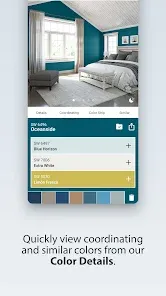
ColorSnap® Visualizer provides tailored color suggestions based on the shades you select or capture. This intuitive feature helps you discover complementary colors and find inspiration for your next project, ensuring that your choices harmonize beautifully.

Instant Color Matching

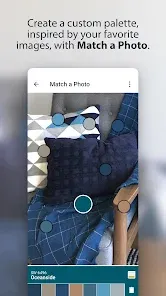
ColorSnap® Visualizer allows users to capture colors from their surroundings using their device's camera, making it easy to find the perfect paint shade. This feature ensures that inspiration can come from anywhere, simplifying the decision-making process for your next home project.

Palette Creation

This app enables users to create personalized color palettes based on their preferences and inspirations. You can save your favorite combinations and easily access them later, making it simple to coordinate your design and achieve a cohesive look throughout your home.

Virtual Room Painting

With the app's virtual room painting feature, you can visualize how different colors will look in your space before making a purchase. Just upload a photo of your room, and experiment with various shades to find the ideal match for your style and decor.

Pros & Cons

Pros
  • Easily visualize paint colors in real spaces
  • Explore a vast range of color palettes effortlessly
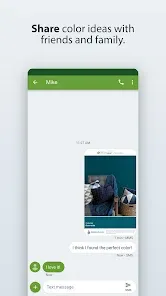
  • Share your favorite color combinations with friends
  • Receive personalized color recommendations based on photos
  • Seamlessly connect with local paint retailers for purchases
Cons
  • Limited color options may frustrate users
  • User interface can be confusing for beginners
  • Requires good lighting for accurate color representation
  • May not reflect true paint texture or finish

Real Experience Using ColorSnap® Visualizer

Application Scenarios

ColorSnap® Visualizer is a versatile app designed for anyone looking to experiment with color in their home or workspace. Whether you are a homeowner planning to redecorate, a professional interior designer, or simply someone who enjoys DIY projects, this app offers a plethora of features to assist in visualizing your ideas. Users can take a photo of their space and apply different Sherwin-Williams paint colors to see how they would look before making any purchases. It’s also great for those who want to create mood boards or explore color palettes for specific themes, making it an essential tool for planning events or renovations. The app’s ability to match colors from photos allows users to find inspiration in everyday items, facilitating a seamless transition from concept to reality.

User Experience

The user experience within ColorSnap® Visualizer is intuitive and engaging. Upon launching the app, users are greeted with a clean interface that makes navigation a breeze. The color matching feature is particularly impressive; simply take a photo of an object, and the app identifies potential paint colors that complement it. Users can also experiment with different room layouts by virtually painting walls and furniture. The augmented reality feature adds an extra layer of realism, allowing users to visualize colors in real-time as they move their device around their space. The app includes a save feature, so users can easily revisit their favorite colors and combinations. Overall, the seamless integration of practical tools and an attractive interface makes it a joy to use.

Pricing

ColorSnap® Visualizer is free to download and use, making it accessible for everyone from casual users to professionals. There are no hidden fees or in-app purchases required to access its core features. This pricing strategy is a significant advantage, especially considering the quality of the tools available. Users can enjoy a comprehensive color visualization experience without any financial commitment, which encourages experimentation and creativity with color choices.

Updates & Support

The app is regularly updated to enhance functionality and incorporate user feedback, ensuring that it remains relevant in an ever-evolving digital landscape. Sherwin-Williams is committed to providing excellent customer support, and users can easily access help through the app or their website. There is a comprehensive FAQs section that addresses common inquiries, and users can also contact support directly for personalized assistance. Regular updates not only improve performance but also introduce new features, keeping the app fresh and engaging for users who return to it time and again.

verified Security & Privacy Review

The ColorSnap® Visualizer app prioritizes user security and privacy, implementing robust measures to protect personal information. The app requires minimal permissions, primarily accessing the camera and storage to enhance user experience while ensuring that unnecessary data collection is avoided. Users can expect transparent data handling practices, as the app clearly outlines what data is collected and how it is used in its privacy policy. ColorSnap® Visualizer does not track user activity outside of the app, and any data collected is typically used to improve functionality and user engagement. The app employs encryption protocols to safeguard any sensitive information transmitted over the internet. Additionally, users have the option to manage their privacy settings, allowing them to control the extent of data shared with the app. Overall, ColorSnap® Visualizer demonstrates a commitment to maintaining user trust by adhering to industry standards for data protection while providing a seamless and enjoyable experience.

Reviews

2.3

“Easy to use and very accurate color matching!”

“Great for visualizing paint colors in my space.”

“User-friendly interface makes color selection a breeze.”

“Found my perfect paint shade effortlessly with this app.”

“Love the color palette suggestions, super helpful!”

Editor's Choice